166
SBCSU - Station and S0 bus Configuration of SWU
Interrelationships
Parameter Description
Error Messages and Advisories
The AMO SBCSU configures terminal devices (stations) at S0 bus connections, S0 interfaces, Up0/E interfaces, IP interface and on the ATM switch. A maximum of one voice terminal may be assigned to an S0 bus. A maximum of three terminals with three different station numbers can be set up per Up0/E access. Apart from
configuring stations, the AMO SBCSU offers the options of displaying, regenerating and changing the associated data, as well as cancelling station assignments.
The AMO SBCSU assigns all station combinations which contain the following terminals. All other station combinations are assigned with the aid of the AMOs SCSU or SSCSU.
The following terminals are configured for the VOICE service:
•
OPTISET: Digital telephone for Up0/E interface and CorNet-TS protocol
•
OPTIP500: Digital telephone for Up0/E interface and CorNet-TS protocol
•
OPTIIP: Digital telephone for IP interface and CorNet-TS protocol
•
SET600: Digital telephone for S0 interface and
EDSS1 (EURO-ISDN) or NI-BRI protocol
•
ANADEV: Analog voice terminal
(connected to Up0/E via terminal adapter a/b)
•
Terminal equipment for Cordless Multicell Integration (CMI Version >= V2.2):
BASE: CMI base station with Up0/E interface and CorNet-TS protocol
RADIO: CMI mobile user with Up0/E interface and CorNet-TS protocol
EXTLINE: CMI Extension connection with S0 interface and EDSS1 (EURO-ISDN) protocol
•
Voice terminal equipment with SIP or S0 or S2 interfaces
The following terminals are configured for non-voice services only:
•
API: Workstation protocol interface and
CorNet protocol (DATA service)
•
ANADEV: analog non-voice terminal
(connected to Up0/E via terminal adapter a/b)
•
ANADTE: analog DTE (connected to Up0/E via terminal adapter a/b)
•
ANAFAX: analog FAX (connected to Up0/E via terminal adapter a/b)
•
DTE:
–
digital DTE with S0 interface,
EDSS1 (EURO-ISDN) protocol
–
digital DTE with U2B1Q interface, NI-BRI protocol
–
digital DTE with X.21 interface (connected via terminal adapter)
–
digital DTE with V.24 interface (connected via terminal adapter),
EDSS1 (EURO-ISDN) protocol
–
digital DTE with U2B1Q interface (connected via terminal adapter),
NI-BRI protocol
–
analog DTE (connected to S0 via terminal adapter a/b and modem)
•
FAX:
–
Group 2 and 3 (connected to S0 via terminal adapter a/b)
–
Group 4, EDSS1 (EURO-ISDN) or NI-BRI protocol
•
Non-voice terminal equipment with S0 or S2 interfaces, e.g. DP systems, LANs, Servers.
The type of non-voice terminal equipment for DTE and FAX connected to S0 (analog, digital S0, digital X.21) is not taken into account for the purpose of assignment in this AMO. In addition to the terminal name, only the protocol type parameter DPROT resp. FPROT must be declared. The terminal attributes, which are not relevant for assignment purposes, are determined when the terminal first responds to a polling message at the bus connection or the station line circuit.
The terminals are assigned to the following modules:
SLMS
(S0 interface)
STMD, STMD2
(S0 interface)
DIU-N2, DIU-N4
(S2 interface)
DIU-S2
(S2 interface)
SLMQ
(ANSI-U interface)
In the case of extremely long lines
(from 1-2 km up to 9 km), use
SLMQ3
(U2B1Q interface)
SLC24
(Up0/E interface)
SLMO, SLMO16, SLMO24,SLMOP, SLOP2
(Up0/E interface)
STHC, STHC2
(combination of STMD and SLMO, i.e. S0 as well as Up0/E interface)
STMA
(IWU to the ATM switch)
STMI-HFA
(HFA gateway version# 1 to IP)
STMI2-HFA
(HFA gateway version# 2 to IP)
STMI2-SIP
(SIP Subscriber)
In particular, the following combinations are possible:
1.
Functional bus with 3 alternative connection paths
>> refer to Feature Usage Example Terminal Configuration, Digital S0 and UP0 <<
–
Direct connection to SLMS or STMD via S0 line
–
Connection to SLMQ or SLMQ3 via PNT
–
Connection to STMD as external station
Non-voice terminals connected to a functional bus do not have associated voice terminals. Thus, only terminals with an independent dialing circuit may be connected.
With this bus type, only one station number can be assigned per bus connection, and a maximum of one terminal per service.
To assign additional station numbers, please refer to chap. “
Multiple Subscriber Numbers (MSN) - MSN on the S0 bus
”.
2.
OPTISET configuration with 3 connection options
>> refer to Feature Usage Example optiset E Configuration << resp.
>> refer to Feature Usage Example optiPoint Up0E Configuration << resp.
>> refer to Feature Usage Example optiPoint IP Configuration <<
–
Connection via PNT-Q to SLMQ-EXT (parts number Q2153 -X only)
or SLMQ3
–
Connection via the Up0/E line direct to SLMO (w/o FCTID)
or SLMO (FCTID=1)
–
Connection via the Up0/E line direct to STMA (FCTID=4)
as ATM-IWU in the PSW (Port Switching) operating mode
With an OPTISET connection to the SLMO, SLMQ-EXT or STMA-PSW a maximum of three terminals under a maximum of three different station numbers can be set up. Permitted terminals for this purpose are: CorNet-TS terminals (OPTISET, OPTIP500), analog terminals
(ANADEV, ANAFAX, ANADTE) or terminals with an S0 interface (API, SET600, FAX, DTE).
One OPTISET or OPTIP500 must always be set up for the main station number. A further OPTISET or OPTIP500 may be set up for a secondary station number; i.e. a maximum of two OPTISET / OPTIP500 devices can be operated per OPTISET connection. Per main station number or per secondary station number, a maximum of two S0 devices can be installed.
Unlike with the S0 bus, functional terminals can also be set up for a secondary station number, providing these all have the same call number. For administration all functional terminals (SET600, FAX, DTE) then count collectively as just one device.
Only one analog terminal (regardless of which type) can be set up on an OPTISET connection: either an analog non-voice terminal (i.e. ANAFAX or ANADTE) on the main station number or a general analog terminal (ANADEV) under a secondary station number.
A functional terminal of one type can be set up only once per OPTISET access. However, up to a maximum of two CorNet-TS and CorNet-T terminals of the same type can be installed. Functional terminals can also be reached via MSN station numbers (see also Chapter “
Multiple Subscriber Numbers (MSN) - MSN for OPTISET configurations
”).
Within each service, terminals with different protocols may be installed; i.e. via the OPTISET configuration, the voice terminals OPTISET / OPTIP500 (CorNet-TS) and SET600 (functional protocol) or a functional DTE can be operated at the same time.
In order to connect additional terminals, the following OPTISET / OPTIP500 Adapters may be necessary:
•
a maximum of one OPTISET E / OPTIPOINT500 Slave Phone Adapter
*** cannot be specified explicitly, but is instead generated implicitly by AMO ***
*** and displayed in the OPTISPA field of the DISPLAY mask ***
to connect a second OPTISET / OPTIP500 device
•
a maximum of one OPTISET E / OPTIPOINT500 S0 Adapter
*** cannot be specified explicitly, but is instead generated implicitly by AMO ***
*** and displayed in the OPTIS0A field of the DISPLAY mask ***
to connect S0 devices
•
a maximum of one OPTISET E / OPTIPOINT500 a/b Adapter
*** cannot be specified explicitly, but is instead generated implicitly by AMO ***
*** and displayed in the OPTIABA field of the DISPLAY mask ***
to connect analog devices
•
a maximum of one OPTIPOINT500 USB Adapter (integrated)
(optionally working as S0 Adapter, Control Adapter or Data Adapter)
*** cannot be specified explicitly, but is instead generated implicitly by AMO ***
*** and displayed in the OPTIUSB field of the DISPLAY mask ***
to connect S0 devices
•
a maximum of two OPTISET E Control Adapters (OPTICA parameter)
to connect a PC dialer
•
a maximum of two OPTISET E Data Adapters (OPTIDA parameter)
to connect a data terminal
•
OPTISET E / OPTIPOINT500 Slave Phone Adapter (OPTISPA) and
OPTISET E / OPTIPOINT500 a/b Adapter (OPTIABA) are mutually exclusive
•
The total of OPTIS0A, OPTISPA, OPTIABA, OPTIUSB (each implicitly configured),
OPTICA and OPTIDA must not exceed two
Also, per OPTISET voice terminal, a maximum of four add-on devices or a maximum of three add-on devices and one identity card reader (IDCR) can be connected.
Per OPTIP500 voice terminal, a maximum of two add-on devices or a maximum of one add-on device and one SmartCard Reader (IDCR) or application module (APPM) can be connected.
For the different connection alternatives via the OPTISET configuration
>> refer to Feature Usage Example optiset E Configuration << resp.
>> refer to Feature Usage Example optiPoint Up0E Configuration << resp.
>> refer to Feature Usage Example optiPoint IP Configuration <<
For ATM specific connection alternatives via the OPTISET configuration
>>refer to "Hicom 300/300 E/300 H ATM Connectivity Phase 1 to 3"<<
>> ATM Usage Example STMA Station and Trunk Module for ATM <<
For HFA specific connection alternatives via the OPTISET configuration
>> refer to Feature Usage Example HiPath Feature Access <<
3.
CMI configuration ( CMI version >= V3.0 )
–
Connection directly to SLC24 via Up0/E line
For a CMI it is possible in each case to set up one of 4 different CMI terminals each with its own station number. CMI-CorNet-TS terminals (BASE, RADIO) and CMI terminals with an S0 interface (EXTLINE) are permitted here.
It should be noted that the various CMI terminals can only seize specific circuits in the SLC24 module :
Table 166-1
BASE
0 - 23
EXTLINE
24 - 87
RADIO
88 - 215
Starting with CMI Version V3.0 CMI expansion lines and CMIADM devices are no longer used. CMI Version 2.3 is not released for HiPath 4000 V3.0.
Up to four add-ons can be set up for a CMI-CorNet-TS terminal (CMIADM, BASE, RADIO).
Functional CMI terminals (EXTLINE) cannot be accessed under MSN station numbers.
4.
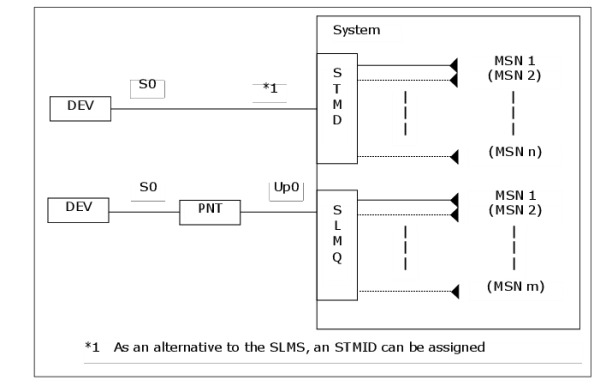
Point-to-point connections for functional S0/S2 terminals
>>refer to Feature Usage Example Adding an S2 station <<
–
Direct voice/non-voice connection with a maximum of two b-channels to STMD via an S0 line.
For short lines a SLMS can be used instead of an STMD.
–
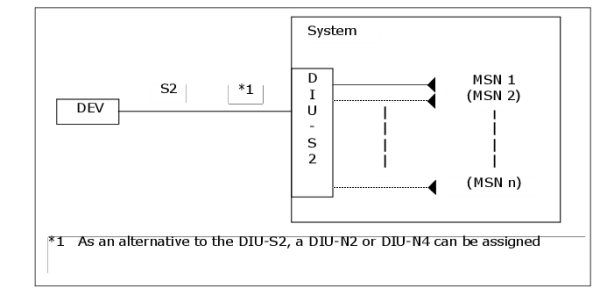
Direct voice/non-voice connection with a maximum of 30 b-channels to DIU-S2, DIU-N2 or DIU-N4 via an S2 line
–
Direct voice/non-voice connection with a maximum over IP to STMI2-SIP
The individual b-channels of the SIP/S0/S2 line will no longer be permanently assigned to different call numbers - instead, any number of MSN station numbers are assigned to the termination, of which up to 2 (for S0) or 30 (for S2 and SIP) MSN station numbers may be in the calling condition simultaneously. Which b-channel is used for the connection is left to chance.
Point-to-point connections can be set up for non-voice terminals with S0/S2 interfaces, e.g. DP-systems, LANs, servers.
To assign additional station numbers, please refer to chap. “
Multiple Subscriber Numbers (MSN) - MSN for functional point-to-point connections
”.
Figure 24
Connection of a terminal with 2 b-channels (S0 or Up0)
Figure 25
Connection of a terminal with 30 b-channels (S2)
5.
Multiple Subscriber Numbers (MSN)
MSN on the S0 bus
>> refer to Feature Usage Example EURO-ISDN Terminals <<
For the bus type described above:
•
Functional bus
there is also the possibility of enhancing the existing bus configuration to include so called Multiple subscriber numbers (MSN). In this way
•
an existing functional device, which belongs to the main station number, can be reached using different station numbers (whereby the actual dialled number is always displayed)
•
further functional devices for a service already configured on the bus can be attached and reached respectively by their own station numbers.
A restriction to functional devices of a special service is not possible.
The devices attached to the bus must be set to the station numbers used.
Fundamentally the following distinction applies:
•
An MSN station number
is a new number on the bus by which each existing functional device of the main station number can be reached.
In this respect, there is no limitation as to the number of MSN station numbers which can be configured on the bus.
MSN for OPTISET configurations
>> refer to Feature Usage Example optiset E Configuration << resp.
>> refer to Feature Usage Example optiPoint Up0E Configuration <<
Via the OPTISET configuration, the existing device constellation can be expanded by so-called MSN station numbers (Multiple Subscriber Numbers). This has the following advantages:
–
An existing functional device set up for a main station number or a secondary station number can be reached at several station numbers; (however, it is always the dialed station number that is displayed).
–
Other functional devices of a service already configured via an OPTISET configuration can be connected and can be reached at their own station numbers.
Restricting this to functional terminals with certain services is not possible.
The functional terminals connected via the OPTISET configuration must be set to the station numbers that have been set up.
The following distinction must always be made:
•
An MSN station number
is an additional station number for the OPTISET configuration at which any existing functional terminal can be reached.
There is no restriction on the number of MSN station numbers per OPTISET configuration.
•
An MSN secondary station number
is an existing station number without functional services that is connected via the OPTISET configuration (irrespective of whether main or secondary station number) and that is extended in such a manner that each existing functional terminal of the OPTISET configuration can also be reached at this station number. If the functional services are set up for a secondary station number, unlike with the S0 bus, the main station number can also be an MSN secondary station number.
The number of MSN secondary station numbers via the OPTISET configuration is subject to the following restrictions: The total number of CorNet-TS terminals, CorNet-T terminals, functional terminals (each service here counting individually), and MSN secondary station numbers must not exceed eight; however, the MSN share of a station number counts only as a single terminal, irrespective of how many functional services are in fact thus reachable.
MSN for functional point-to-point connections
>> refer to Feature Usage Example Adding an S2 station <<
The Point-to-Point connections for functional S0/S2/SIP terminals described before may also be extended by so called MSN station numbers (Multiple Subscriber Numbers).
A restriction to functional devices of a special service is not possible.
•
An MSN station number
is a new number on the bus by which each existing functional device of the main station number can be reached.
In this respect, there is no limitation as to the number of MSN station numbers which can be configured on the bus.
6.
Signed-off subscribers
>> refer to Feature Usage Example AUTOSET RELOCATE Applications <<
Terminals OPTISET and OPTIP500 can also be installed as signed-off subscribers. These are not assigned a location. Locations entered for signed-off subscribers are ignored. Signed-off subscribers can sign on by means of a registration code number and PIN at any suitable terminal, or they can sign on via a suitable terminal at the appropriate location, or they can be signed on at a suitable location by means of AMO DSSU.
Suitable locations for the various terminals are:
•
for OPTISET / OPTIP500:
–
with PNT-Q to SLMQ or SLMQ3
–
direct to SLMO
–
with OPTISPA to an OPTISET / OPTIP500 master terminal
(except if connected to SLMQ3).
However, the location or the TSI at which a signed-off subscriber can be signed on must be signed off.
${DocTitle}
, ID:
${DocID}
©
02/2025
Mitel Networks Corporation. - All rights reserved.
Mitel and the Mitel logo are trademarks of Mitel Networks Corporation. Unify and associated marks are trademarks of Unify Software and Solutions GmbH&Co. KG.
All other trademarks herein are the property of their respective owners.