195.5.1
Activating of a LAN Tracepoint
For activating the tracepoints ETHSD and ETHRV the commands
•
selmsg,lan,g1,cd1..;
•
setlan,g1,ethsdðrv;
•
on;
at the HICOM tracer will be sufficient. Additionally for the tracepoints TPI and TCP the connection must be selected, which is to be protocolled.Therefore the user must execute following steps:
1.
Determine the data segment of OLTSTRX
2.
Start the Debugger
3.
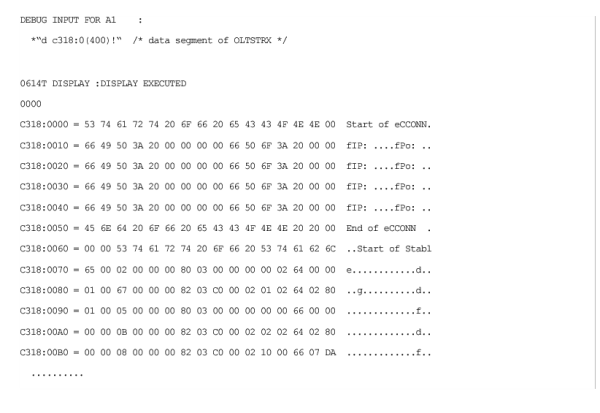
Display the data segment of OLTSTRX
4.
The trace output shows 4 character strings. “Start of eCCONN“ and “End of eCCONN" are enclosing the table „expected client connections“, “Start of Stable“ and “End of Stable “ the table „trace sockets“.
5.
Both tables make it possible for the user to select the connections, which are to be protocolled.
OpenScape 4000 V10, Volume 1: AMO Descriptions, Service Documentation, Issue 20
, ID:
P31003H31A0S107207620
©
05/2026
Mitel Networks Corporation. - All rights reserved.
Mitel and the Mitel logo are trademarks of Mitel Networks Corporation. Unify and associated marks are trademarks of Unify Software and Solutions GmbH&Co. KG. All other trademarks herein are the property of their respective owners.