10.2.7.1. Restriction of the Available Signaling Bandwidth
(Traffic Shaping) 


The signaling bandwidth for controlling an access points is not particularly
large and fluctuates very heavily. A flat rate of 64 Kbps is required
for the signaling connection, although in some configurations a lower
bandwidth (e.g. 32 Kbps) would be sufficient for normal business hours,
i.e. to control the call processing/access point.
Bandwidth requirements spike briefly when a call processing action
triggers numerous parallel follow-up actions in the peripherals. Several
large packets containing signaling information can be sent to an access
point in a short period of time.
During startup/installation of an access point there is also more
bandwidth needed (e.g. FTP loadwre transfer for NCUI board and other
periperal boards) and as a consequence there must be a minimum bandwidth
of 64 Kbps for TCP signaling available/guaranteed (same bandwidth available
via ISDN modem, i.e. signaling survivability).
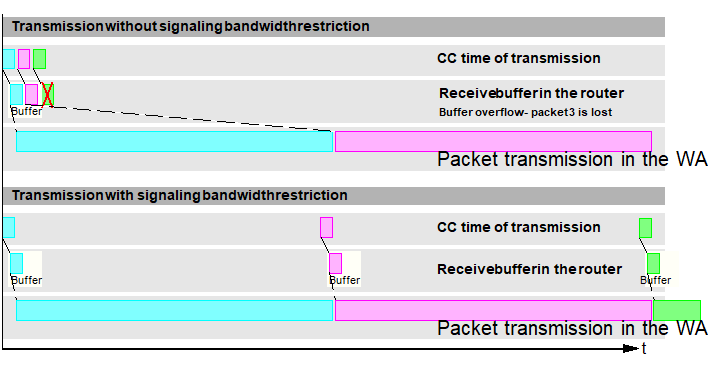
For a WAN router with a very low available bandwidth for this signaling
connection (e.g. 64 Kbps), this means that while the first packet from
this burst is being sent, another is being received. The router may not
have enough buffer space to buffer the packets. As a result, packets
from this “burst“ are rejected by the router and have to be resent
later by the CC.
Restricting the signaling bandwidth to an access point in the CC prevents
a burst from occurring when packets are immediately sent one after the
other from the CC. This is done by staggering the packets so that they
are sent at intervals that prevent buffer overflow in the router.
Figure 188. Signaling connection with/without bandwidth restriction
IMPORTANT:
If there is only a bandwidth of between 64 and
250 Kbps available for signaling to an access point in the IP network,
then signaling bandwidth restriction must be activated (AMO STMIB, parameter
SIGQOS) in the CC and set to the value available in the network.
The signaling bandwidth restriction delays signaling messages in the
CC and sometimes results in a backlog of several messages. If a backlog
of this kind persists for several seconds, the signaling bandwidth configured
is too low. The system issues the error message F8292 (see Table 16
“F8292 - Bandwidth Requirement Exceeds Limit”) that
marks the beginning of backlog. The publication of a message status can
also be a criteria for changing from the signaling path to the signaling
survivability path (see Section 2.7.4,
“Advanced Criteria for Signaling Survivability”).
The message F8293 is output to signal that the backlog has cleared
(see Section 2.7.6.5,
“F8293 - Bandwidth Required Back Below Limit”).
The restriction of the signaling bandwidth only affects the signaling
path over LAN. The modem connection is not affected in the case of signaling
survivability.
IMPORTANT:
Under-dimensioning the signaling bandwidth can
lead to a message buffer deficit which results in a access point reset.
All connections are then cleared down. The system outputs the error
message F8292 as soon as under-dimensioning is detected during live operation
(see Section 2.7.6.4,
“F8292 - Bandwidth Requirement Exceeds Limit”).
The actual available signaling bandwidth in the customer network must
be increased in response to this message. Ignoring these early warning
signals can result in the mentioned access point reset or other major
issues. Furthermore a restriction of the bandwidth in the TCP can cause
long delays during loading the loadware and setting up the shelf/system!
Procedure
At the start of each second, a transmission credit with the value
of the signaling bandwidth configured is made available for use. If the
setting is 64 Kbps, for example, 8000 bytes may be transmitted every
second. For every packet to be sent, the credit is now reduced by the
packet size. If there is not enough credit left, the packet is delayed
until sufficient credit is available.
When the second expires, the remaining transmission credit is cancelled.
The next second then starts again with a new credit for the value of
the signaling bandwidth configured, for example, 8000 bytes. Returned
packets can now be sent.
The transmission bandwidth is restricted at “application level“,
in other words, over the TCP/IP stack.
Generation
 |
Configuration Management > System Data
> IPDA > Access point
Click Search and enter
or change the bandwidth on the Quality of Service tab in the Signaling
Quality of Service section, then Save.
|
 |
CHANGE-STMIB:MTYPE=NCUI2,TYPE=SIGQOS,LTU=99,BANDW=64; |
The signaling bandwidth is expressed in kilobits per second (Kbps).
The value
BANDW=0 disables signaling bandwidth restriction
(default configuration). The setting becomes effective immediately.