14.6.2.1. Configure Common Gateway HG 3500 


In order to configure a CGW board, you have to do the following:
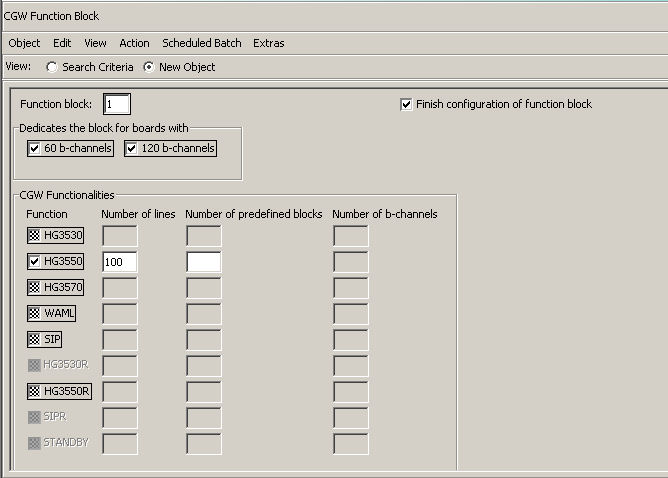
Step 1: Create function block
Start CM > System Data > Board > CGW Function Block
Click Search for searching for a free function block number.
Click New for adding a new function block. Enter the required
data and click Save.
Step 2: Search for a free slot
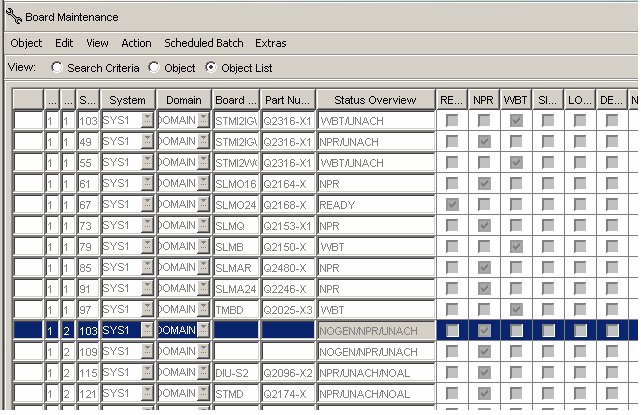
Before entering the LTU and SLOT number it is recommended to check
if the desired SLOT is free. To do this call: CM > System Data
> Maintenance> Board Maintenance.
Following the search in the object list view, free LTUs and SLOTs
are marked with NOGEN/NPR/UNACH in the Status Overview
column.
Step 3: Open Board configuration menu in OpenScape 4000 Assistant
CM > System Data > Board > Board
Step 4: Add new board
Press New button in order to add a new board.
Step 5: Fill in the mask
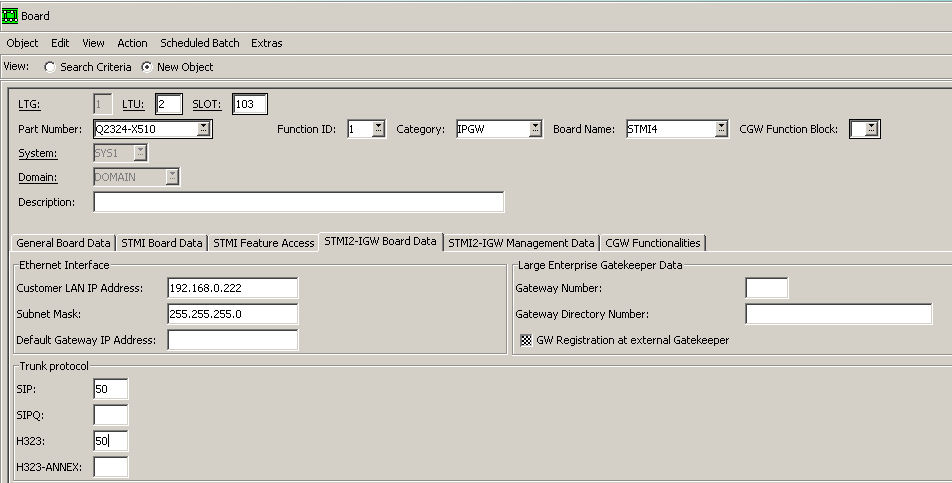
- Part Number: Q2316-X or Q2316-X10 or Q2324-X500 or Q2324-X510
- Function ID: is always 1
- Category: IPGW
- Board Name: STMI2, STMI4, STMIX or STMIY
- CGW Function Block: enter previously created function block for trunking (see Step 1: Create function block)
- LTU and SLOT: select a free slot (see Step 2: Search for a free slot)
Step 6: Open STMI2-IGW Board Data dialog and fill mandatory fields
Customer LAN IP Address and Subnet Mask.
Trunk Protocol: number of b-channels per protocol (e.g. SIP/SIPQ:
50).
IMPORTANT:
Only one trunk protocol per board is supported!
A combination of different trunking protocols on one board is not possible!
After all required data has been entered in the relevant fields, press
the Save button.
The board is now added and can be found in Board Dialog or
in Board Maintenance.