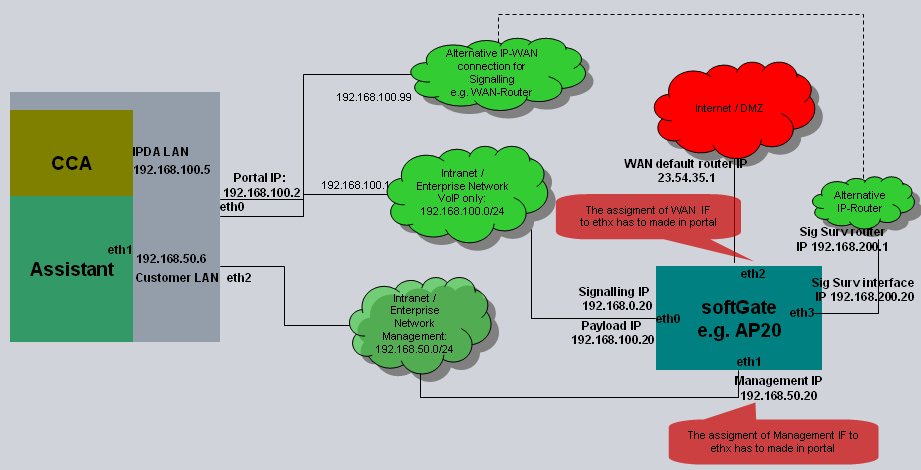
3.1.4. LAN Interfaces 


The OpenScape 4000 SoftGate offers the following LAN interfaces:
- IPDA LAN
-
For connecting to the OpenScape 4000 host system.
- Management LAN
-
The feature "Separate LAN Connectivity for Administration and Voice Over IP" is supported. The Voice LAN can now be split fully from the Management LAN.
- WAN
-
The OpenScape 4000 SoftGate offers a WAN interface to the Internet.You can find a scenario using the WAN interface of the OpenScape 4000 SoftGate in Chapter 14, “Secure Remote Subscriber”.
- Signaling Survivability
-
A LAN interface for signaling survivability is supported.
- XLINK
-
The XLINK interface is used for OpenScape Access/Branch and RG 8350 A.The only official way to configure/reconfigure LAN interfaces is using the firstinstall XML file. This includes Bitrate, Bond, VLAN and IP configuration. The XML file is used during first installation or when calling the Recovery Tool. For further details please refer to the documentation “OpenScape 4000, Installation, Configuration and Migration, Installation Guide”.
INFO:
Should different VLANs be required for individual vSTMI boards of the SoftGate, then the SoftGate LAN interface must be selected as eth<n> or bond<n>. Afterwards any appropriate LAN interface tagging must be configured under the AMO interface. The SoftGate LAN interface can be selected in either the Portal (SoftGate LAN Wizard) or through XML configuration. If the requirement is that all traffic from the SoftGate is used within the same VLAN, it is also possible to select vlan<n> as the SoftGate interface. No AMO VLAN configuration is required either for this second use case, but the prerequisite is the VLAN must be specified as an interface in the XML installation file.Figure 46. LAN interfaces of OpenScape 4000 SoftGate