3.3.3.2.3. Configuration 


The figures in this section depict the configuration in the sample
scenario.
Overview
- Network -> Host
- Network -> Interfaces
- SIP -> Gateways
- SIP -> Servers
- SIP -> Registrations
- ISDN -> Basic Rate Interface
- Telephony -> Call Routing Config
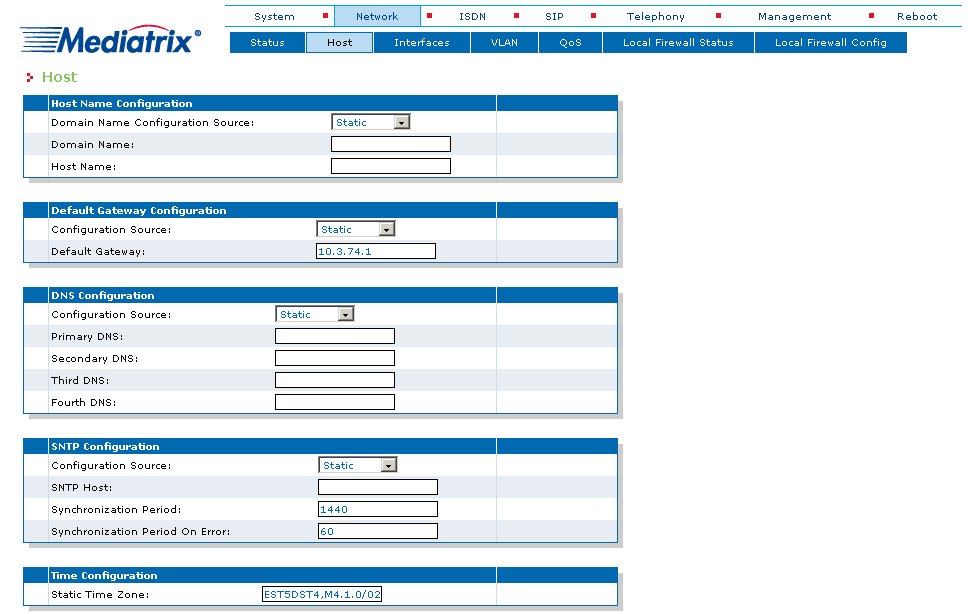
Network -> Host
Set Static
- in the section Host Name Configuration for Domain Name Configuration Source,
- in the section Default Gateway Configuration for Configuration Source,
- in the section DNS Configuration for Configuration Source and
- in the section SNTP Configuration for Configuration Source.
Figure 61. Mediatrix 44xx Gateway (Trunking) - Network -> Host
Network -> Interfaces
The network interfaces should be configured with unique LAN IP addresses.
Theoretically, a Mediatrix 4400 gateway can support up to 48 network
interfaces.
IMPORTANT:
Care must be taken when assigning IP addresses
to ensure that they can be reached by OpenScape 4000 SoftGate.
An OpenScape 4000 SoftGate (or vHG3500) can only operate one network
interface in the Mediatrix gateway. It may be necessary to configure
subscriber and trunking scenarios over a network interface.
Configure a LAN interface in this mask.
IMPORTANT:
The name of the interface can be chosen at random
and does not yet define usage. In this case we call it „LAN“.
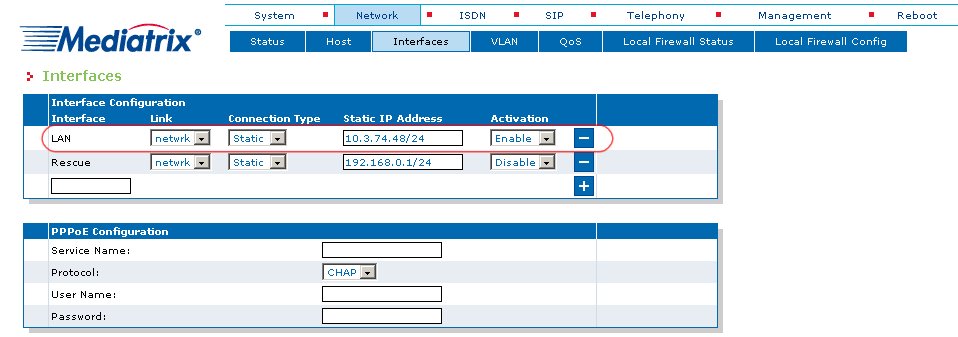
Mediatrix 44xx Gateway (Trunking) -
Network -> Interfaces
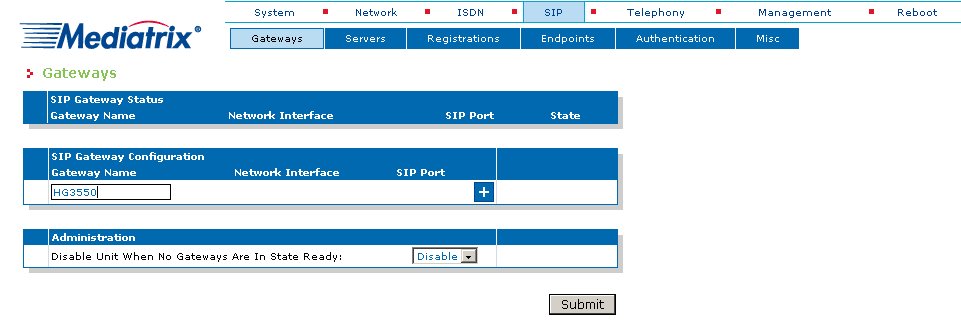
SIP -> Gateways
Configure your SIP gateway now. As Gateway Name you can chose
„HG3550“ for example.
Figure 62. Mediatrix 44xx Gateway (Trunking) - SIP -> Gateways
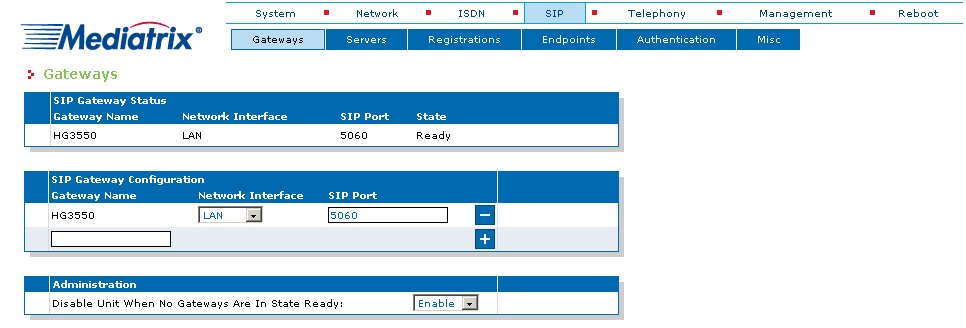
Select the value „LAN“ in the SIP Gateway Configuration
section in the field Network Interface.
Figure 63. Mediatrix 44xx Gateway (Trunking) - SIP -> Gateways
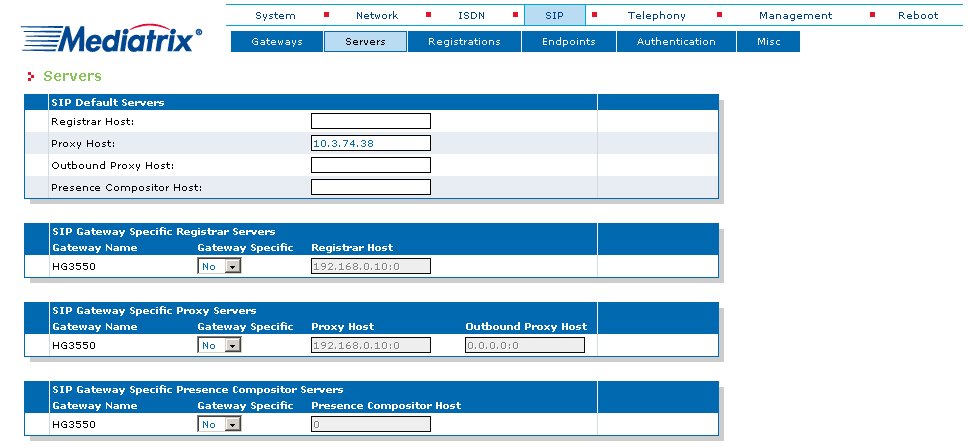
SIP -> Servers
Enter the IP address of the virtual HG 3550 in the section SIP
Default Servers in the field Proxy Host (in this case 10.3.74.38).
Figure 64. Mediatrix 44xx Gateway (Trunking) - SIP -> Servers
SIP -> Registrations
There are no endpoints in the trunking configuration, which is why
registration is not necessary.
IMPORTANT:
As the Mediatrix gateway only supports native
SIP (not SIP-Q), a registration mechanism is not provided for trunking.
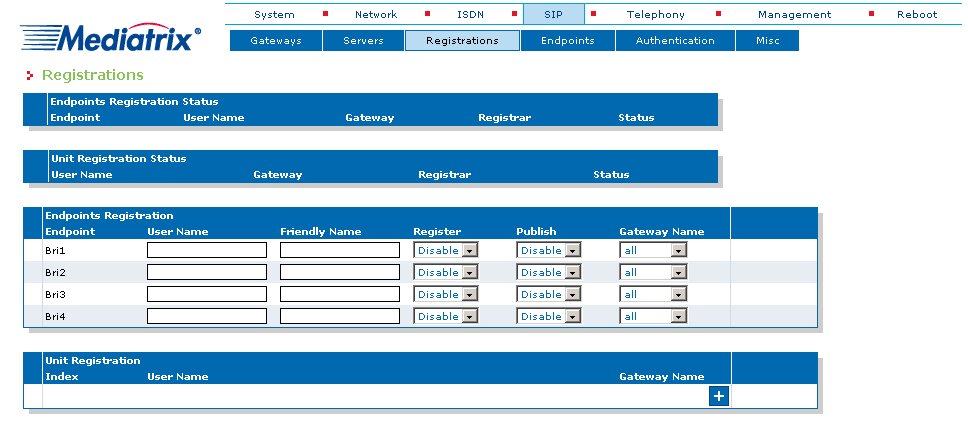
Mediatrix 44xx Gateway (Trunking) -
SIP -> Registrations
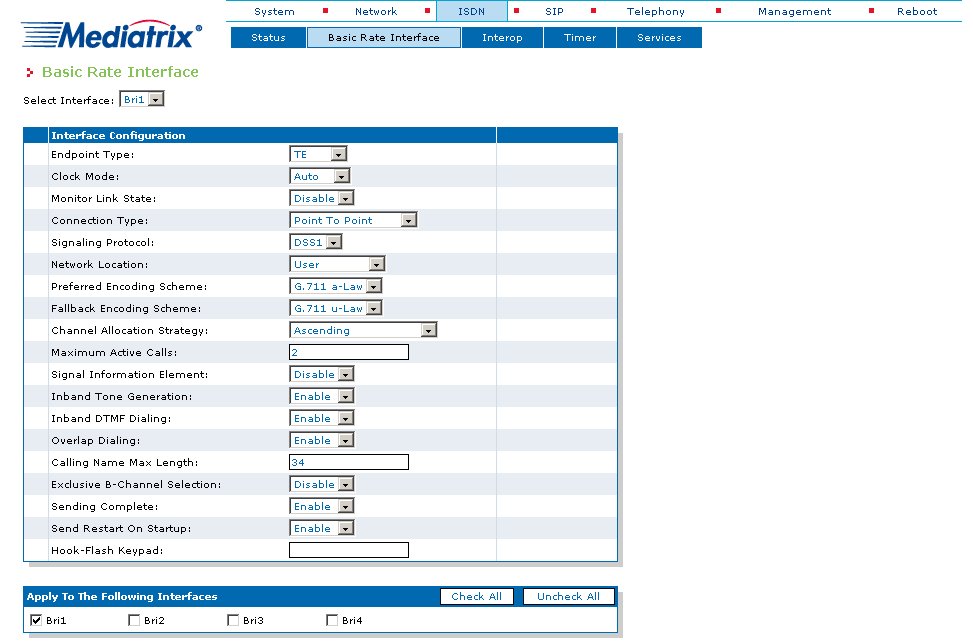
ISDN -> Basic Rate Interface
Configure the ISDN parameters for every interface that should be used.
- Endpoint Type: TE
- Connection Type: e.g.: Point To Point
The ISDN trunking partner/CO provider protocol should be used, where applicable,
to ensure that the "Exclusive B-Channel Selection" field is enabled for
both interfaces.
Figure 65. Mediatrix 44xx Gateway (Trunking) - ISDN -> Basic Rate Interface
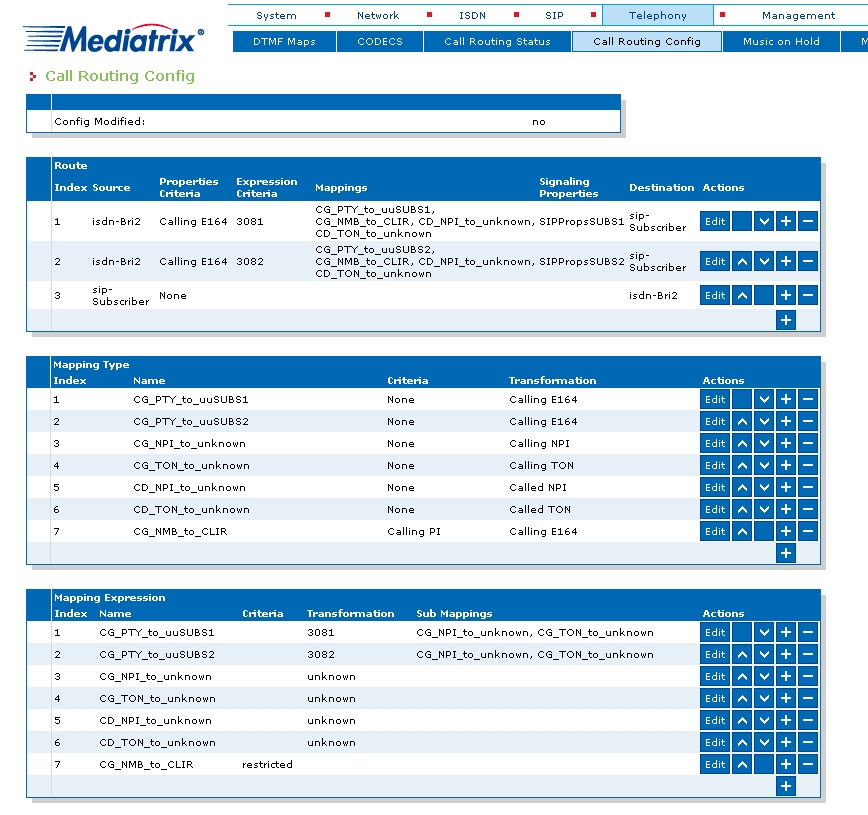
Telephony -> Call Routing Config
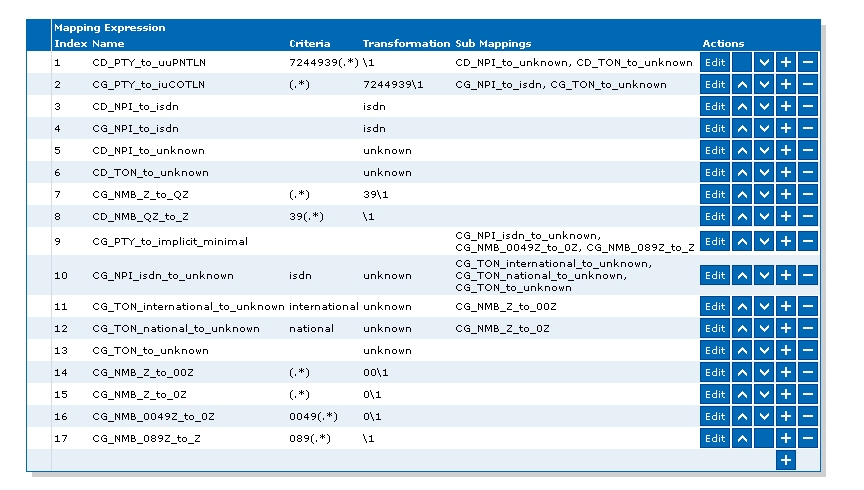
The Mediatrix gateway’s "Telephony - Call Routing Config" setting
is not used in the general scenario for CO trunks (especially not for
differentiation based on E.164 number). Station number handling is usually
configured in the OpenScape 4000 system (see OpenScape 4000 sample configuration for S0 trunking).
OpenScape 4000 sample configuration for S0 trunking
ADD-BFDAT:FCTBLK=34,FUNCTION=HG3550&SIP,BRDBCHL=BCHL120,ATTR=SOCO CHA-BFDAT:CONFIG=CONT,FCTBLK=34,FUNCTION=HG3550,LINECNT=1,UNITS=1; CHA-BFDAT:CONFIG=CONT,FCTBLK=34,FUNCTION=SIP,LINECNT=20,BCHLCNT=2; CHA-BFDAT:CONFIG=OK,FCTBLK=34,ANSW=YES; /* */ ADD-BCSU:TYPE=IPGW,LN=1,LTU=19,SLOT=8,PARTNO="Q2330-X ",FCTID=1,LWVAR=0,FCT BLK=34,BCHLSIP=2,BCHL3550=10,ALARMNO=0; /* */ ADD-CGWB:LTU=19,SLOT=8,SMODE=NORMAL,IPADDR=10.3.74.38,NETMASK=255.255.255.0; CHANGE- CGWB:MTYPE=CGW,LTU=19,SLOT=8,TYPE=GLOBIF,PATTERN=213,VLAN=NO,VLANID=0,DEFRT=0.0. 0.0,BITRATE=AUTONEG,TRPRSIP=10,TRPRSIPQ=0,TRPRH323=0,TPRH323A=0,TLSP=4060,DNSI PADR=0.0.0.0; CHANGE-CGWB:MTYPE=CGW,LTU=19,SLOT=8,TYPE=SERVIF,LOGINTRM="TRM"; CHANGE-CGWB:MTYPE=CGW,LTU=19,SLOT=8,TYPE=ASC,UDPPRTLO=29100,TOSPL=48,TOS SIGNL=184, T38FAX=YES,RFCFMOIP=YES,RFCDTMF=YES,REDRFCTN=YES,PRIO=PRIO1,CO DEC=G711A,VAD=NO,RTP=30;
|
REDRFCTN
|
Redundant transmission of the RFC2833 tones
in accordance with RFC2198
|
|
RFCDTMF
|
Transmission of DTMF tones in accordance with
RFC2833.
|
|
RFCFMOIP
|
Transmission of fax/modem tones in accordance
with RFC2833
|
IMPORTANT:
The parameters mentioned above must have the
same value in all IPDA gateways (STMI2/4 and STMIX/Y (vSTMI) with regard
to AMO CGWB & NCUI2+/4 (vNCUI) with regard to AMO STMIB). This avoids
problems and a common function across all systems is achieved!
CHANGE-CGWB:MTYPE=CGW,LTU=19,SLOT=8,TYPE=ASC,PRIO=PRIO2,CO DEC=G729A,VAD=NO,RTP=20; CHANGE-CGWB:MTYPE=CGW,LTU=19,SLOT=8,TYPE=ASC,PRIO=PRIO3,CODEC=NONE,VAD=NO; CHANGE-CGWB:MTYPE=CGW,LTU=19,SLOT=8,TYPE=ASC,PRIO=PRIO4,CO DEC=NONE,VAD=NO,RTP=20; CHANGE-CGWB:MTYPE=CGW,LTU=19,SLOT=8,TYPE=ASC,PRIO=PRIO5,CO DEC=NONE,VAD=NO,RTP=20; CHANGE-CGWB:MTYPE=CGW,LTU=19,SLOT=8,TYPE=ASC,PRIO=PRIO6,CO DEC=NONE,VAD=NO,RTP=20; CHANGE-CGWB:MTYPE=CGW,LTU=19,SLOT=8,TYPE=ASC,PRIO=PRIO7,CO DEC=G729AB,VAD=YES,RTP=20; CHANGE-CGWB:MTYPE=CGW,LTU=19,SLOT=8,TYPE=DSP,JITBUFD=60; CHANGE-CGWB:MTYPE=CGW,LTU=19,SLOT=8,TYPE=MGNTDATA,MGNTPN=8000,BUSPN=443; CHANGE-CGWB:MTYPE=CGW,LTU=19,SLOT=8,TYPE=DMCDATA,DMCCONN=0; CHANGE-CGWB:MTYPE=CGW,LTU=19,SLOT=8,TYPE=WBMDATA,LOGINWBM="HP4K-DEVEL",ROLE=EN GR; CHANGE-CGWB:MTYPE=CGW,LTU=19,SLOT=8,TYPE=WBMDATA,LOGINWBM="HP4K-SU",ROLE=SU; CHANGE-CGWB:MTYPE=CGW,LTU=19,SLOT=8,TYPE=WBMDATA,LOGINWBM="HP4K-ADMIN",ROLE=AD MIN; CHANGE-CGWB:MTYPE=CGW,LTU=19,SLOT=8,TYPE=WBMDATA,LOGINWBM="HP4K-READ ER",ROLE=READONLY; CHANGE-CGWB:MTYPE=CGW,LTU=19,SLOT=8,TYPE=GWDATA,GWID1="PRIMARYRASMANAGERID"; CHANGE-CGWB:MTYPE=CGW,LTU=19,SLOT=8,TYPE=H235DATA,SECSUBS=NO,SECTRNK=NO,GLO BID1="Gateway2003",TIMEWIN=100,GLOBPW=242-191-30-119-188-83-173-161-43-0-70-36- 218-74-169-221-78-102-174-170; CHANGE-CGWB:MTYPE=CGW,LTU=19,SLOT=8,TYPE=LEGKDATA,GWNO=119,GWDIRNO=23;REGEXT GK=NO; CHANGE-CGWB:MTYPE=CGW,LTU=19,SLOT=8,TYPE=SIPTRERH,GWAUTREQ=NO; CHANGE- CGWB:MTYPE=CGW,LTU=19,SLOT=8,TYPE=SIPTRSSA,SIPREG=NO,REGIP1=0.0.0.0,PORTTCP1=506 0,PORTTLS1=5061,REGTIME=120,REGIP2=0.0.0.0,PORTTCP2=5060,PORTTLS2=5061; CHANGE-CGWB:MTYPE=CGW,LTU=19,SLOT=8,TYPE=DLSDATA,DLSIPADR=10.3.0.200,DL SPORT=18443,DLSACPAS=YES; /* */ ADD-GKREG:GWNO=19,GWATTR=EXTGW&HG3550V2&SIP,GWIPADDR=10.3.74.48,GWDIR NO=22,DIPLNUM=0,DPLN=0,LAUTH=1,INFO="",SECLEVEL=TRADITIO; /* */ ADD-BUEND:TGRP=119,NAME="CO AP19 MEDIATRIX",NO=10,TRACENO=0,ACDTHRH=*,PRIO NO=1,TDDRFLAG=ON,GDTRRULE=0,ACDPMGRP=0,CHARCON=NEUTRAL; /* */ ADD-TDCSU:OPT=NEW,PEN=1-19-008-0,COTNO=21,COP NO=21,DPLN=4,ITR=0,COS=1,LCOSV=1,LCOSD=1,CCT=" ",DESTNO=0,PROTVAR=EC MAV2,SEGMENT=8,DEDSVC=NONE,TRTBL=GDTR,SIDANI=N,ATNTYP=CO,CBMATTR=NONE,TCHARG=N,S UPPRESS=0,TRACOUNT=31,SATCOUNT=MANY,ALARMNO=2,FIDX=1,CARRIER=1,ZONE=EMPTY,COTX=2 1,FWDX=1,CHIMAP=N,UUSCCX=16,UUSCCY=8,FNIDX=1,NWMUXTIM=10,CLASSMRK=EC&G711&G729AO PT,TCCID="",TGRP=119,SRCHMODE=DSC,INS=Y,SECLEVEL=SECURE,DEV=HG3550CO,BCHAN=1&&6, BCNEG=N,BCGR=1,LWPAR=0,LWPP=0,LWLT=0,LWPS=0,LWR1=0,LWR2=0,DMCALLWD=N; /* */ /* ------ LCR example for a national number------ */ /* ------ Number must go out as block dial------ */ /* ------ In the system either "prepared dial" must be activated ------ */ /* ------ or LDPLN end with -Z and dial with # (SIP functionality------ */ /* */ ADD-RICHT:MODE=LRTENEW,LRTE=119,LSVC=ALL,NAME="CO NATIONAL",TGRP=119,DNNO=1-1- 119,DTMFTEXT="",ROUTATT=YES,EMCYRTT=NO,INFO="",PDNNO=0,CONFTONE=NO,RERINGRP=NO,N OPRCFWD=NO,NITO=NO,CLNAMEDL=NO,FWDSWTCH=NO,LINFEMER=NO,NOINTRTE=NO; /* */ ADD-LODR:ODR=19,CMD=OUTPULSE,DGTS=49; ADD-LODR:ODR=19,CMD=ECHO,FIELD=4; ADD-LODR:ODR=19,CMD=NPI,NPI=ISDN,TON=INTERNAT; ADD-LODR:ODR=19,CMD=END; /* */ ADD-LDAT:LROUTE=119,LSVC=ALL,LVAL=1,TGRP=119,ODR=19,LAUTH=1,CARRIER=1,ZONE=EMP TY,LATTR=NONE,VCCYC=4,GW1=19-0; /* */ ADD-LDPLN:LCRCONF=LCRPATT,DIPLNUM=0,LDP=0-W-0-Z,LROUTE=119,LAUTH=1,PINDP=NO;
It is assumed that the OpenScape 4000 transmits all dial
patterns (subscr, national, internet) in E164 ISDN
/ international format (block dialing must be configured).
The example here refers to a location with the number +49 (30) 430-xxx.
IMPORTANT:
The longest number to be processed must be first
with these criteria!
Outgoing calls from the OpenScape 4000 SoftGate to the CO Carrier
All dial patterns with an "+" at the beginning arrive on the Mediatrix
gateway via the sip HG3550 interface This way the Mediatrix recognizes
that it is an E164 number in ISDN / INTERNATIONAL format. Depending on
the requirements of the CO carrier, the number to ISDN-BRI can be modified
to a national ("CO_outg_national") or subscriber ("CO_outg_subscr") format.
The modification applies to calling and called numbers.
Criteria/Transformation
Therefore the following criteria/transformation is applied:
- E164 -> E164 or TONE -> TONE.
Incoming calls from the CO carrier to the OpenScape 4000 SoftGate
The came applies to incoming calls to the sip HG3550.
The called number in the subscriber format is converted to international
("CO_inc_called") format. If the carrier transmits the called number
in national format, the routing must be changed from "CO_inc_called
(.+) +4930\1" to "CO_inc_called (.+) +49\1".
The incoming number (calling number) is modified depending on format
via the routing entries "CO_inc_calling_subscr_to_4930
" or "CO_inc_calling_national_to_49
".
Different rules apply to the calling number as to the called number because
the called number is always the same (depending on the carrier either
subscriber or national) but the calling number can be different (subscriber,
national or international).
Criteria/Transformation
Therefore the following criteria/transformation is applied:
- Calling E164 -> Calling E164 or Calling TONE -> Calling TONE and
- Called E164 -> Called E164 or Called TONE -> Called TONE.
Mediatrix 44xx Gateway (Trunking) -
Telephony -> Call Routing Config 1
Mediatrix 44xx Gateway (Trunking) -
Telephony -> Call Routing Config 2
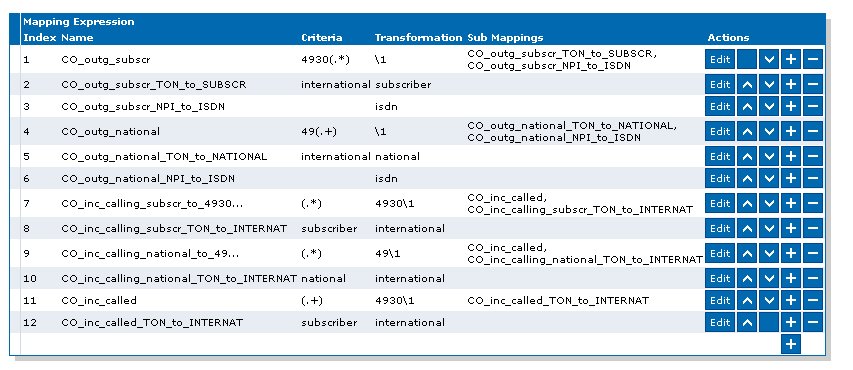
Mediatrix 44xx Gateway (Trunking) -
Telephony -> Call Routing Config 3