3.8.3.3.2. Configuration 


Prerequisite: IPv6 operation between the OpenScape 4000 central
switch and all relevant OpenScape 4000 SoftGates must be configured in
the system. The parameter IPMODE=DUALSTCK must be set for this
purpose for each OpenScape 4000 SoftGate in AMO STMIB.
CHANGE-STMIB:MTYPE=NCUI2,LTU=1,TYPE=IPCONF,IPMODE=DUALSTCK;
The OpenScape 4000 SoftGate must then be supplied with the new configuration
and restarted (
EXEC-USSU:MODE=UPDATAP,LTU=<ap-number>;)!To configure the internal IPv6 connections, the following address
information is needed:
- IPv6 addresses of all hosts involved, i.e. the OpenScape 4000 central switch and OpenScape 4000 SoftGates and possibly APE / Survival OpenScape 4000 SoftGates.
- IPv4 addresses of the connected devices, in order to route the IP traffic via the IPv6 connections (tunnel) between the affected hosts.
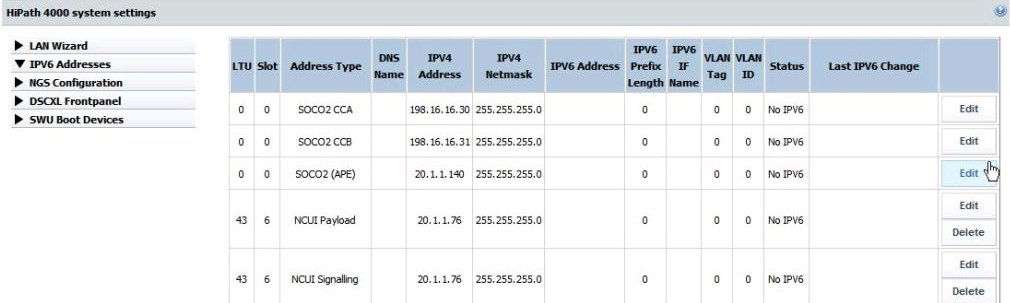
The Next Generation Server of the OpenScape 4000 host system is the central
point for IPv6 configuration. All IPv6 addresses are configured/administered
here, including:
- every IPv6 address for every OpenScape 4000 SoftGate
- IPDA LAN host addresses of the OpenScape 4000 central switch (DSCXL-V2 or server),
- all IPv6 addresses of all APEs / survival OpenScape 4000 SoftGates.
Figure 115. NGS - Administration/configuration of IPv6 addresses
The IPv4 addresses are provided locally on each host during installation
with the OpenScape 4000 Platform Administration (Portal) on both the
OpenScape 4000 central switch and the OpenScape 4000 SoftGate hosts.
After the first installation is completed, the OpenScape 4000 central
switch and OpenScape 4000 SoftGates communicate the required IPv4 addresses
to the NGS server using a notify mechanism.
The following addresses are stored in a table residing in the NGS
server:
- CC-A, CC-B and CC_APE addresses
- Signaling and payload addresses of every OpenScape 4000 SoftGate
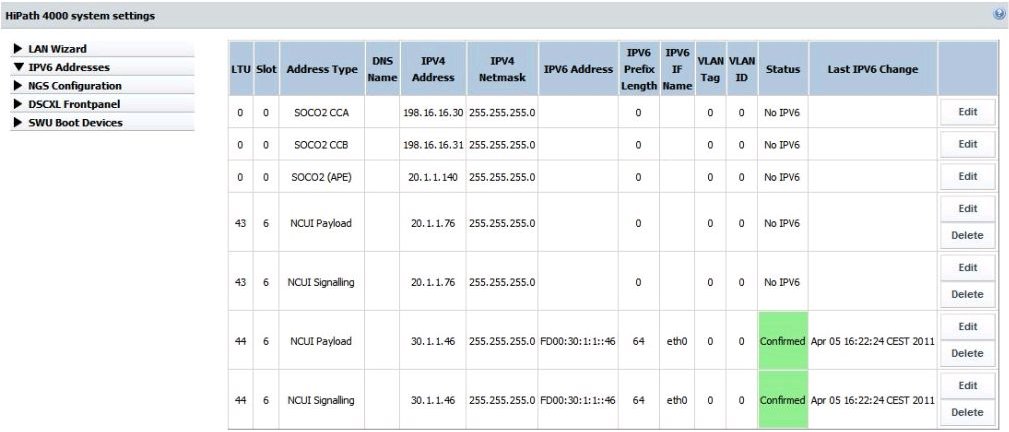
The IPv6 addresses have to be confirmed manually. The configuration of
an IPv6 address requires specification of 3 elements:
- IPv6 address itself
- IPv6 prefix length
- Name of the network interface the IP address in the Linux OS of the host is bound to
Figure 116. NGS - Confirming IPv6 addresses manually
IMPORTANT:
- The interface name (IPV6 IF name) must
correspond to the actual IP interface on the OpenScape 4000 SoftGate/OpenScape
4000 system/APE (Linux OS), e.g. eth0, eth1, etc.
IMPORTANT:
OpenScape 4000 SoftGate polls the NGS server periodically
for changes on the IPv6 address data. The polling period is a configurable
parameter, where the default value is set to 5 minutes. Since the polling
instances of all interconnected SoftGates operate independently of each
other, it will in general take one full polling period to propagate the
information about the modified IP address data to all these SoftGates.
Therefore, the update of all affected IPv6 connections will also take
at least one full polling period.