3.10.2.4. DMZ 


In most cases where the customer requires additional protection, an
additional primary DMZ firewall where possible should suffice. In addition
to the constantly active internal OpenScape 4000 SoftGate voice firewall,
this additional firewall could be activated between the Internet and
the OpenScape 4000 SoftGate.
In the following example we consider a DMZ scenario, which consists
of both a primary and a secondary DMZ firewall.
Figure 128. DMZ scenario
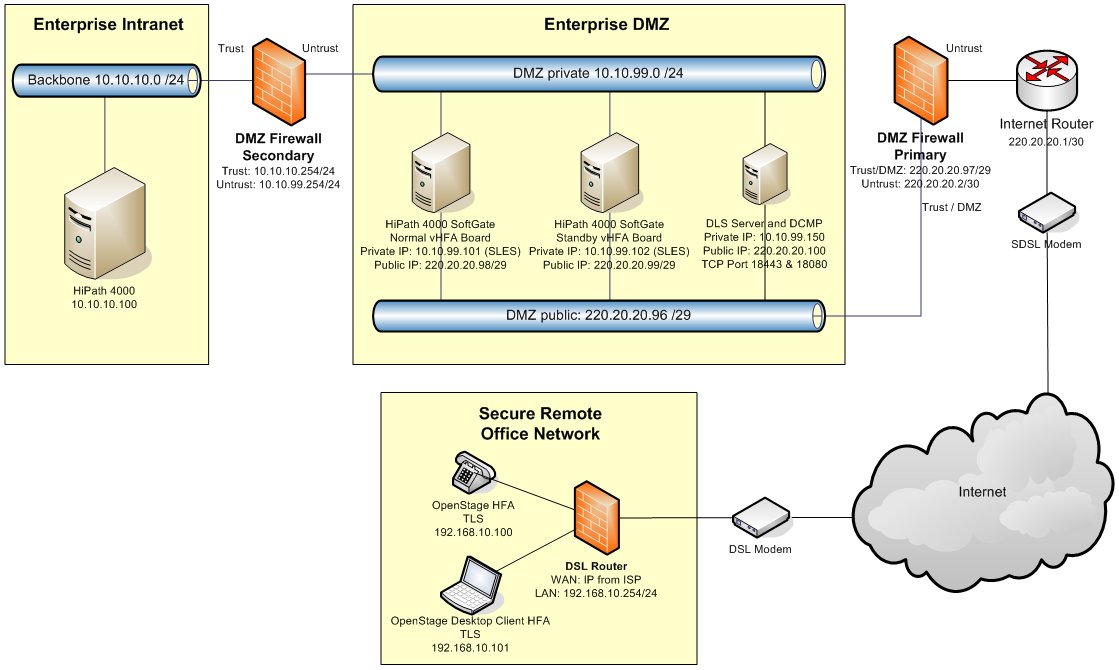
Figure 132
shows a network plan with a DMZ scenario consisting of corporate/enterprise
network, DMZ private and DMZ public/Internet. If such a DMZ is to be
used, it must be checked whether all required ports have been enabled
in the DMZ firewalls (typically primary and secondary DMZ firewalls).
Figure 129. DMZ scenario - Required ports
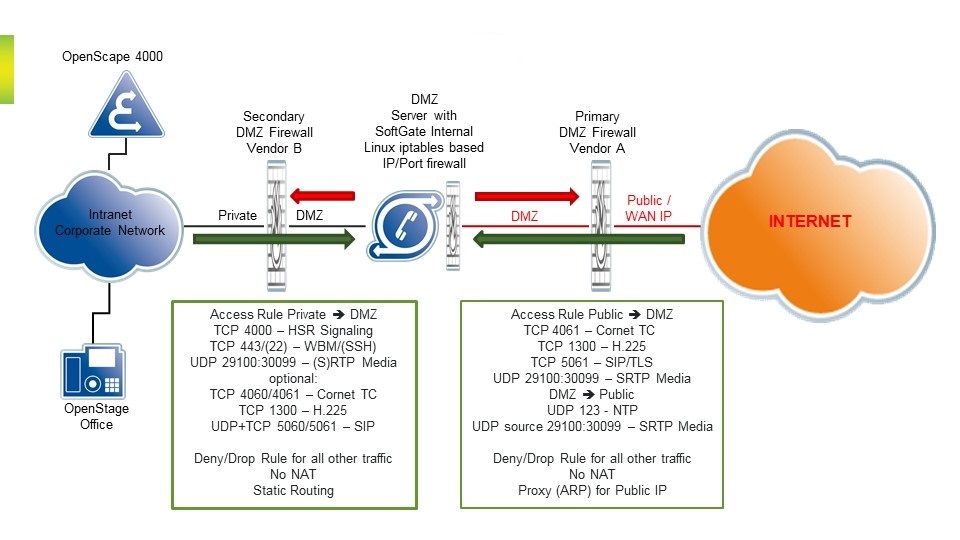
Figure 133
shows a DMZ scenario from another perspective, in which the required
ports will be discussed in greater detail. The respective ports as well
as other ports are listed below and can also be found in the OpenScape
4000 Security Checklist.
The following ports (with reference to Figure 132
and Figure 133)
have to be open in the firewall:
Primary DMZ firewall
- Internet/Public (Untrust) => DMZ Public (Trust)
- TCP 4061 for Cornet TC/TLS
- TCP 1300 for H.323/TLS
- TCP 5061 for SIP/TLS
- UDP ports for SRTP media (Default = 29100-30099, AMO STMIB:WANFD)
Optional:- TCP 443 for Picture CLIP (OpenStage 60/80)
- TCP 8802 for WSI (CP400/600/700 HFA)This port can be configured in Platform Portal (central host platform) and can be activated for WAN (by default off).
- TCP 18080/18443 for DLS and DCMP (e.g. use of SoftClient or Software Lifecycle)
- DMZ Public (Trust) => Internet/Public (Untrust)
- UDP 123 for NTP synchronization of OpenScape 4000 SoftGate via the Internet
- UDP ports for SRTP media (Default = 29100-30099, AMO STMIB:WANFD)
- Deny/drop rule for all other traffic
- No NAT
- Proxy (ARP) for Public IP
INFO:
The blocking of DMZ Public (Trust) => Internet/Public (Untrust) traffic is for the prevention of misuse of the OpenScape 4000 SoftGate server and the public IP.
Secondary DMZ firewall
- Corporate/Enterprise Network (Trust) => DMZ Private (Untrust)
- TCP 4000 for the HSR signaling protocol. For signaling survivability, please refer to Section "Signaling Survivability" for the relevant ports.
- TCP 443/22 for WBM/SSH administration ports
- UDP ports for (S)RTP media (Default = 16384-<n - Ports>) - see HG 3500 and HG 3575 Gateways >Chapter 20, “IP Ports”
- UDP ports for (S)RTP media (Default = 29100-30099) - see HG 3500 and HG 3575 Gateways > Chapter 20, “IP Ports”
- Deny/drop rule for all other traffic
- No NAT
- Static routing
Optional:- TCP 4060 for Cornet TC/TCP: HFA terminal registers from the corporate/enterprise network.
- TCP 4061 for Cornet TC/TLS: HFA terminal registers from the corporate/enterprise network.
- UDP & TCP 5060 for SIP terminal registers from the corporate/enterprise network.
- TCP 5061 for SIP/TLS terminal registers from the corporate/enterprise network.
- TCP 1300 for H.323/TLS: HFA terminal registers from the corporate/enterprise network.
- TCP 1720 for DMC (e.g. OpenScape 4000 SoftGate vNCUI DMC activated)
- TCP 18443/18444 for DLS functionality. Additional ports may be necessary depending on the manner of use of the DLS. See OpenScape Deployment Service Documentation or Release Note for a detailed list of ports.
- DMZ Private (Untrust) => Corporate/Enterprise Network (Trust)
- UDP ports for (S)RTP media (Default = 16384-<n - Ports>) - see HG 3500 and HG 3575 Gateways > Chapter 20, “IP Ports”.
- UDP ports for (S)RTP media (Default = 29100-30099) - see HG 3500 and HG 3575 Gateways > Chapter 20, “IP Ports”.
Optional:- TCP 1720 for H.323/TCP: HFA terminal registers from the corporate/enterprise network.
- TCP 1720 for DMC (e.g. OpenScape 4000 SoftGate vNCUI DMC activated)
- UDP ports for DMC from optiPoint (Default=5004-ff) / OpenStage (Default=5010-ff) terminals (see documentation for terminals).
- TCP 443 for Backup Server (e.g. use of automatic restore concept)
- TCP 8082/8084/8085 for DLS functionality: Additional ports may be necessary depending on the manner of use of the DLS. See OpenScape Deployment Service Documentation or Release Note for a detailed list of ports.
INFO:
Open ports in the direction of the protected corporate/enterprise network (known as firewall pinholes) should be avoided for safety reasons if possible, but are required for the above-named exception scenarios.