3.10.3. Generation (Example) 


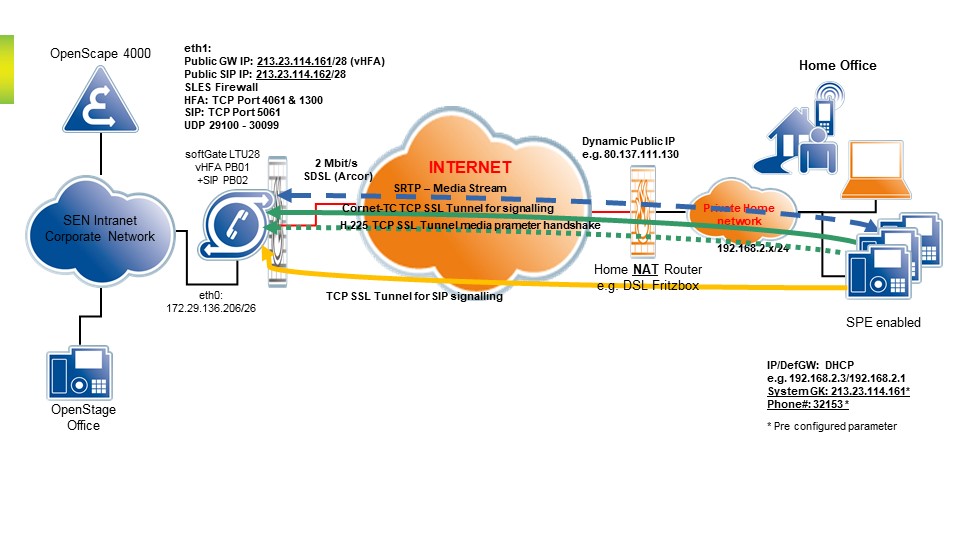
The next diagram roughly outlines the IP communication relationship
between the SPE-enabled HFA device and the OpenScape 4000 SoftGate.
Figure 130. Secure IP connectivity for remote subscribers - Sample generation
Configuration steps
The following steps have to be performed following installation of
the OpenScape 4000 SoftGate:
- Generate the WAN interface with AMO STMIB (IP address, netmask and default router).
WAN interface data:AMO STMIB is extended with the following parameters in a new WANIF branch:WIPADR=<ip address>, WNETMASK=<ip address>, WVLAN=<YES/NO>, WVLANID=<number>, WDEFRT=<ip address>, WPUBIP=<ip address>Example:
CHANGE-STMIB:MTYPE=NCUI2,LTU=20,TYPE=WANIF,WIPADR=10.80.144.246,WNETMASK=255.255.248.0,WVLAN=NO,
WVLANID=0,WDEFRT=10.80.144.1,WPUBIP=172.16.1.126;
WANIFWAN interfaceWIPADRIP address of WAN interfaceWNETMASKNetmask of WAN interfaceWVLANVLAN tagging of WAN interface (YES/NO)WVLANIDVirtual LAN ID of WAN interfaceWDEFRTIP address of the default router in the WAN segmentWPUBIPPublic IP address of WAN interfaceAfter changing these parameters,EXEC-USSU:MODE=UPDATAP,LTU=<LTU_of_OpenScape4000_SoftGate>;
of the OpenScape 4000 SoftGate must be performed. The OpenScape 4000 SoftGate is reset and the changes will be activated.WAN feature data:AMO STMIB is extended with the following parameters in a new WANFD branch:WUDPPRTL=<number>, WUDPPRTH=<number>, WTOSPL=<string>, WTOSSIGN=<string>, WTLSP=<number>Example:CHANGE-STMIB:MTYPE=NCUI2,LTU=20,TYPE=WANFD,WUDPPRTL=29100,WUDPPRTH=30099,WTOSPL="184",WTOSSIGN="104",WTLSP=4061;
WANFDFeature data of the WAN interfaceWUDPPRTLLower limit for the released UDP port rangeWUDPPRTHUpper limit for the released UDP port rangeWTOSPLTOS, Payload outgoing WAN for HFAWTOSSIGNTOS, DiffServ Code Point for HFA signalingWTLSPHFA TLSP portThe OpenScape 4000 SoftGate itself does not have to be reset if these parameters are changed, rather the data is activated as soon as the AMO has made the changes.WTOSSIGNTOS, DiffServ code point for HFA signalingWTLSPHFA TLSP portAfter changing these parameters,RES-USSU:LTU,<LTU_of_OpenScape4000_SoftGate>;of the OpenScape 4000 SoftGate must be performed. The OpenScape 4000 SoftGate is reset fully and the changes are activated.INFO:
(HFA only) The default UDP port range of 1000 open ports (Default = 29100-30099) can be restricted. It must be noted here that two UDP ports must be available for each HFA terminal in the remote office. If no UDP port is available at call setup, the HFA terminal is reset with an L1 error. So-called overbooking is not supported. - Configure the OpenScape 4000 SoftGate's WAN interface via the Web Based Management
(WBM)
OpenScape 4000 SoftGate WBM > Configuration > WAN > Settings
Figure 131. Secure Remote Subscriber - OpenScape 4000 SoftGate WAN settings
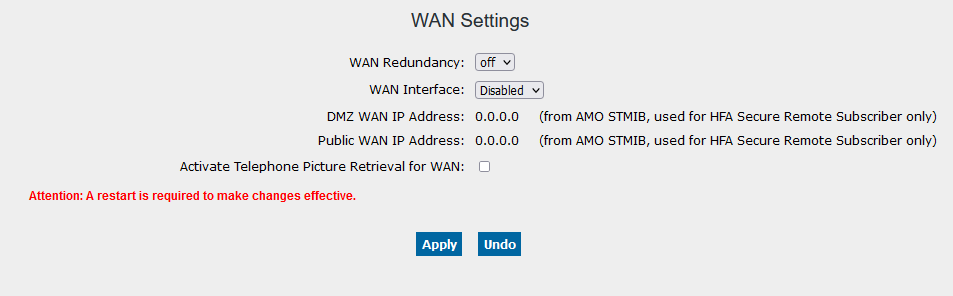
- Select a WAN interface (e.g. eth1). Apply the settings and then restart OpenScape 4000 SoftGate with the Restart button in the WBM.
INFO:
If the WAN interface is to be configured later, as described in point 3, via AMO STMIB, then the restart from the WBM can be relinquished. The necessaryEXEC-USSU:UPDATAP,<LTU_of_OpenScape4000_SoftGate>;command essentially leads to a full OpenScape 4000 SoftGate reset.- If the Picture CLIP (see Chapter 15, “Picture CLIP”) feature is required for subscribers in the remote office, it can be activated here. In this case, the required TCP Port 443 on the WAN interface is opened, though explicitly for this feature. The WBM is furthermore not accessible via the WAN interface as a result.
- If gatekeeper redundancy for HFA subscribers is required, this must likewise be configured (see Chapter 10, “Gatekeeper Redundancy for HFA/ SIP Subscriber”).
- An SPE certificate has to be imported for the WAN interface of the OpenScape 4000
SoftGate.
OpenScape 4000 SoftGate WBM > Configuration > WAN > SPE > Import Keycert
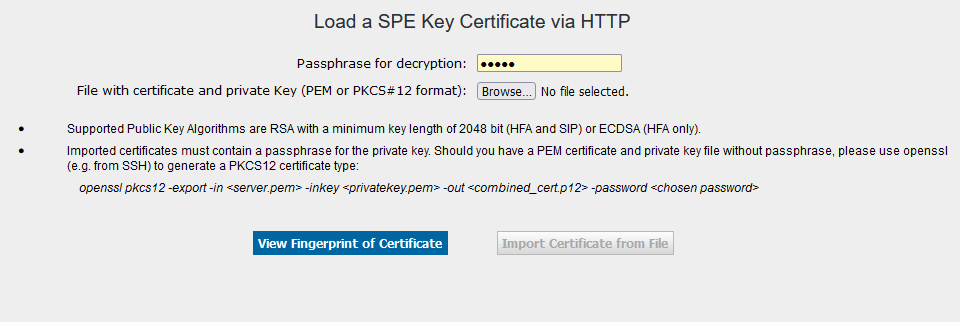 Secure Remote Subscriber - OpenScape 4000 SoftGate SPE certificate
- The Load a SPE Key Certificate via HTPP screen is displayed.
Enter the decryption password and then search for the SPE certificate. Press View Fingerprint of Certificate. Now import the certificate with the Import Certificate from File button.- The file containing the SPE certificate originates either from a customer-defined PKI certification authority (RA/CA) or (if not available to the customer) can be generated with the OpenScape 4000 Assistant. See documentation Signaling and Payload Encryption > Chapter 5, “Generation SPE Certificates with OpenScape 4000 Assistant”. The SPE certificate must be available in PEM or PKCS#12 format.
- Configure SIP STMI board for SIP/UFIP SRS
WAN interface data for SIP STMI:AMO CGWB is extended with the parameters USEWANIFExample:
CHANGE-CGWB:MTYPE=CGW,LTU=24,SLOT=4,TYPE=GLOBIF,IPADR=10.80.144.244,NETMASK=255.255.248.0,
DEFRT=10.80.144.190,USEWANIF=YES,WPUBIP=172.16.1.126,SIPTLSP=5061;
IPADR IP address of SIP WAN interface (eth1)NETMASK Netmask of WAN interfaceDEFRT IP address of the default router in the WAN segmentUSEWANIF Enabling SIP SRS on the SIP STMI boardSIPTLSP TCP/TLS port for secure SIP communicationWPUBIP Public IP address of WAN interfaceAfter changing these parameters,RESTART-BSSU:ADDRTYPE=PEN,LTU=<LTU_of_OpenScape4000_SoftGate>,SLOT=<SIP_STMI_slot>;
of the OpenScape 4000 SoftGate must be performed. The SIP STMI board is reset and the changes will be activated.MANLANIF interface reconfiguration for SIP STMI:AMO CGWB supports extra configuration of the management LAN interface (WBM) which is quite important in case of WAN configuration as web management access over the WAN interface is by default prohibited by iptables rules on internal SoftGate firewall. Therefore the extra IPDA LAN IP address shall be configured for the SIP STMI board management.Example:CHANGE-CGWB:MTYPE=CGW,LTU=24,SLOT=4,TYPE=MANLANIF,MIPADR=10.80.170.244,MNETMASK=255.255.240.0,MDEFRT=10.80.160.1;
MIPADR IP address used for WBM management (eth0)MNETMASK Netmask of MANLANIFMDEFRT IP address of the default router in the IPDA/MANLANIF segmentASC config data for SIP STMI media ports:AMO CGWB allows to define range of SRTP media ports which are used as source/destination ports for media streams established towards SIP subscribers.If SIP/UFIP SRS is used together with HFA SRS and they share single public IP address on the Primary DMZ firewall (AMO STMI WIPADR) then media port range configured for vHFA proxy MUST be different than port range for SIP STMI. I.e. default range 29100:30099 for vHFA and 30100:31099 for SIP STMIExample:CHANGE-CGWB:MTYPE=CGW,LTU=24,SLOT=4,TYPE=ASC,UDPPRTLO=30100,UDPPRTHI=31099;
UDPPRTLO Lowest UDP port used for SRTP media streamsUDPPRTHI Highest UDP port used for SRTP media streamsINFO:
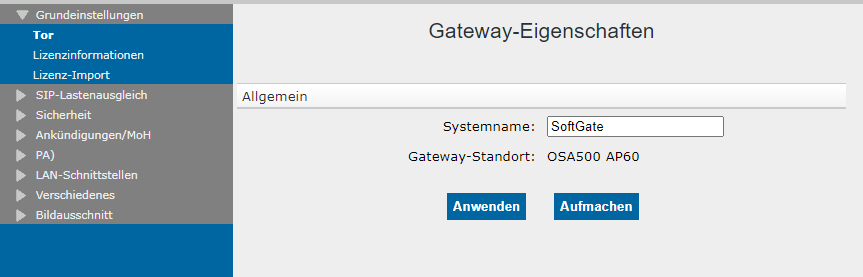
WAN interface is not configurable via SoftGate SIP STMI WBM but proper configuration can be verified in SIP STMI WBM as following:OpenScape 4000 SoftGate SIP STMI WBM > Configuration > Basic Settings > GatewayFigure 132. Configure SIP STMI board for SIP/UFIP SRS
 SPE certificate import into SIP STMI cards:SIP/UFIP SRS requires signaling and payload encryption (SPE) and therefore remote SIP/UFIP subscribers cannot register to the OpenScape 4000 SoftGate if SPE is not correctly configured on the SIP STMI board dedicated for SRS. It includes but not restricts to the proper SPE certificate configuration.OpenScape 4000 SoftGate SIP STMI WBM > Configuration > Security > Import SPE
Figure 133. Configure SIP STMI board for SIP/UFIP SRS
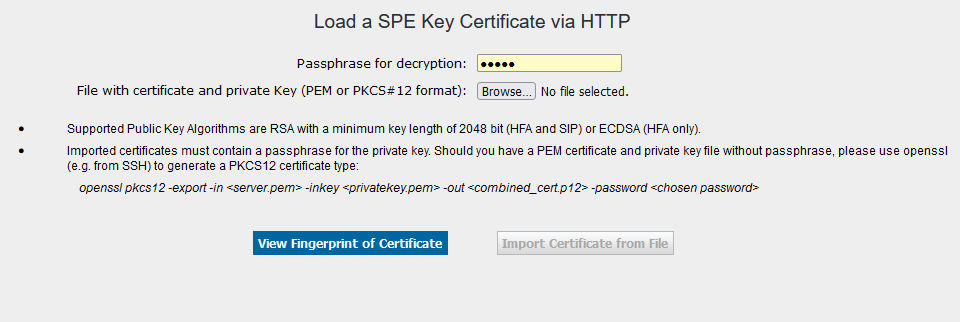
- The Load a SPE Key Certificate via HTPP screen is displayed. Enter the decryption password and then search for the SPE certificate. Press View Fingerprint of Certificate. Now import the certificate with the Import Certificate from File button.
- The file containing the SPE certificate originates either from a customer-defined PKI certification authority (RA/CA) or (if not available to the customer) can be generated with the OpenScape 4000 Assistant. See documentation Signaling and Payload Encryption > Chapter 5, “Generation SPE Certificates with OpenScape 4000 Assistant”. The SPE certificate must be available in PEM or PKCS#12 format.
- If the HFA and SIP/UFIP SRS share the same Primary DMZ firewall with one Public IP then both certificates – one downloaded to the SoftGate (see step 2.) and this one downloaded to the SIP STMI shall be identical.
- Generate the phone for the remote office with AMO SBCSU.
IMPORTANT:
An IP password has to be configured in AMO SBCSU: - Configure the phone for the remote office via its own menu.
The following settings have to be entered in the phone's menu:
- Gateway IP address (=WAN IP address of the OpenScape 4000 SoftGate)
- Station number (AMO SBCSU)
- IP password (AMO SBCSU)
- Transport mode: TLS
- NTP server
The address of an NTP server pool (z. B. 0.de.pool.ntp.org) should be entered as the NTP address. The phone then always gets a list of active NTP servers.Use of a server pool requires the availability of a DNS server in order to resolve the DNS name. If the phones are connected with the default routers via DHCP, the DNS is usually entered automatically and the name can be resolved. If, however, the OpenStage phone in the remote office is assigned a static IP address, the DNS also has to be entered.For the time change from daylight saving time to standard time, please change Timezone offset (hours) from 2 to 1 on the phone.Service Menu > Admin > ok > (Password = 123456*) ok > Date and time > ok > Time source > ok > (Time source = SNTP, SNTP IP = <ip address of the NTP server pool or of the NTP server>, Timezone offset (hours) = 1 ) > Save & exit > ok*please note that non-default password should be used.- optional: DLS IP address