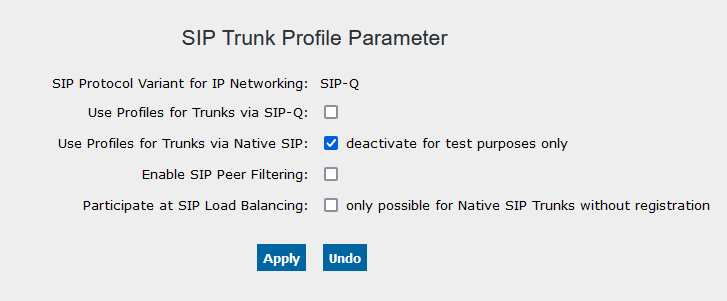
14.2.5.10. SIP Peer Filtering 


The feature SIP Peer Filtering is released for HG 3500 and
vHG 3500 SIP.
To avoid hacker attacks (scanning) via SIP trunks, only SIP requests
from "known" peers (partners) are answered, all other requests are ignored.
"Known" peers are IP addresses or FQDNs from an enabled SIP Trunk Profile
and/or registered SIP clients.
There are two operation modes:
- Gateway/HG configured (B channels) for SIP clients and SIP trunks.
Only incoming REGISTER messages from "known" peers will be answered, all other requests from "unknown" peers will be ignored.
- Gateway/HG configured as trunking gateway only (there are only configured SIP trunk
B
channels)
Only requests from "known" peers will be answered; all requests from "unknown" peers will be ignored.Typical use case where this feature should be activated is SIP trunk gateway connected to SIP provider via WAN/Internet without additional security tools like firewall usage.The feature can be activated in the SIP Trunk Profile Parameter menu via the checkbox Enable SIP Peer Filtering. After activation/deactivation of the feature the gateways be restarted.WBM > Configuration > Voice Gateway > SIP Trunk Profile Parameter
Figure 241. SIP Peer Filtering