4.2.2. Generation (Example) 


Separate LAN interfaces can be defined in the OpenScape 4000 SoftGate WBM in the LAN
Interfaces menu for HFA and SIP. The IPDA LAN interface is used as standard (HFA LAN
Interface: Default IPDA or SIP LAN Interface: Default IPDA).
Configuration > LAN Interfaces > HFA Interface > parameter HFA LAN
Interface
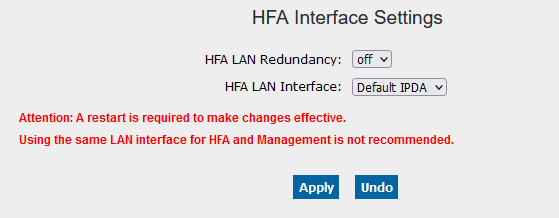
OpenScape 4000 SoftGate - HFA interface
Configuration > LAN Interfaces > SIP Interface
> parameter SIP LAN Interface
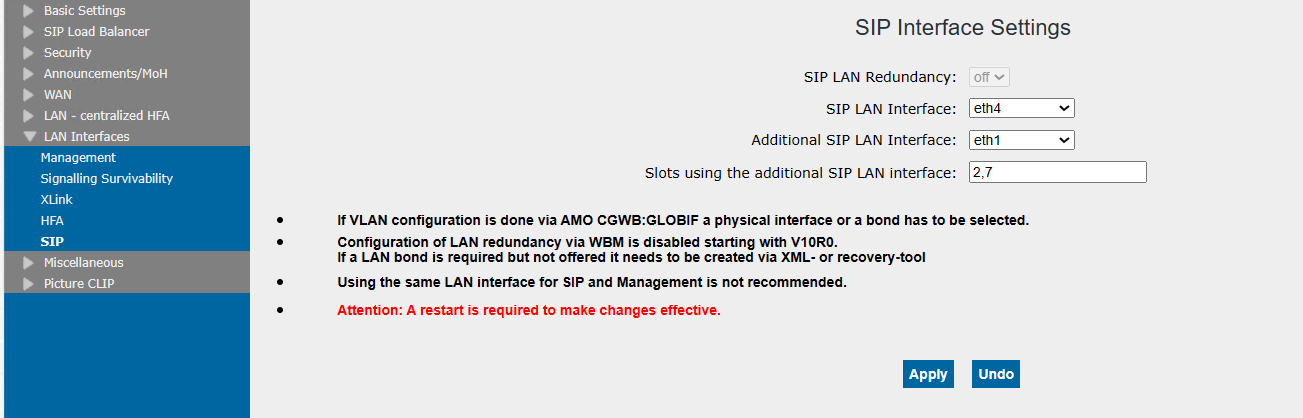
OpenScape 4000 SoftGate - SIP interface
It is possible to use the same interface for SIP and HFA. However, it is not recommended
to
operate SIP and HFA on the management interface, assuming this interface has been
configured. It
is also the case for SIP boards that a configured WAN interface is set up by preference.
A
separate SIP interface would not be considered in this case.
For SIP clients and SIP trunks it is possible to define an additional SIP LAN interface
by
choosing it from the selection list (i.e., none, bond0, eth2, etc.).
The slot configuration for the additional SIP LAN interface should be under the format
of
empty-string numbers or followed by comma.
If additional LAN interface is set to none (default) no slot can be entered.
The corresponding configuration data is contained in the HBR backup.
Redundant LAN (bonding) can also be configured for SIP and HFA. Additional information
in this
regard can be found in Chapter 19,
“Redundant LAN Interfaces (Bonding)”.
The IP addresses that have been configured with AMO CGWB for the corresponding boards
are
configured at the relevant LAN interfaces when the OpenScape 4000 SoftGate is restarted.