7.3.5.1.1. Configuring the HG 3500 Board 


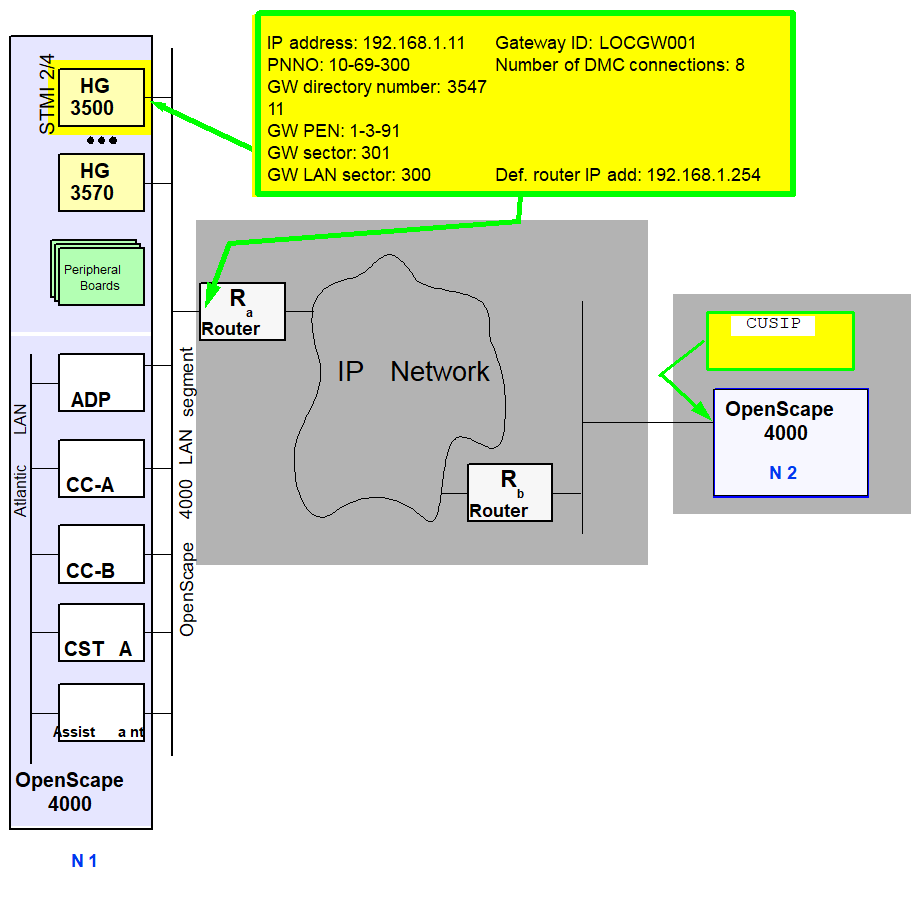
The configuration example applies to the OpenScape 4000 system with
gatekeeper on the left (“N 1“). The HG 3500 to be administered with
the relevant configuration data is colored yellow. The gatekeeper (CUSIP=192.168.2.11)
in the partner system “N 2“ is colored in a lighter shade of yellow
and will be described in more detail later in conjunction with the AMOs
GKREG and GKTOP.
Figure 152. Configuring a HG 3500 gateway
|
|
|
|
|
|
|
CONFIG=CONT, |
FCTBLK=1, |
FUNCTION=HG3550, |
LINECNT=1, |
|
UNITS=3; |
||
|
CONFIG=OK, |
FCTBLK=1, |
ANSW=YES; |
|
|
|
|
|
|
|
|
|
|
|
FCTBLK=1, |
BCHL3550=30; |
|
|
|
|
|
IPADR=192.168.1.11, |
|
NETMASK=255.255.255.0; |
||
CHANGE
|
|
|
|
TYPE=GWDATA, |
|
GWID1=LOCGW001; |
||
CHANGE
|
|
|
|
TYPE=LEGKDATA, |
|
GWNO=3, |
GWDIRNO=354711; |
|
CHANGE
|
|
|
|
TYPE=DMCDATA, |
|
DMCCONN=8; |
||
CHANGE
|
|
|
|
TYPE=GLOBIF, |
|
DEFRT=
|
Generation
A HG 3500 board is configured via 3 AMOs: BFDAT, BCSU and CGWB.
AMO BFDAT
The configuration of the functional blocks for the HG 3500 board is
done with the AMO BFDAT.
 |
Configuration Management > System Data > Board > CGW Function
Block
Click New, enter data and click Save.
|
 |
|
Table 19. AMO BFDAT parameters
|
AMO
|
Parameter
|
Sprache/ Language
|
Beschreibung/ Description
|
|
BFDAT
|
ANTW
|
d
|
ANTW=JA
Block-Konfiguration abschließen
|
|
ANSW
|
e
|
ANSW=YES
Finish block configuration
|
|
|
ANZEINH
|
d
|
Anzahl der vordefinierten Blöcke mit ausgewählter
Funktion pro Satz.
|
|
|
UNITS
|
e
|
Defines the number of predefined blocks with
the selected function per line.
|
|
|
ANZSATZ
|
d
|
Anzahl der funktionsbezogenen Saetze.
|
|
|
LINECNT
|
e
|
Defines the number of lines related to the selected
function.
|
|
|
BKANANZ
|
d
|
Block fuer Baugruppe mit 60 und/oder 120 B-Kanälen
|
|
|
BRDBCHL
|
e
|
Dedicates the block for boards with 60 and/or
120 b-channels
|
|
|
CONFIG
|
d
|
CONFIG=WEITER
Weitere Block-Konfiguration
möglich
CONFIG=OK
Block-Konfiguration abschließen
|
|
|
CONFIG
|
e
|
CONFIG=CONT
Continue block configuration
CONFIG=OK
Finish
block configuration
|
|
|
FCTBLK
|
d
|
Dieser Index beschreibt den Funktionsblock welcher
auf dem Common Gateway konfiguriert werden soll. Anhand des Funktionsblocks
wird die Konfiguration der benötigten pyhsikalischen Lines (Sätze der
Baugruppe) festgelegt.
|
|
|
FCTBLK
|
e
|
This index describes the function block which
should be configured on the common gateway board. With that index the
amount of needed physical lines (board circuits) is calculated.
|
|
|
FUNCTION
|
d
|
Dieser Parameter legt das Konfigurationsprofile
des CGW fest. Dabei muss die evtl. benötigte HG3570 Funktion als erste
angeführt werden. Falls ein bestimmter Line-Bereich für die Funktionen
HG3530, HG3540 oder HG3550 vorreserviert werden soll, muss die entsprechende
Funktion am Ende stehen und mit dem Wert HG35xxR abgeschlossen sein.
Die Funktion kann nur als Einzel-Funktion konfiguriert werden.
|
|
|
FUNCTION
|
e
|
This parameter defines the configuration profile
of the common gateway board. If HG3570 functionality is used, it must
be configured at first position. If a prereservation of a certain line
range of functions HG3530, HG3540 or HG3550 is desired, this function
must be at the end of the profile just suffixed by the according HG35xxR
value. The function can only be configured as single function.
|
AMO BCSU
The modules are configured in the system and activated with the AMO
BCSU.
|
|
Configuration Management > System
Data > Board > Board
Click New, enter data and Save.
|
|
|
|
Table 20. AMO BCSU parameters
|
AMO
|
Parameter
|
Sprache/ Language
|
Beschreibung/ Description
|
|
BCSU
|
TYP
|
d
|
TYP=IPGW
Common Gateway Baugruppe
|
|
MTYPE
|
e
|
MTYPE=IPGW
Common gateway board
|
|
|
LTG
|
d
|
LTG-Nummer
Parameter kann entfallen -
oder muss auf 1 gesetzt werden.
|
|
|
LTG
|
e
|
Line/Trunk Group Number
Parameter can
be omitted - or must be set to 1.
|
|
|
LTU
|
d
|
LTU-Nummer des Rahmens, in dem die HG 3500 eingesetzt
wird.
Die HG 3500 darf nur in den Rahmen des OpenScape 4000 Zentralsystems
(LTU 1..15) eingesetzt werden. Der Rahmen muss mit einer LTUCX Baugruppe
ausgestattet sein.
|
|
|
LTU
|
e
|
Line/Trunk Unit Number of the shelf where the
HG 3500 is plugged.
An HG 3500 may only be used in a shelf of the
OpenScape 4000 central system (LTU 1..15). The shelf must be equipped
with a LTUCX board.
|
|
|
EBT
|
d
|
Einbauteilung des Steckplatzes der HG 3500
|
|
|
SLOT
|
e
|
Slot where the HG 3500 resides.
|
|
|
SACHNR
|
d
|
Sachnummer der HG 3500-Baugruppe
|
|
|
PARTNO
|
e
|
Part Number of the HG 3500 Board
|
|
|
FCTID
|
d
|
Function ID
|
|
|
FCTID
|
e
|
Function ID
|
|
|
FCTBLK
|
d
|
Function Block Index
|
|
|
FCTBLK
|
e
|
Function block index
|
|
|
BKAN3550
|
d
|
Anzahl der B-Kanäle für die HG3550 Funktion
|
|
|
BCHL3550
|
e
|
Amount of b-channels for HG3550 function
|
|
|
HWYBDL
|
d
|
Highway Bündel
Die HG 3500 / STMI2/4 Baugruppe unterstützt die Wideband Technologie. Deshalb muss
der Baugruppe
entweder das Highway Bündel A (default) oder F zugewiesen werden.
|
|
|
HWYBDL
|
e
|
Highway bundle
The HG 3500 / STMI2/4 board supports wideband technology. Thus either highway bundle
A (default)
or F must be assigned to this board.
|
AMO CGWB
Use the ADD branch to make the individual settings necessary for operating
the HG 3500 board. Global and Ethernet-specific board data is configured.
This data is not loaded to the board until the board is activated or
deactivated and then re-activated (RESTART-BSSU).
The CHANGE branch MTYPE=CGW allows you to set a number of parameters
that are located in different branches. Data from the branches TYPE=GWDATA,
TYPE=DMCDATA, and TYPE=LEGKDATA is also needed for startup.
The specification of a GWNO depends on the operating scenario set
(see AMO ZANDE)
- PBX with LEGK
- PBX without LEGK
Operation in mixed mode is not possible.
A gateway number is required if the gatekeeper is configured at the
local PBX and you want to register the gateway here.
A gateway number is not required if a gateway registers at a foreign
PBX’s gatekeeper. If entered, a gateway number would be ignored.
Adding Ethernet-specific board data
|
|
Configuration Management > System Data > Board > Board
Click Search and select Board Name=STMI2,Board Name=STMI4, Board Name=STMIX or
Board Name=STMIY .
Make the settings on the STMI Board Data tab and Save.
Configuration Management > System Data > Maintenance > Board
Maintenance
Click Search and select STMI.
Click Execute on the Action pull-down menu, select Restart
and confirm with OK.
|
|
|
ADD-CGWB:LTU=3,SLOT=91,IPADDR=192.168.1.11,NETMASK=255.255.255.0; The HG 3500 must be restarted in order for this change to become effective.
Use
RESTART-BSSU:ADDRTYPE=PEN,LTU=3,SLOT=91; |
IMPORTANT:
Established connections are cleared down as
a result!
Table 21. AMO CGWB parameters
|
AMO
|
Parameter
|
Sprache/ Language
|
Beschreibung/ Description
|
|
CGWB
|
LTU
|
d
|
LTU-Nummer des Rahmens, in dem die HG 3500 gesteckt
ist.
|
|
LTU
|
e
|
Line/Trunk Unit Number of the shelf where the
HG 3500 is plugged.
|
|
|
EBT
|
d
|
Einbauteilung des Steckplatzes der HG 3500
|
|
|
SLOT
|
e
|
Slot where the HG 3500 resides.
|
|
|
IPADR
|
d
|
IP-Adresse der HG 3500 im Kunden LAN
Legt
die IP-Adresse fest, über die ein HG 3500 Gateway am OpenScape 4000
LAN-Segment erreicht werden soll.
|
|
|
IPADR
|
e
|
IP-Address of HG 3500 on customer LAN
Assigns
the address with which a HG 3500 gateway can be reached on the OpenScape
4000 LAN-segment.
|
|
|
NETMASK
|
d
|
Netzmaske des LAN-Segmentes
|
|
|
NETMASK
|
e
|
Netmask of LAN-segment
|
|
|
MUSTER
|
d
|
Ruhebitmuster
Der Default-Wert ist
213 (dezimal)
|
|
|
PATTERN
|
e
|
Idle Pattern
Default value is 213
(decimal)
|
IMPORTANT:
Before administering the
ADD-CGWB
command, use ping to check that the gateway IP address given to
you by the administrator is reachable. CUSIP must not respond
as this would indicate that the corresponding address has already been
assigned. CUSIP must be set differently for every HG 3500. The
AMO does not verify if this rule is observed.TYPE=GWDATA - Changing gateway identification
|
|
Configuration Management > System Data > Board > Board
Click Search and select Board Name=STMI2, Board Name=STMI4, Board
Name=STMIX or Board
Name=STMIY.
Make the settings on the STMI2-IGW Board Data tab and Save.
Configuration Management > System Data > Maintenance > Board
Maintenance
Click Search and select STMI.
Click Execute on the Action pull-down menu, select Restart
and confirm with OK.
|
|
|
CHANGE-CGWB:MTYPE=CGW,TYPE=GWDATA,LTU=3,SLOT=91,GWID1=INTGW001; The HG 3500 must be restarted in order for this change to become effective.
Use
RESTART-BSSU:ADDRTYPE=PEN,LTU=3,SLOT=91; for this.
|
IMPORTANT:
Established connections are cleared down as
a result!
Table 22. AMO CGWB parameters in the CHANGE branch under MTYPE=CGW, TYPE=GWDATA
|
AMO
|
Parameter
|
Sprache/ Language
|
Beschreibung/ Description
|
|
CGWB
|
LTU
|
d
|
LTU-Nummer des Rahmens, in dem die HG 3500 gesteckt
ist.
|
|
LTU
|
e
|
Line/Trunk Unit Number of the shelf where the
HG 3500 is plugged.
|
|
|
EBT
|
d
|
Einbauteilung des Steckplatzes der HG 3500
|
|
|
SLOT
|
e
|
Slot where the HG 3500 resides.
|
|
|
GWID1
|
d
|
Gateway Identifikation 1. Teil
Die Gateway
Identifikation ist der 1. Teil einer beliebigen 64 Zeichen langen Zeichenkette.
Die Eingabe ist CASE-sensitiv.
|
|
|
GWID1
|
e
|
Gateway Identifikation 1. part
A gateway
identification is the 1. part of an idividual 64 character long characterstring.
The input is CASE-sensitive.
|
|
|
STMIB
|
GWID2
|
d
|
Gateway Identifikation 2. Teil
Die Gateway
Identifikation ist der 2. Teil einer beliebigen 64 Zeichen langen Zeichenkette.
Die Eingabe ist CASE-sensitiv.
|
|
STMIB
|
GWID2
|
e
|
Gateway Identifikation 2. part
A gateway
identification is the 2. part of an idividual 64 character long characterstring.
The input is CASE-sensitive.
|
Resetting the parameters to default values
You can reset the initialization settings with the command:
CHANGE-CGWB:MTYPE=INITCGW,TYPE=GWDATA;TYPE LEGKDATA - Changing the gateway directory number
|
|
Configuration Management > System Data > Board > Board
Click Search and select Board Name=STMI2, Board Name=STMI4,
Board Name=STMIX or Board
Name=STMIY.
Make the settings on the STMI2-IGW Board Data tab and Save.
Configuration Management > System Data > Maintenance > Board
Maintenance
Click Search and select STMI.
Click Execute on the Action pull-down menu, select Restart
and confirm with OK.
|
|
|
CHANGE-CGWB:MTYPE=CGW,TYPE=LEGKDATA,LTU=3,SLOT=91,GWNO=3,GWDIR NO=354711; The HG 3500 must be restarted in order for this change to become effective.
Use
RESTART-BSSU:ADDRTYPE=PEN,LTU=3,SLOT=91; for this.
|
IMPORTANT:
Established connections are cleared down as
a result!
Table 23. AMO CGWB parameters in the CHANGE branch under MTYPE=CGW, TYPE=LEGKDATA
|
AMO
|
Parameter
|
Sprache/ Language
|
Beschreibung/ Description
|
|
CGWB
|
LTU
|
d
|
LTU-Nummer des Rahmens, in dem die HG 3500 gesteckt
ist.
|
|
LTU
|
e
|
Line/Trunk Unit Number of the shelf where the
HG 3500 is plugged.
|
|
|
EBT
|
d
|
Einbauteilung des Steckplatzes der HG 3500
|
|
|
SLOT
|
e
|
Slot where the HG 3500 resides.
|
|
|
GWNR
|
d
|
Gateway Nummer
Die Gateway Nummer dient
zur Identifikaiton der HG 3500 und ist immer erforderlich, wenn ein Gatekeeper
an der lokalen PBX betrieben wird. Verfügt die lokale PBX über keinen
Gatekeeper so wird auch keine Gateway Nummer benötigt Der Default-Wert
ist 0 (dezimal)
|
|
|
GWNO
|
e
|
Gateway number
A gateway number is used
to identify a HG 3500 and it necessary, when a gatekeeper is operating
on the lokal PBX. Is there no gatekeeper working on the lokal PBX then
no gateway number is needed Default value is 0 (decimal)
|
|
|
GWRNR
|
d
|
Gateway Rufnummer
Legt eine Rufnummer
fest, mit der das Gateway an der lokalen PBX erreichbar ist. Die Rufnummer
muß eigens mit dem AMO WABE und Kennzahlpunkt QUER eingerichtet werden.
|
|
|
GWSTNO
|
e
|
Gateway station number
Assigns an access
code, with which a gateway can be reached on the local PBX. The access
code must be specially configured with AMO WABE and DAR = QUER.
|
|
|
REGEXTGK
|
d
|
Gateway Registrierung an einem remote Gatekeeper
Damit
wird gesteuert, ob sich ein Gateway an einem remote Gatekeeper registrieren
darf.
|
|
|
REGEXTGK
|
e
|
Gateway registration at remote gatekeeper
Controls,
if a gateway is permitted to register at a remote gatekeeper.
|
Resetting the parameters to default values
Resetting the CGWB parameters for the LEGKDATA is neither helpful
nor supported. You can only set other values with the command:
CHANGE-CGWB: MTYPE=STMI2IGW,TYPE=LEGKDATA, ...... ;TYPE DMCDATA - Changing the number of DMC connections
|
|
Configuration Management > System Data > Board >
Board
Click Search and select the board. Make the settings on the STMI
Board Data tab and Save.
Configuration Management > System Data > Maintenance > Board
Maintenance
Click Search and select STMI.
Click Execute on the Action pull-down menu, select Restart
and confirm with OK.
|
|
|
CHANGE-CGWB:MTYPE=CGW,TYPE=DMCDATA,LTU=3,SLOT=91,DMCCONN=8; The HG 3500 must be restarted in order for this change to become effective.
Use
RESTART-BSSU:ADDRTYPE=PEN,LTU=3,SLOT=91; for this.
|
IMPORTANT:
Established connections are cleared down as
a result!
Table 24. AMO CGWB parameters in the CHANGE branch under MTYPE=CGW, TYPE=DMCDATA
|
AMO
|
Parameter
|
Sprache/ Language
|
Beschreibung/ Description
|
|
CGWB
|
LTU
|
d
|
LTU-Nummer des Rahmens, in dem die HG 3500 gesteckt
ist.
|
|
LTU
|
e
|
Line/Trunk Unit Number of the shelf where the
HG 3500 is plugged.
|
|
|
EBT
|
d
|
Einbauteilung des Steckplatzes der HG 3500
|
|
|
SLOT
|
e
|
Slot where the HG 3500 resides.
|
|
|
DMCCONN
|
d
|
Anzahl der möglichen DMC Verbindungen
Legt
den Maximalwert der möglichen DMC Verbindungen für die HG 3500 fest.
|
|
|
DMCCONN
|
e
|
Number of possible DMC connections
Assigns
the maximum number of possible DMC connections for the HG 3500.
|
Resetting the parameters to default values
You can reset the initialization settings with the command:
CHANGE-CGWB:MTYPE=INITCGW,TYPE=DMCDATA;TYPE GLOBIF - Changing the default router IP address
|
|
Configuration Management > System Data
> Board > Board
Click Search
and select the board. Make the settings on the STMI2-IGW Board Data
tab and Save.
Configuration Management > System Data
> Maintenance > Board Maintenance
Click
Search and select STMI.
Click Execute on
the Action pull-down menu, select Restart and confirm with
OK.
|
|
|
CHANGE-CGWB:MTYPE=CGW,TYPE=GLOBIF,LTU=3,SLOT=91,DE FRT=192.168.1.254; The HG 3500 must be restarted in order for this change
to become effective. Use
RESTART-BSSU:ADDRTYPE=PEN,LTU=3,SLOT=91; for this.
|
IMPORTANT:
Established connections are cleared down as
a result!
Table 25. AMO CGWB parameters in the CHANGE branch under MTYPE=CGW, TYPE=GLOBIF
|
AMO
|
Parameter
|
Sprache/ Language
|
Beschreibung/ Description
|
|
CGWB
|
LTU
|
d
|
LTU-Nummer des Rahmens, in dem die HG 3500 gesteckt
ist.
|
|
LTU
|
e
|
Line/Trunk Unit Number of the shelf where the
HG 3500 is plugged.
|
|
|
EBT
|
d
|
Einbauteilung des Steckplatzes der HG 3500
|
|
|
SLOT
|
e
|
Slot where the HG 3500 resides.
|
|
|
DEFRT
|
d
|
IP-Adresse der Default Routers
Der Default-Wert
ist 0.0.0.0
|
|
|
DEFRT
|
e
|
Default router IP-address
Default value
is 0.0.0.0
|
Resetting the parameters to default values
You can reset the initialization settings with the command:
CHANGE-CGWB:MTYPE=INITCGW,TYPE=GLOBIF;TYPE GKDATA - Changing IP addresses for primary and secondary gateways
This step is only necessary if there is no gatekeeper configured on
the local OpenScape 4000 system and a gateway should register at a foreign
PBX’s gatekeeper. Use this command to enter the IP addresses of the
relevant gateways.
|
|
Configuration Management > System Data > IPDA > IPDA Access Point
Click Search and select the access point, change data and
Save.
|
|
|
CHANGE-CGWB:MTYPE=CGW,TYPE=GKDATA,LTU=3,SLOT=91,PRIGK IP=192.168.1.90,PRIGKPN=1719,PRIGKID1=PRIMARYRASMANAGERID; In this case, only a primary gatekeeper is assigned.
The HG 3500 must be restarted in order for this change to become effective.
Use
RESTART-BSSU:ADDRTYPE=PEN,LTU=3,SLOT=91; |
IMPORTANT:
Established connections are cleared down as
a result!
Table 26. AMO CGWB parameters in the CHANGE branch under MTYPE=CGW, TYPE=GKDATA
|
AMO
|
Parameter
|
Sprache/ Language
|
Beschreibung/ Description
|
|
CGWB
|
LTU
|
d
|
LTU-Nummer des Rahmens, in dem die HG 3500 gesteckt
ist.
|
|
LTU
|
e
|
Line/Trunk Unit Number of the shelf where the
HG 3500 is plugged.
|
|
|
EBT
|
d
|
Einbauteilung des Steckplatzes der HG 3500
|
|
|
SLOT
|
e
|
Slot where the HG 3500 resides.
|
|
|
PRIGKIP
|
d
|
IP Adresse der HG 3500 des primär anzusprechenden
Gatekeeper
Jeder Gatekeeper wird durch eine IP-Adresse adressiert.
|
|
|
PRIGKIP
|
e
|
IP address of the HG 3500 for the primary addressed
gatekeeper
Every gatekeeper is addressed by it’s own IP address
|
|
|
PRIGKPN
|
d
|
Portnummer der HG 3500
Die Portnummer
für HG 3500 ist standardmäßig 1719.
|
|
|
PRIGKPN
|
e
|
Portnumber of HG 3500
The default portnumber
for a HG 3500 is .1719.
|
|
|
PRIGKID1
|
d
|
ID des primär anzusprechenden Gatekeeper -
1. Teil
Der Default-Wert ist “PrimaryRASManagerID“. Die Eingabe
ist CASE-sensitiv.
|
|
|
PRIGKID1
|
e
|
ID of the primary addressed gatekeeper - 1.
part
Default value is “PrimaryRASManagerID“. The input is CASE-sensitive.
|
|
|
PRIGKID2
|
d
|
ID des primär anzusprechenden Gatekeeper -
2. Teil Die Eingabe ist CASE-sensitiv.
|
|
|
PRIGKID2
|
e
|
ID of the primary addressed gatekeeper - 2.
part The input is CASE-sensitive.
|
|
|
SECGKIP
|
d
|
IP Adresse der HG 3500 des sekundär anzusprechenden
Gatekeeper
Jeder Gatekeeper wird durch eine IP-Adresse adressiert.
|
|
|
SECGKIP
|
e
|
IP address of the HG 3500 for the secondary
addressed gatekeeper
Every gatekeeper is addressed by it’s own
IP address
|
Resetting the parameters to default values
You can reset the initialization settings with the command:
CHANGE-CGWB: MTYPE=INITCGW,TYPE=GKDATA;Display:
AMO BCSU
When configuring a HG 3500, the distribution and number of available
IP connections (B channels) is defined with the HG 3500 FCTID in the
AMO BCSU.
In contrast to NCUI4 and STMI2/4 and STMIX/Y, no supplementary information,
such as IP address, B channels, etc., is output for a HG 3500 gateway.
|
|
Displaying can be performed with the OpenScape
4000 Assistant/Manager, Boards window.
|
|
|
DISPLAY-BCSU:TAB,1,LTU Number,Slot; The AMO outputs typical board data for the common gateway.
|
DIS-BCSU:TBL,1,3,91;
H500:  AMO BCSU STARTED
 ADDRESS :  LTG  1   LTU 3    SOURCE GROUP 1
-----+-----------+--------+---+-+-+---+-+------------+------------+-----------|
     |           |        |   |S|H|AL-| |            |            |           |
     | ASSIGNED  | MODULE |FCT|E|W|ARM| | INSERTED   |    HW-     | MODULE    |
 PEN | MODULE    | TYPE   |ID |C|Y|NO | | MODULE     |STATE INFO  | STATUS    |
-----+-----------+--------+---+-+-+---+-+------------+------------+-----------|
  91 | Q2316-X10  STMI2      1   A   0|*| Q2316-X10  | -05 -      | READY     |
     +--------------------------------+-+------------+------------+-----------|
     | IP ADDRESS : 192.168.  1. 11         B-CHANNELS : 120    BCHLCNT : 120 |
     | BLOCK NO   :   1                     PRERESERVED LINES ASSIGNED :   NO |
     |  1. FUNCT  : STMI2-IPGW    1 LINES   B-CHANNELS :  30    BCHLCNT :  30 |
     +--------------------------------+-+------------+------------+-----------|
AMO CGWB
|
|
Displaying with the AMO CGWB can only be executed
in expert mode.
Expert Mode > Expert Access > Open ...<IP>
with AMO
(see AMO command)
|
|
|
DISPLAY-CGWB:CGW,<LTU Number>,<Slot>; The AMO outputs all HG 3500 specific data.
|
Values must be configured for the following data to ensure correct
operation:
- Ethernet interface
- Gateway data
- Gatekeeper-specific data
Delete:
AMO BCSU
|
|
Deletion with the AMO BCSU can only be executed
in expert mode.
Expert Mode > Expert Access > Open ...<IP>
with AMO
(see AMO command)
|
|
|
DELETE-BCSU:PER,,LTU Number,Slot,Part Number; The AMO deletes the specified board from the OpenScape
4000 system.
|
AMO CGWB
The AMO does not feature a DELETE branch. The configuration data modified
with the AMO CGWB (TYPE=LEGKDATA) for a local gateway is deleted when
deleting the AMO GKREG.
This data can be restored at any time with the AMOs CGWB and GKREG.
Resetting the parameters to default values:
- Resetting the CGWB parameters for the LEGKDATA is neither helpful nor supported.
- You can reset the initialization settings for individual data types with the command:
CHANGE-CGWB:MTYPE=INITCGW,TYPE=<param>;- You can reset the initialization settings for all data types with the command:
CHANGE-CGWB:MTYPE=INITCGW,TYPE=ALL;