10.7.1. Functions 


You can add or change the following IPDA components:
- IPDA System Parameter
-
The following functions are available:
- Configure System IP Addresses
IP addresses of the OpenScape 4000 LAN segment, central processors, and the default router of the OpenScape 4000 LAN segment.- Configure Network Parameters
Parameters used for transmission bitrate, VLAN tagging and quality of service parameters are configured here.- Configure Payload Quality Thresholds
Configure thresholds (e.g. timers) used to monitor transmissin quality on a connection. - HG 3570 Boards (Create or Modify HG 3570 Boards)
- Access Points (Create or Modify HG 3575 Modules)
-
With this function you can configure new access points/OpenScape 4000 SoftGates or modify existing access points/OpenScape 4000 SoftGates. It is also possible to configure a new access point/OpenScape 4000 SoftGate by using an already existing access point/OpenScape 4000 SoftGate as template.Result Access Point:
- AMO batch
- CLI batch (for configuring the NCUI board in the AP)
Result OpenScape 4000 SoftGate:- AMO batch
- xml file (for configuring the OpenScape 4000 SoftGate)
- Survivability Routing (Payload and Signaling)
-
Here you can configure alternate routes for the Signaling and payload connections to be used in case the IP network fails.
- Access Point Emergency
-
With Access Point Emergency, additional control processors at access points (CC-AP) are deployed, which can take over control of a group of access points when these access points have lost connection to the host control processors (CC-A, CC-B) due to network failure or failure oft he host system itself.The following functions are available:
- Configure a local CC for an access point
- Configure a control processor located in an access point, which will be used in emergency situations.
- Configure an emergency group
Configure emergency group specific data, i.e. criteria for switching to emergency mode resp. back and the control processor to be used.- Assign an access point to an emergency group
Here you can assign an individual access point to the emergency groups defined before or change the influence of this AP for switching the group to emergency mode.- Configure alternate routing for emergency
Configure an alternate CO route per source group, which will be used in emergency situations. - System Initialization
-
You can perform the following under System Initialization
- Reset of Boards
Reload of HG3570 boards and/or access points.- Loadware and SIU Files onto Access Points
Load new loadware onto access points.- System Restarts
Execute Soft- or System-Restart on the OpenScape 4000 Switch.- Switch Systemmode
Switch a system unit to emergency or normal mode.
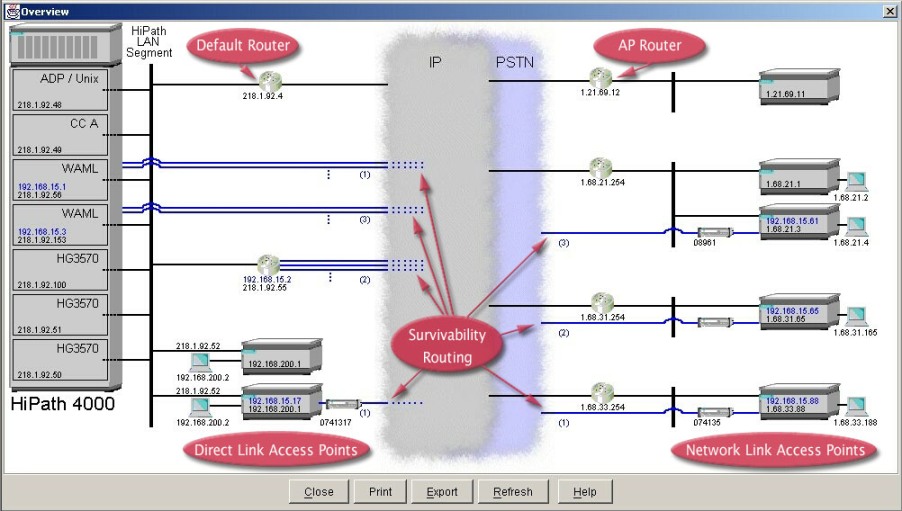
Button “Overview”
Additionally the assistant provides a graphical overview of the current
IPDA configuration.
Figure 208. IPDA Wizard - Graphical overview of the current IPDA configuration