11.3.2.2. Configuring a Routine Configuration Data Backup to Hard Disk 


While the CC-AP/Survivable OpenScape 4000 SoftGate draws the essential
configuration data from the host system using restore, a regular backup
of the specific local CC-AP/Survivable OpenScape 4000 SoftGate configuration
is still worthwhile. Because changes to the local configuration are rather
rare, a weekly backup is sufficient. When defining the starting time,
make sure that this backup should run at an appropriate time, i.e. after
the host system backup and subsequent restore on the CC-AP/Survivable
OpenScape 4000 SoftGate.
The example is based on the following plan:
- Start backup of the host system: daily at 10:05pm
- Completion of the CC-AP/Survivable OpenScape 4000 SoftGate restore: by 6:30am, at the latest
- Local backup to hard disk: Sundays at 12:05pm
Prerequisite for the configuration:
- Logged on to the OpenScape 4000 Assistant via a Web browser under the
ID “
rsta“. - Software Management -> Backup & Restore has been started.
- In the Backup & Restore user interface, select the function Schedule.
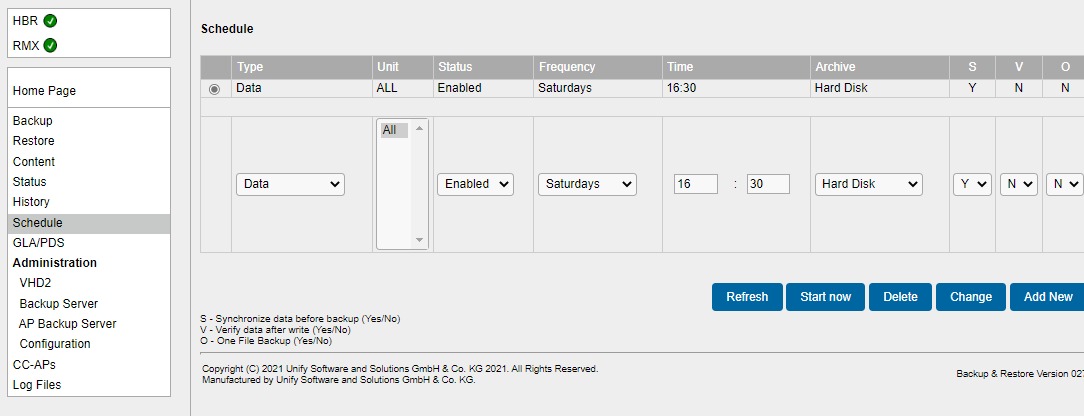
OpenScape
4000 Assistant Backup & Restore: Creating a schedule for the configuration
data backup
The following fields must be completed:
Table 74. Schedule input fields for the configuration data backup
|
Field name
|
Value
|
Explanation
|
|
Type
|
Data
|
Only this value is permitted
|
|
Unit
|
All
|
Only this value is permitted
|
|
status
|
Activated
|
This is where a configured schedule can be activated
or deactivated.
|
|
Frequency
|
for example, Sundays
|
Typically, a backup should be carried out weekly,
for example, on Sundays.
|
|
Time
|
Hour: Minute
|
Time of day at which the backup should start
|
|
Archive
|
Hard disk
|
Only this value is permitted
|
|
S
|
Yes/No
|
Synchronize before backup, i.e. perform UPDATE.
- Is not necessary in this case.
|
|
V
|
Yes/No
|
Backup data verification
|
Complete setup of the configuration data backup with
- Add New - The new entry is saved in the schedule. A backup is performed according to the configuration.
A backup procedure takes approx. 10 minutes.