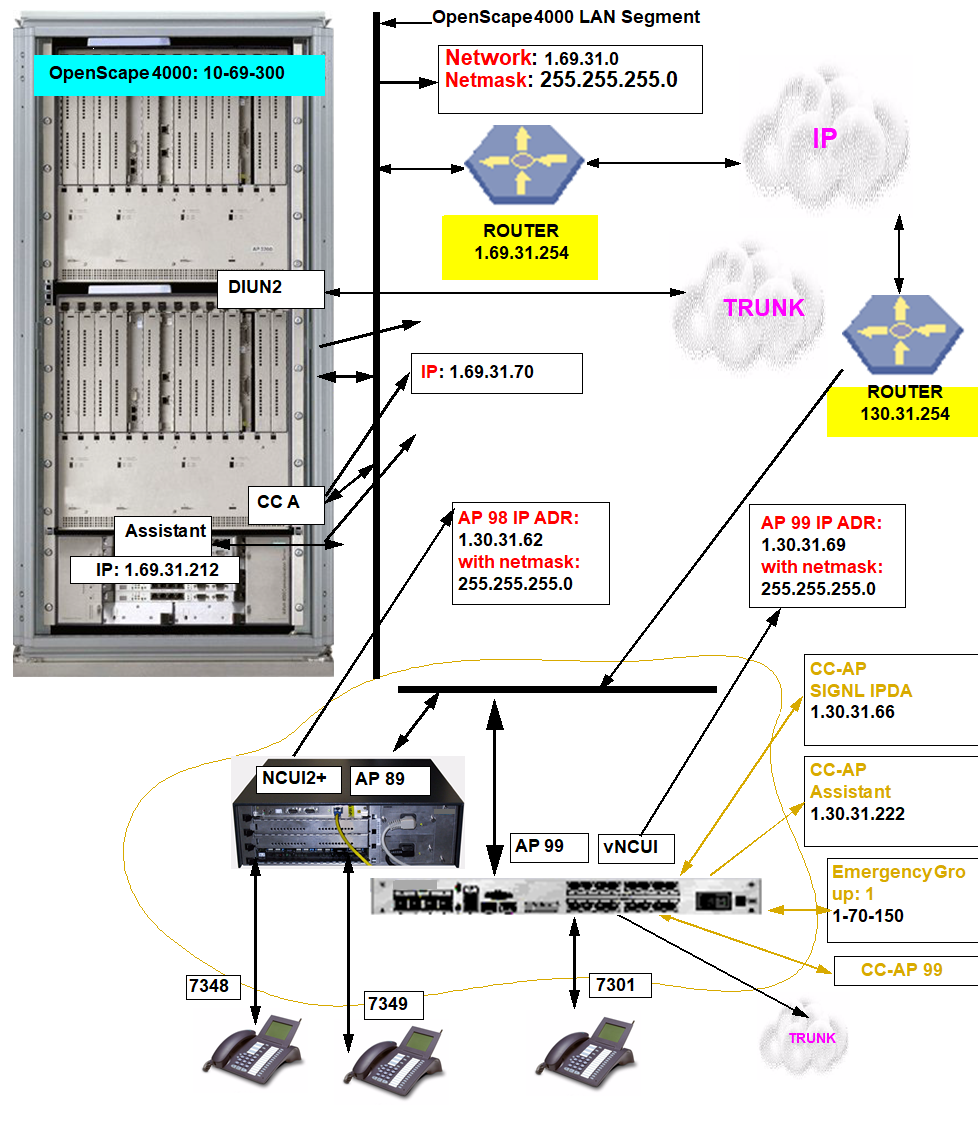
11.7.1. Introduction 


This chapter illustrates an AP Emergency configuration example and
its generation by means of AMOs and OpenScape 4000 Assistant. An existing
IPDA configuration is used.
Case distinction:
A distinction is made with an AP Emergency between a direct link and
a networked configuration.
Direct Link means that the AP Emergency and OpenScape 4000 host system
are in the same network segment (OpenScape 4000 LAN Segment).
Networked Configuration means that the AP Emergency and OpenScape
4000 host system are in different network segments.
The following should be noted here:
- If the IPDA shelves in an emergency group are activated via a direct link, their associated emergency processor must likewise be activated via a direct link.
- If IPDA shelves are activated via a networked configuration, the associated emergency processor can be activated either via a direct link or networked configuration.
The configuration of a direct link emergency processor differs only marginally
from that of a networked configuration. It must simply be noted in the
case of a networked configuration that the respective router entries
correspond in the OpenScape 4000 Assistants for host and APE.
The following generation example corresponds to the following configuration
and IP situation: