13.3.1.3.3. Signaling Survivability with WAML Replacement 


For the feature “Signaling Survivability with WAML Replacement “
a common gateway board (HG 3500) must be configured in the AMO BFDAT
using FUNCTION=WAML. Either a separate board or a board that supports
multiple functions can be used for this purpose.
IMPORTANT:
If this feature is configured (STMI board with
WAML function), then the redundant LAN interfaces function does not work.
See also Section 6.4,
“Redundant LAN Interface”.
Hardware:
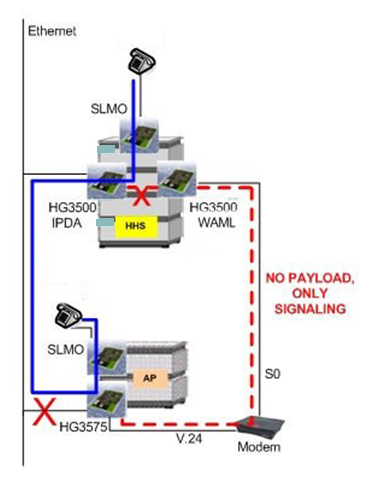
- STMI (HG 3500) with WAML functionality is used as a router. It must be configured in the host system in order to communicate with CCA/ CCB (within the same network).
- S0 connection has to be configured.
- Modem ISDN connected with V.24 (modem) at NCUI (HG 3575).
Figure 231. Signaling survivability withWAML replacement
The configuration consists of 3 parts:
1. IPDA
ADD- SIPCO:NETADDR=172.28.145.0,NETMASK=255.255.255.0,IPMODE=IPV4,DEFRT=172.28.145.25 4,CCAADDR=172.28.145.150,CCBADDR=0.0.0.0,SURVNET=192.168.15.0; ADD-UCSU:UNIT=AP,LTG=1,LTU=18,LTPARTNO=Q2305-X40,SRCGRP=1,FRMTYPE=L80XF,CONN TYPE=APDL,LSRTADDR=172.28.145.155,APRTADDR=172.28.145.254,LOCID=012,LOCATION="IP DA17WEAS",PLCHECK=YES,BCHLCNT=30,CONVLAW=NO,TCLASS=0,ALARMNO=0; ADD-APRT:TYPE=APNET,LTU=18,APIPADDR=172.28.0.57,NETMASK=255.255.255.255,TAIPAD DR=0.0.0.0;
/* HG3575 Configuration data
|
ip_addr_eth is
|
*
|
172.28.145.155
|
|
netmask_eth is
|
*
|
255.255.255.0
|
|
default_gateway is
|
*1
|
172.28.145.254
|
|
ip_addr_signaling is
|
*
|
172.28.0.57
|
|
netmask_signaling is
|
*
|
255.255.255.255
|
|
ip_addr_survivability is
|
*2
|
192.168.15.18
|
|
netmask_survivability is
|
*2
|
255.255.255.0
|
|
gateway_survivability is
|
*2
|
192.168.15.1
|
|
netmask_hhs is
|
*
|
255.255.255.0
|
|
ip_addr_CC_A is
|
*
|
172.28.145.150
|
|
ip_addr_CC_B is
|
*3
|
0.0.0.0
|
|
ip_addr_CC_C is
|
0.0.0.0
|
2. Signaling Survivability with WAML
/* WAML
ADD-BFDAT:FCTBLK=5,FUNCTION=WAML,BRDBCHL=BCHL60&BCHL120; CHANGE-BFDAT:CONFIG=CONT,FCTBLK=5,FUNCTION=WAML,BCHLCNT=1; CHANGE-BFDAT:CONFIG=OK,FCTBLK=5,ANSW=YES; ADD-BCSU:MTYPE=IPGW,LTG=1,LTU=1,SLOT=85,PARTNO="Q2316-X10",FCTID=1,LW VAR="0",FCTBLK=5,BCHLWAML=10; ADD-CGWB:LTU=1,SLOT=85,SMODE=NORMAL,IPADR=172.28.145.156,NETMASK=255.255.255.0;
/* Direction to the router and call number of the router
ADD-BUEND:TGRP=111,NAME="WAML",NO=30; ADD-COT:COTNO=222,PAR=ANS&LWNC&DFNN&NTON&NLCR&NLRD,INFO=FUER_WAML; ADD-COP:COPNO=222,PAR=SFRM,TRK=TA,TOLL=TA,DEV=LAN,INFO=COP_FUER_WAML; ADD-COSSU:NEWCOS=222,AVCE=TA&TNOTCR; ADD-WABE:CD=446,DAR=TIE,CHECK=N; ADD-TDCSU:OPT=NEW,PEN=1-1-85-0,COTNO=222,COP NO=222,COS=222,LCOSV=1,LCOSD=1,CCT=WAMLREPLACED,DESTNO=0,PROTVAR=ECMAV2,SEG MENT=8,NNO=1-1-318,TGRP=111,DEV=HG3550LA,BCHAN=1&&10; ADD-RICHT:MODE=LRTENEW,LRTE=223,LSVC=ALL,NAME=WAML,TGRP=111,DNNO=1-1-118; ADD-LODR:ODR=11,CMD=ECHO,FIELD=1; ADD-LODR:ODR=11,CMD=END; ADD-LODR:ODR=11; ADD-LDAT:LROUTE=223,LSVC=ALL,LVAL=1,TGRP=111,ODR=11,LAUTH=1; ADD-LDPLN:LCRCONF=LCRPATT,DIPLNUM=0,LDP=446,LROUTE=223,LAUTH=1; /* IP address of the router (IP address of the physical router – WAML) ADD-APRT:TYPE=SURV,CONF=ROUTER,ROUTERNO=1,LSADDR=172.28.145.156; /* Assign access point to the survivability router ADD-APRT:TYPE=SURV,CONF=AP,LTU=18,ROUTERNO=1;
3. WAML (HG 3500/STMI) configuration with WBM
WAML and LAN Redundancy
If WAML functionality is configured there is no LAN redundancy at
all despite the configuration of the LAN2 active or not.
Therefore select during initial setup (Wizard > Initial Setup)
Not configured or deactivated.
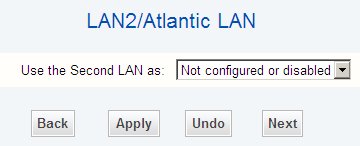
WAML replacement - Second LAN
Router Call Number
Configuration > Routing > PSTN > (right mouse click) Edit
Global PSTN Data -> Router Call Number “446” as configured in
AMO LDPLN.
Figure 232. WAML replacement - PSTN global data
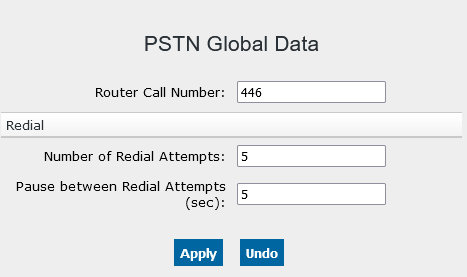
You can check the result with Configuration > Routing > PSTN
> Display Global PSTN Data.
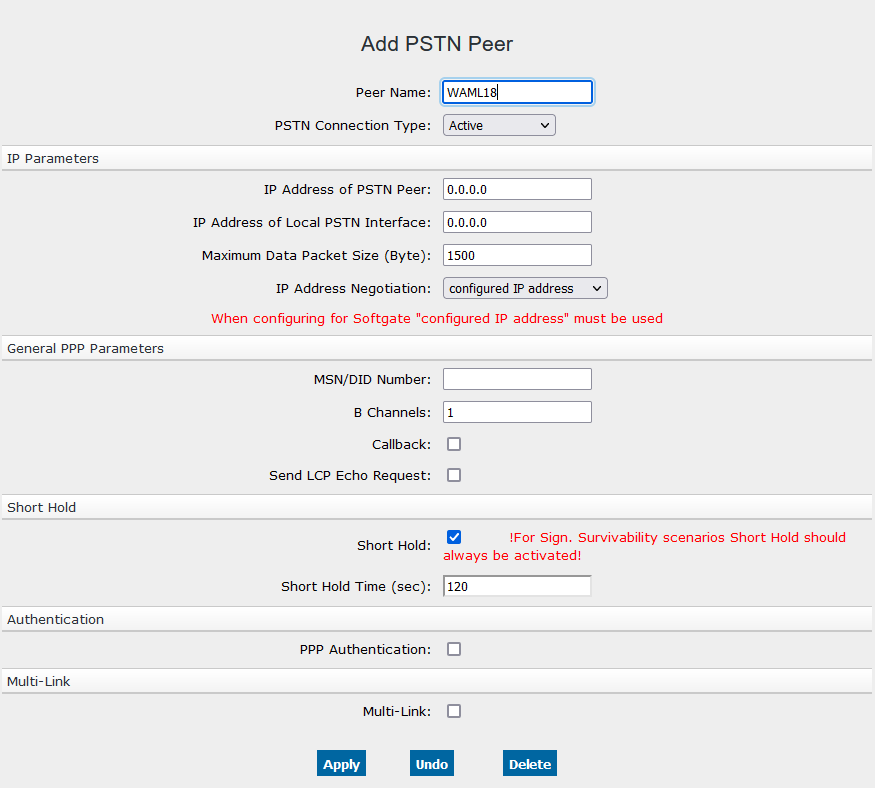
PSTN Peer
The PSTN Peer (PSTN-Partner) is the survivability-modem with its IP-Address
coming from AMO SIPCO, parameter SURVNET + access point number, here
192.165.15.18.
The PSTN-interface is the PPP side of the WAML, i.e. AMO SIPCO, parameter
SURVNET + router number, here 192.168.15.1.
Configuration > Routing > PSTN > PSTN Partner > (1) WAML18
INFO:
Activate Short Hold and set the Short Hold Time to
180 seconds.
Figure 233. WAML replacement - PSTN peer
PSTN Station Number
With this number the WAML reaches the survivability modem. The number
is configured on the S0 trunk with the extension 3277. Change Direction
to Incoming and Outgoing.
Configuration > Routing > PSTN > PSTN Peers > (1) WAML18
> Add Station Number
Figure 234. WAML replacement - PSTN station number
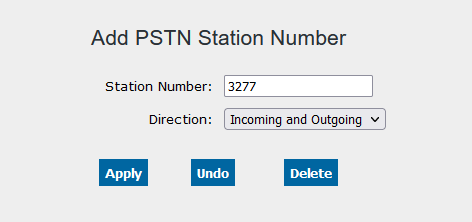
You can check the result with Configuration > Routing > PSTN
> PSTN Peers > WAML18 > Display Station Number.
Static Route
Destination is the signaling IP address of the HG 3575 (NCUI), as
configured as APIPADDR in AMO APRT (172.28.0.57)
The Route Gateway is the ISDN IP address of the modem (AMO SIPCO,
parameter SURVNET+AP no.): 192.168.15.18
The Destination Netmask must be set to 255.255.255.255 for tunneling.
Therefore the netmask entry is hard coded to 255.255.255.255 and read-only
for STMI boards with WAML function.
Configuration > Routing > IP-Routing > Static Routes>
WAML18
Figure 235. WAML replacement - Static route
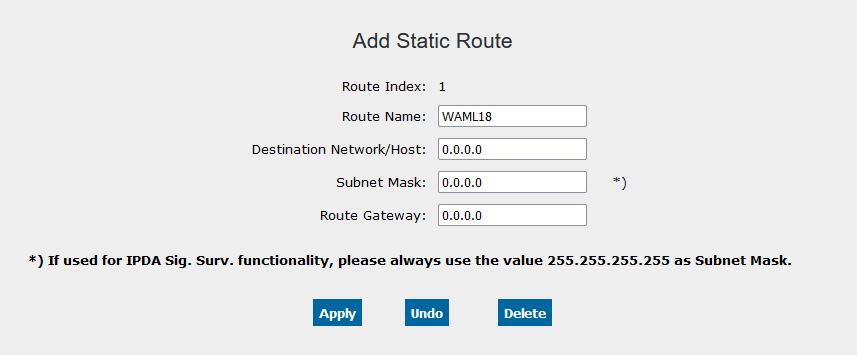
Save all the changes (disk icon) and reboot the board. Then the changes
become effective.