13.3.2.1. Configuring the OpenScape 4000 


Figure 237. Signaling Survivability via alternate LAN
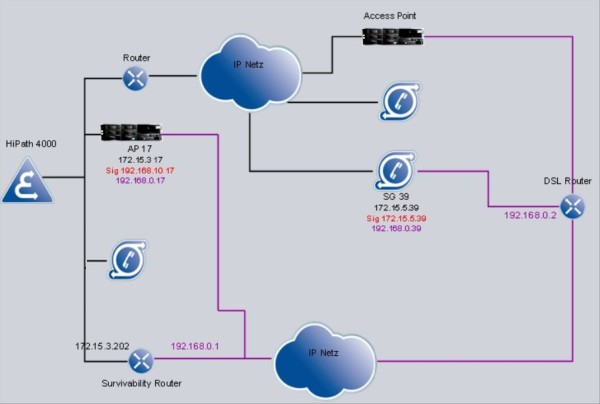
The configuration in the OpenScape 4000 switch is realized as follows:
- If signaling survivability via alternate LAN will be used, UDP must be configured for HSR signaling for the access point/OpenScape 4000 SoftGate.
 |
Access Point (direct link):
|
IMPORTANT:
When switching from HSRTCP to HSRUDP
or vice versa an
EXEC-USSU:TYPE=UPDATAP,LTU=<number>;
must be executed. Existing connections are cleared down without further
warning!INFO:
SIPCO parameter SURVNET has no effect on the feature Signaling
Survivability via alternate LAN, however AMO APRT requires an entry to
allow it to add a router.
- Announce the survivability routers in the system
 |
Configuration Management > System Data > IPDA > IPDA Signaling Survivability
Router
Click Search, enter or change the router number and address on the Router Data
tab, then Save.
|
|
|
|
Router 1 from the example in Figure 16 “Signaling Survivability via alternate LAN”
is thus configured.
- Assign the access points to the survivability routers
|
|
Configuration Management > System Data > IPDA > IPDA Access Point
Click Search, set the desired router number on the General tab under
signaling survivability and Save.
|
|
|
|