18.1.3.4. Certificate Verification Level 


During session setup of TLS (Transport Layer Security) the product
needs to check the presented identity (certificate) of the opposite side
of the communication channel. This checking needs to be done on client
side of the TLS session regarding the identity of the server side or
on both the client and server side if MTLS (Mutual TLS) is being used.
IMPORTANT:
If on the TLS server side Trusted or Full is configured,
the certificate from the TLS client is requested (Mutual TLS). If on
the gateway subscribers are configure which do not have a certificate,
then select on the gateway (which is on this interface TLS server) as
Certificate Verification Level None, but on the subscribers (which are
TLS clients) Trusted or Full to check the received certificate from
the TLS server.
IMPORTANT:
For SIP-Q trunks the Certificate Verification
Level None is not allowed, because Mutual TLS is mandatory.
IMPORTANT:
If for native SIP trunks the gateway has a certificate,
the Certificate Verification Level should not be None in order to check
the received certificate.
IMPORTANT:
For all SIP interfaces on a gateway the Certificate
Verification Level is the same. Thus it is not possible to have on one
gateway SIP-Q trunking and SIP subscribers without certificates configured.
For the certificate verification three different levels are defined
which can be selected:
Configuration > Security > Signaling and Payload Encryption
(SPE) > SPE Security Setup > SIP TLS Parameters > Certificate
Verification Level.
Figure 373. SPE security setup - certificate verification level
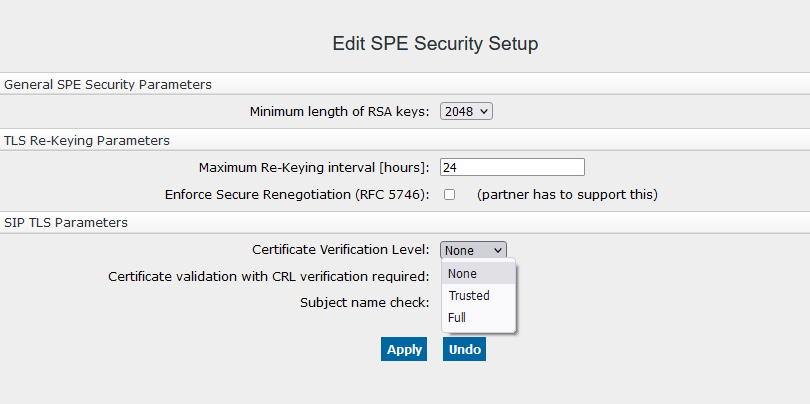
- None - no authentication of the remote entity performed.
The certificate of remote entity is not requested and not checked.
- Trusted - the certificate (including certificate chain) provided by the remote entity
is
requested and checked for integrity.
This means that the chain of trust for the digital signature provided by the remote entity ends up in one of the (root) CA-certificates, which are preconfigured for that interface on the product. And that all certificates in the chain are not expired (i.e. current date/time is within the certificate's given validity period).
- Full - the certificate (including certificate chain) provided by the remote entity
is requested
and checked against the same criteria as in Trusted mode, plus:
the correct use of all critical extensions is checked (e.g. Basic constraints, Key Usage, Extended Key Usage). If an extension is marked critical and is not recognized, the certificate must be rejected. And the correct use of known extensions not marked as critical is checked (e.g. Basic constraints, Key Usage, Extended Key Usage).There are optional checks:In level Trusted and Full:
- Certification validation with CRL verification required:
Check that none certificate in the chain is revoked. This behavior can be changed by checkbox:Configuration > Security > Signaling and Payload Encryption (SPE) > SPE Security Setup > SIP TLS Parameters > Certification validation with CRL verification required.In level Full:
- Subject name check:
The end entity’s identity is verified. This behavior can be changed by checkbox:Configuration > Security > Signaling and Payload Encryption (SPE) > SPE Security Setup > SIP TLS Parameters > Subject name check.