Configuring the IP subscriber.
The AMO SDAT is used for basic subscriber configuration:
CHANGE-SDAT:STNO=<station
number>,TYPE=DATA1,CLASSSEC=<security_level>;
The security level
(CLASSSEC) can feature the following values:
|
SECURE:
|
These subscribers are allowed to connect to the HFA/ SIP gateway with TLS or TCP
depending on the subscriber settings (WBM/DLS). That means that this subscriber can
be
fully secure (SRTP+TLS) or traditionally non-secure, i.e. no signaling or payload
encryption. This can be set via WBM/DLS for the subscriber. The AMO SDAT configuration
stays SECURE in both cases (setting of the subscriber secure or non-secure).
Default value.
|
|
CIPHER:
|
These subscribers allow only fully encrypted direct connections. This means that the
connection to the system logged on and each DMC connection must be encrypted. This
setting provides the highest security but may lead to a lower connection quality.
This
setting is not applicable for SIP subscribers on STMI boards.
|
IMPORTANT:
For HFA subscribers there is no separation between payload and
signaling encryption: either both are active or not active.
IMPORTANT:
HFA/
SIP subscribers can only be configured as SECURE or CIPHER in AMO SDAT. Other values
are
available in the AMO but cannot be used for HFA/ SIP subscribers.
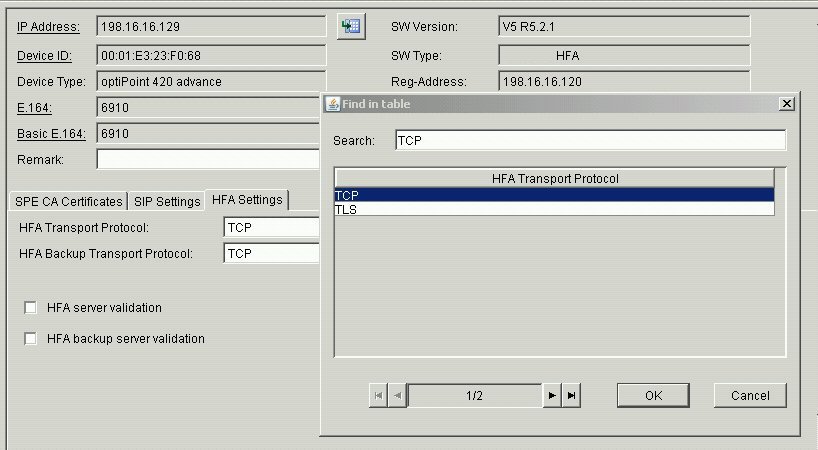
Configuring SPE at the HFA subscriberSPE settings are performed at the HFA subscriber either with DLS/WBM
or via the subscriber itself. Signaling and display settings can also be performed
at the
subscriber.
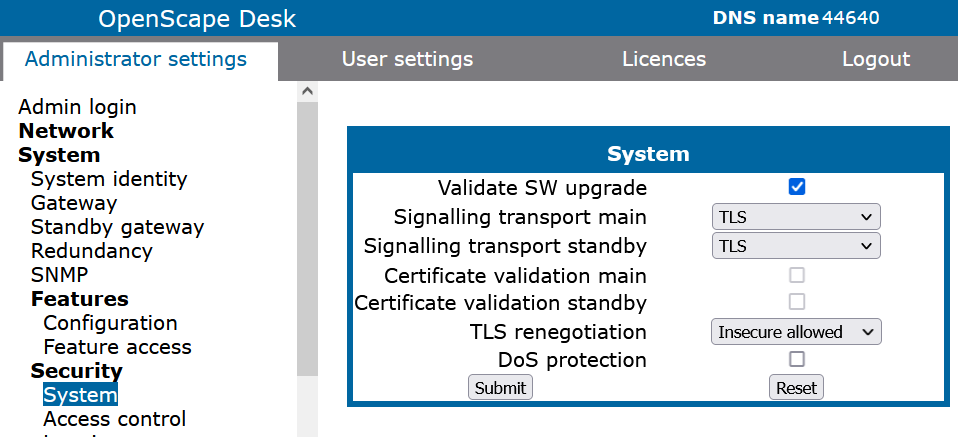
OpenStage WBM
(Tab sheet) Administrator Pages > System >
Security
Figure 377. OpenScape Desk Phone
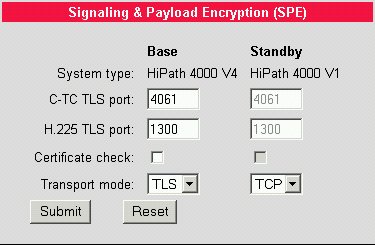
It can be specified in this menu whether the transport mode TLS or TCP is used.
Additionally, it can be defined that the SPE certificate will be checked by the CA
certificate
(check box Certificate check).
Admin > System > Signaling & Payload
Encryption (SPE)
DLS
IP Devices > IP Phone Configuration > Signaling
and Payload Encryption (SPE)
Figure 378. Detailed Information / Documentation
For more information please refer to the relevant documentation:
Deployment
Service
http://apps.g-dms.com:8081/edoku/jsp/searchresult_v2.jsp?edokutype=&search_mode=product&product=OpenScape%20Deployment%20Service&product_version_main=&product_version_sub=&search_term_type=all&term=&sort_result=title&docclass=&language=de&checkdate=&solutions=false&lang=en
OpenStage HFA Subscribers
http://apps.g-dms.com:8081/edoku/jsp/searchresult_v2.jsp?edokutype=&search_mode=product&product=OpenStage%20HFA&product_version_main=&product_version_sub=&search_term_type=all&term=&sort_result=product&docclass=&language=en&checkdate=&lang=en
optiPoint 410
http://apps.g-dms.com:8081/techdoc/en/P31003H8400B413017619/index.htm
- optiPoint 410 economy/standard
http://apps.g-dms.com:8081/techdoc/en/P31003H8400B412017619/index.htm
http://apps.g-dms.com:8081/techdoc/en/P31003H8400B411017619/index.htm
optiPoint 420 Operating Manual
http://apps.g-dms.com:8081/techdoc/en/P31003H8400B423017619/index.htm
- optiPoint 420 economy/standard
http://apps.g-dms.com:8081/techdoc/en/P31003H8400B422017619/index.htm
optiPoint 410/420 Administrator Manual
- optiPoint 410/420 Administrator Manual
http://apps.g-dms.com:8081/techdoc/en/P31003A2056B4150176A9/index.htm


 It can be specified in this menu whether the transport mode TLS or TCP is used. Additionally, it can be defined that the SPE certificate will be checked by the CA certificate (check box Certificate check).Admin > System > Signaling & Payload Encryption (SPE)
 DLSIP Devices > IP Phone Configuration > Signaling and Payload Encryption (SPE)
 For more information please refer to the relevant documentation:Deployment Servicehttp://apps.g-dms.com:8081/edoku/jsp/searchresult_v2.jsp?edokutype=&search_mode=product&product=OpenScape%20Deployment%20Service&product_version_main=&product_version_sub=&search_term_type=all&term=&sort_result=title&docclass=&language=de&checkdate=&solutions=false&lang=enOpenStage HFA Subscribers