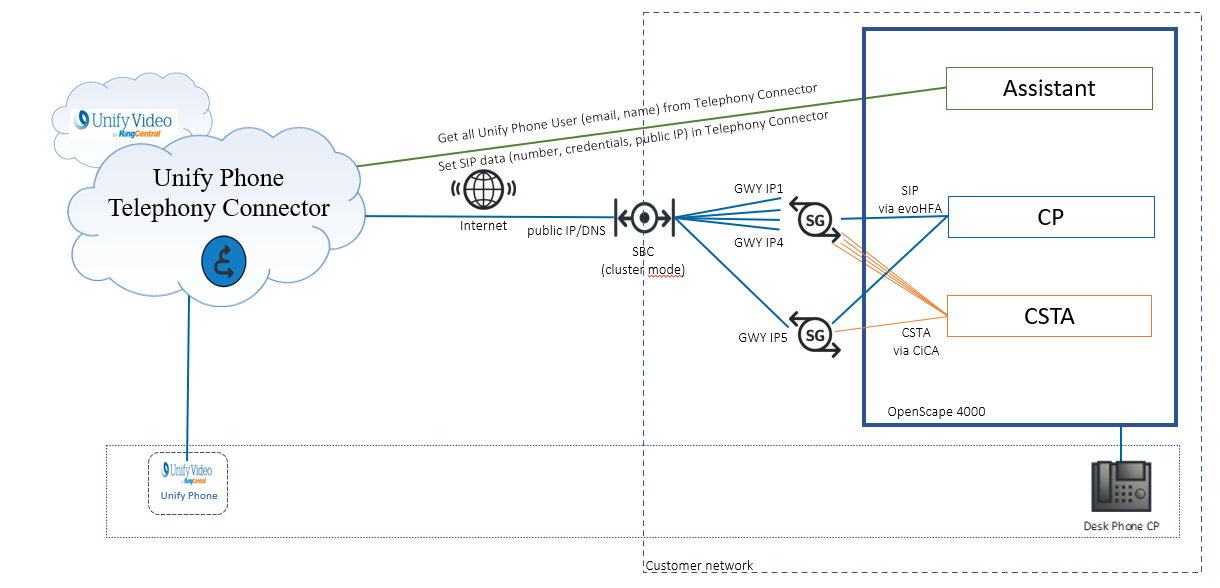
16.1.2. Architecture 


Each Unify Phone user must be configured in an OpenScape 4000 system as UFIP SIP
device. This client device requires a Unify Phone license but it will not use a Flex
license (similar to OSMO). Nevertheless, the desk device of a Unify Phone user
requires a Flex license even if the desk phone does not exist physical. The UFIP SIP
is an auxiliary device, therefore, direct calls are not possible and its number will
not be presented on any phone displays. The Unify Phone clients are reachable over
the user’s OpenScape 4000 desk phone number. However the physical desk phone is not
mandatory, it can be out of service or unplugged but the Signed–Off stations are not
supported as desk phones.
The OpenScape 4000 Assistant will synchronize the user data with the Unify Phone
Telephony Connector. Therefore, the Assistant must be able to access the Telephony
Connector via the Internet (either directly or via HTTPS proxy). The OpenScape 4000
Assistant will retrieve all Unify Phone users which are configured in Unify Video
from the Telephony Connector. When the Assistant finds a matching Unify Phone
configuration for a user (based on the email address), it will upload the needed
connection data to the Unify Phone Connector.
Unify Phone Web and Mobile clients are connected to OpenScape 4000 via SBC. The
cluster mode allows to distribute the UFIP SIP devices over several Gateways (GWY)
on SoftGates or STMIX/STMIY. Unify Phone Clients can make direct calls to all other
OpenScape 4000 stations, external calls (via trunks) and vice versa. Multiple
registrations for the same Unify Phone user are possible. All registered Unify Phone
Clients and the desk phones will be alerted for incoming calls simultaneously if the
Unify Phone user has configured "Default routing". If a second call is signaled or
receives busy, the routing depends on the "Busy settings" of the Unify Phone
user.
Figure 349. Unify Phone Architecture