- Set the node connection matrix with the following AMOs:
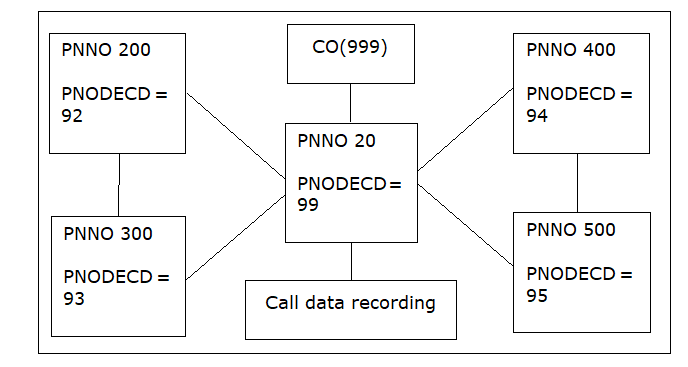
In the example in
Figure 91, the
following is set on physical node 20 (physical node ID 99):
CHA-ZAND:TYPE=ALLDATA,PNNO=20,PNODECD=99;

CHA-KNMAT:NPI=UNKNOWN,LEVEL=0,ONNOL=OWN,
DNNOL=CDR,NUMEXT=99;

CHANGE-GEFE:TYPPARAM=KNMATOUT,PARTY=PAYPTY;
Figure 87. Example of network configuration with open numbering
- The settings (supplements) in the node connection matrix, separated into
connection type internal (KNMATINT), incoming (KNMATINC), or outgoing
(KNMATOUT), do not affect call data recording until, for example, you
set the CALLING party for outgoing connections:
CHA-GEFE:TYPPARAM=KNMATOUT,PARTY=CALLIPTY;
If you want to configure station number cutoff instead
of add-on (only PARTY=CALLEPTY and PARTY=CONNPTY) and the node IDs contain
two digits, you can also do this without KNMAT with the AMO GEFE:
CHA-GEFE:TYPPARAM=DN,DNSHORT=Y;
- Configure the units or amounts with:
Amounts on device:
CHA-ZAND:TYPE=CCD,CDDISPEX=AMOUNT;
or
Units on
device:
CHA-ZAND:TYPE=CCD,CDDISPEX=UNIT,CCUC=50;
(units on device)
If
you want to show units on the display, these are calculated with CCUC from the amounts
used in call data recording and shown rounded off to whole numbers.
- Configure the attendant console display with:
two-line call charge display format (more than
six digits for station and node
numbers)
CHA-ZAND:TYPE=CCD,CDDISPAT=2;
or
One-line call
charge display format (six digits for station number)
CHA-ZAND:TYPE=CCD,CDDISPAT=1;
- Configure the timer for updating the call charge display on the device with:
CHA-CTIME:TYPESWU=CP1,DISPCH=30,CDRDISDE=10;
In this case, the
charges are updated on the display every 30 seconds. The display is deleted 10 seconds
after the call has ended.