8.2.3.5.1. Network-wide Call Pickup 


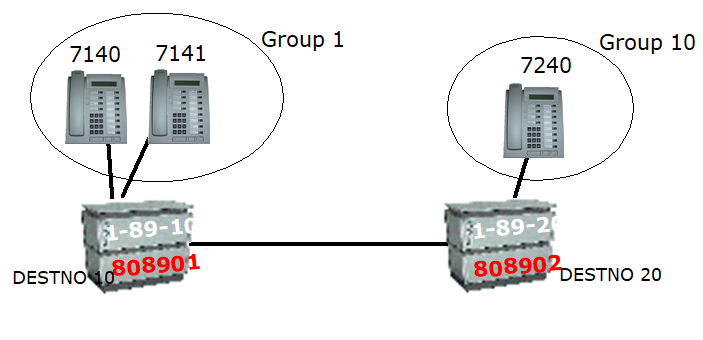
- In closed and open numbering plans
WABE808902NETW DESTNO 20------>WABE808902OWNNODEZAND808902PNODECDWABE808901OWNNODE<-----WABE808901NETW DESTNO 10ZAND808901PNODECD
- Administer the remote connection in Group 1 as follows:
 You can only administer the number of possible remote call pickup groups in expert mode. Expert mode --> ComWin --> Open ...< IP> using AMO (see AMO command).
 Use AMO DIMSU to change the parameter REMPUGR: when needed:
ADD-DIMSU:REMPUGR=1; - For open calling plan
WABE808902TIE------>WABE808902OWNNODEZAND808902PNODECDWABE808901OWNNODE<-----WABE808901TIEZAND808901PNODECDKNMAT808901UNKNOWN/OWNKNMAT808902UNKNOWN/OWNLODR(e.g. LWR 1), ECHO 1LDAT(e.g.: LWR 1), ......LDPLN808902-TConfiguration Management --> Tables --> Dialing Plan --> Dial Codes, click New. Enter dial code and select and save TIE as the dial code type.Configuring a TIE digit analysis result using the AMO WABE:
ADD-WABE:CD=808901,DAR=TIE;You can only administer remote call pickup in expert mode. Expert mode --> ComWin --> Open ...< IP> using AMO (see AMO command).Configure the group using the AMO AUN:ADD-AUN:GRNO=1,STNO=7140&7141,REMAC=808902,REMGRNO=10; - If the two PBXs do not exchange broadcast signaling (LED/display), administer them
as
follows:
Configuration Management --> Groups --> Call Pickup, click New. On the Station number tab, enter the station numbers of the members of the call pickup group. Now change to the Remote Links tab and specify the group number of the remote group (partner system) and select the node code and required signaling parameters and save.Configure call pickup group across the network with the AMO AUN:
ADD-AUN:GRNO=1,STNO=7140&7141,REMAC=808902,REMGRNO=10,REMSIGO=NO,REMSIGI=NO,REMSIGPK=NO; - You should deactivate local signaling at the group:
Configuration Management --> Groups --> Call Pickup, enter the group number that you want to edit under "PU Group" and search. Now change to the Suppl. Data tab and change the setting for signaling to "none" and save.Deactivate call pickup group signaling with the AMO AUN:
CHANGE-AUN:TYPE=GR,GRNO=1,SIGNAL=NONE;