5.16.11.4. Generation (Examples) 


Setting up a specimen PINWM for STN
At first, PIN's must be configured for the STN.
- Increase PIN-Buffer:
ADD-DIMSU:TYPE=USER,PINBUF=80;
- Release the PININT function for the system:
CHANGE-FEASU:TYPE=RELEASE,CM=PININT;
- Release the PINNW function for the switch:
CHANGE-FEASU:TYPE=RELEASE,CM=PINNW;
- Set the COT parameter for the circuits in the case of PINNW:
ADD-COT:COTNO=2,PAR=PINR;
- COPIN10 in the event of Unchecked (PCODE)
ADD-PERSI:TYPE=SYS,PIN10LEN=6;

CHANGE-PERSI:TYPE=COPIN,COPIN=10,COTYPE=PCODE,PINTEXT="FAC,
1CALL)", CDRTEXTS=NO,DISPRSTN=NO,PINTEST=LENGTH,TRKCD=0,
TRKCDTYP=NO,PINDUR=ONE,TRANSFER=NO,IDHOME=NO,
DISPID=PERMDISP,TRACE=NO,PINEXT=YES,DISPPIN=YES,PINNKEY=NO,
DEACKEY=NO,POSCHKN=1,COSHOME=NO,PINLCOS2=NO,DPTEST=NO;
The COPIN10 is setup as standard for Unchecked (PCODE). Of course, the settings can also be made in a different COPIN (see Service Info).COPIN10 for the event of Checked (PIN Mobile)ADD-PERSI:TYPE=SYS,PIN10LEN=6; CHANGE-PERS:TYPE=COPIN,COPIN=10,COTYPE=MOBILE, PINTEXT="FAC,(1CALL)",CDRTEXTS=NO,DISPRSTN=NO, PINTEST=TABLE,TRKCD=0,TRKCDTYP=NO,PINDUR=TIME, TRANSFER=ALL,IDHOME=NO,DISPID=PERMDISP,TRACE=NO,PINEXT=YES, DISPPIN=NO,PINNKEY=NO,DEACKEY=NO,POSCHKN=1,COSHOME=NO, PINLCOS2=NO,DPTEST=NO; ADD-PERSI:TYPE=STN,STNO=7140,NAME="PINWMCHE" PIN10="103157",PININDIV=YES;
The COPIN10 is setup as standard for Unchecked (PCODE). Of course, the settings for Checked can also be made in a different COPIN. - COPIN10 for the event of Restricted (PIN Mobile with IDHome)
ADD-PERSI:TYPE=SYS PIN10LEN=6;

CHANGE-PERSI:TYPE=COPIN,COPIN=10,COTYPE=MOBILE,
PINTEXT="FAC,(1CALL)",CDRTEXTS=NO,DISPRSTN=NO,
PINTEST=TABLE,TRKCD=0,TRKCDTYP=NO,PINDUR=TIME,
TRANSFER=ALL,IDHOME=YES,DISPID=PERMDISP,TRACE=NO,PINEXT=YES,
DISPPIN=NO,PINNKEY=NO,DEACKEY=NO,POSCHKN=1,COSHOME=NO,
PINLCOS2=NO,DPTEST=NO;

ADD-PERSI:TYPE=STN,STNO=7140,NAME="PINWMRES",
PIN10="103157", PININDIV=YES;
Figure 33. Example of a user interface
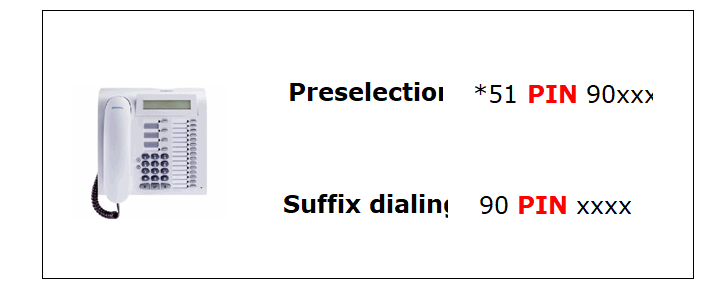
PINWM preparation for preselection
- Setup DAR for PIN (DTMF AND DP):
ADD-WABE:CD=*51,DAR=APIN10,CHECK=NO;

ADD-WABE:CD=*851,DAR=APIN10,CHECK=NO;
- Setup timeout for voice (300 seconds as standard):
CHANGE-CTIME:TYPESWU=CP2,PINVO10=300,PINNV10=1800;
PINNV10 has no relevance to PINWM, as only valid for Voice.
Setup PINWKZ for suffix dialing
- Assign LCOSV the COPIN 10:
CHANGE-COS:TYPE=LCOSV,LCOSV=5,COPIN=10;
In the LCOSV, the type of PIN code to be tested is assigned (Unchecked, Checked, Restricted). - Setup "Recall dial tone" and "Confirmation tone":
CHANGE-ZAND:TYPE=ALLDATA2,CONFTONE=YES;
- Break through authorization (STN with COS No. 13 need not suffix dial a PINWM):
CHANGE-COSSU:TYPE=COS, COS=13,AFAX=NPINDP;
It is never necessary to dial a PIN code with breakthrough authorization. - Declare COPIN 1 valid for PINWM:
CHANGE-PERSI:TYPE=COPIN,COPIN=1,DPTEST=YES;
If an STN has presented identification through preselection of COPIN1 and the parameter DPTEST=YES is set in COPIN1, this COPIN1 counts as being an already activated PINWM COPIN and renewed dialing of the PIN code (in suffix dialing) is thus rendered superfluous.
Activate PINWM for an LCR digit pattern (with PIN prompt):
ADD-LDPLN:LDP="90"-"XXXX",LROUTE=190,LAUTH=3,
SPC=22,PINDP=YES;
The digit pattern must correspond to a block dial. Otherwise,
dialing the number is interrupted by entry of the PIN. The rest of the
number then has to be suffix dialed.