5.23.2. Multi Level Network 


It is possible to configure multi level networks. In all network nodes
however, the node numbers must have the same graduation. You are able
to deny connections level individual.
Figure 61. 3-Level Network
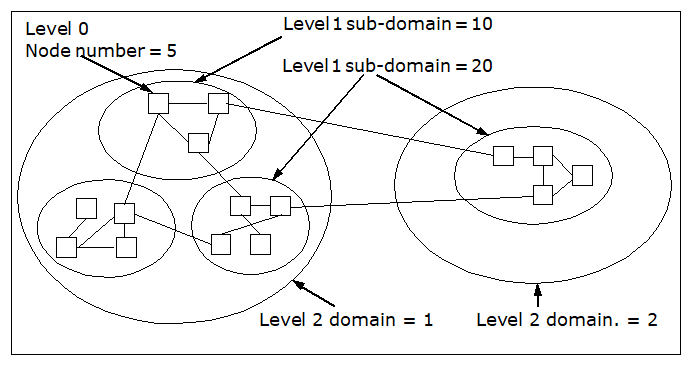
Example 1
You can configure in one or in all network nodes, that e.g. connections
between Level 2 domain 1 and 2 are to be denied:
CHANGE-KNMAT:LEVEL=2,ONNO=1,DNNO=2,CONN=D;
IMPORTANT:
Note that Node numbers / Sub-domains
(Level 0 / 1) are not unique within the network. if the network numbering
scheme comprises higher levels than the specified one.
Example 2
CHANGE-KNMAT:LEVEL=1,ONNO=10,DNNO=20,CONN=D;
Since the levels are handled seperately, this command
prevents all connections between 1-10-xxx and 1-20-xxx, but also between
1-10-xxx and 2-20-xxx (xxx means any Level 0 node number).
The anolog handling will occur if you use level 0 node numbers in
KNMAT which are defined within several sub-domains / domains, i.e. which
are not unique.
For denying connections between node numbers in level 0, see Single Level
Network.