2.3.1.3. Feature Capacities 


IMPORTANT:
Information on feature capacities for both HG
3500 and HG 3575 see Chapter 4, “Features and Restrictions”.
- The HG 3500 gateway has the capacity to convert 60/120 connections into Ethernet packets and provide TDM to IP conversion for 60/120 concurrent calls.
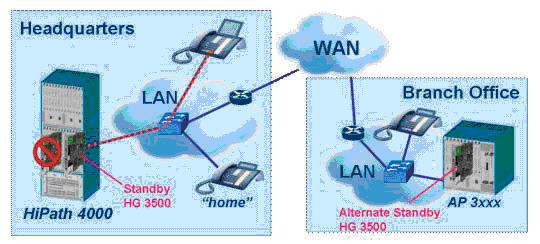
- HG 3500 gateways can be configured as a gateways providing backup capabilities in case of individual gateway failure.
More detailed information on gateways
One or multiple HG 3500 IP line gateways can be defined in the system
that will take over in case any of the installed line gateways fails.
This concept is very efficient and cost effective because a single
gateway can protect multiple gateways against failure. However, a single
gateway cannot protect against multiple gateways failing simultaneously,
which is highly unlikely.
In case of a failure, the system will reprogram a gateway with the
parameters of the failed gateway which will enable the IP clients to
re-login and resume standard operation.
IP phones will automatically register with the activated gateway
and no administrative action is required. Note that users keep the same
features and extensions while operating off the gateway.
Figure 13. HG 3500 Gateway Operation
Gateways can be located in the host system and/or on an IP Access
point. The only requirement is that all active and line gateways have
to reside in the same local IP subnet.
IMPORTANT:
Gateways and IP clients have to reside within
the same system! E.g.: a gateway located in one system cannot control
IP clients controlled normally by a gateway located in another system.
gateways at IP Access Points will not protect IP users at the host against
a host failure because failures at higher levels (e.g. shelf, AP, host
or power failures) will not automatically trigger a switchover.
For configuration purposes please refer to Chapter
8, “Standby Board HG 3500”.
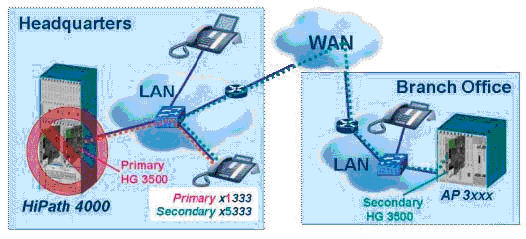
- The HG 3500 gateway supports secondary gateways that provide full redundancy to IP subscribers. Providing full redundancy for IP clients via secondary gateways will protect against higher level failures, like entire Access Point or host failures.
More detailed information on secondary gateways
In order to protect against higher level failures (e.g. Access Point,
host failures) secondary gateways can be added to the system. A secondary
gateway is an additional, fully configured gateway for an IP client located
anywhere within an OpenScape 4000 system. Note that each IP user that
is backed up via a secondary gateway will have 2 extensions, e.g. x1333
on the primary gateway and extension x5333 on the secondary gateway.
In case communication to the primary gateway is lost (e.g. due to
a shelf or host failure), the IP phone will attempt to register with
the secondary gateway. As long as the secondary gateway is operational
and IP connectivity is available, all phones backed up with secondary
gateways will register with their secondary gateway and will be fully
operational.
While registered with the secondary gateway the users will have all
features available that have been enabled on the secondary extension.
Incoming calls terminating on the primary extension will be automatically
forwarded to the secondary extension using a new feature called “Alternate
Routing on Error”.
Figure 14. HG 3500 Secondary Gateway Operation
In order to minimize the number of secondary gateways and additional
trunks required for operating in failure mode, the following measures
can be taken:
- Secondary gateways can be configured with a higher blocking rate, which will limit the number of IP users that can make concurrent calls.
- Minimize the additional trunk required for secondary gateways via “undertrunking”.
Note that these measures are entirely optional and up to the customer’s
preference. However, it may be a reasonable approach to limit resources
(and thus cost) for operation in failure mode because this is a scenario
that is very unlikely to become reality.
IMPORTANT:
Secondary gateways and IP clients have to reside
within the same system! Secondary gateways can automatically backup any
IP user as long as the secondary gateway is operational and IP connectivity
between the IP client and the gateway is available.
- The HG 3500 gateway supports QoS. VLAN-tagging according IEEE 802.1p/q on Layer 2 as well as DiffServ (defined in RFC 2474) on the IP Layer have been implemented in order to provide the best possible voice quality using an IP network.
-
Of course all switches and routers in the customer’s IP network must support IEEE 802.1p/q and/or DiffServ prioritization in order to take advantage of these mechanisms.
- The HG 3500 gateway supports “secondary clients”.
More detailed information on secondary clients
- Secondary clients are soft clients configured with the same phone number
as a regular IP phone.
- Secondary Clients do not require a ComScendo license.
- Secondary Clients require a soft clients SW license.
The standard H225 signaling port is 1720 and this port is used at the soft client to establish calls from the board to the soft client. For the soft client it might be necessary to use a different port. In the case that an other H323 application is running in parallel to the soft client it is possible to configure a different H225 signaling port on the soft client. The soft client informs the HG 3500 at registration time and the HG 3500 will use this port for call establishment.The soft client can be used as a non standard VPN client. In this configuration the HG 3500 checks the delivered IP address and the real address on the connected CorNetTC socket and informs the soft client about its real IP address when these 2 addresses are different.Benefits of Secondary Clients:- Secondary clients provide remote access to all OpenScape 4000 features.
- Starting the secondary client on a PC from any location automatically logs off the office IP phone (associated by the same phone number) and provides the same feature set and class or service to the end-user as the office IP phone.
- After the remote user returns to the office, the IP phone will still be in the logged off state and the user is prompted to start the phone. This will put the IP phone into a normal operation mode until the IP phone is logged off again by an activation of the associated soft client.
- “Overbooking” is possible, meaning that more IP phones per HG 3500 gateway can be configured than there are available connections (maximum of 240 subscribers).
More detailed information on “Overbooking”
-
For overbooking, more stations (LINECNT) are configured than the number of actual subscribers (BCHLCNT). The actual number of subscribers is configured for the B channels.Example:Five employees are working at a warehouse. However, the warehouse is big enough to house 10 terminals. As only five employees can simultaneously make and receive calls, only five B channels are required.Parameters: LINECNT=10, BCHLCNT=5
- Please always consider the number of channels on an STMI card e.g. a 60 (DSP) channel STMI can have up to 240 IP subscribers configured, but not more than 60 parallel calls can be placed. The restriction of DSP channels does not apply to vSTMI cards.
- All IP phones do support DHCP and are supported in DHCP mode via the HG 3500 gateway. Note that a DHCP server has to be configured in the IP network; otherwise static IP addresses are required for all clients.
- The connection of analog devices via an AP 1120 analog gateway is supported. For more details please refer to the E-Doku pages in the intranet (http://apps.g-dms.com:8081/edoku/jsp/searchresult_v2.jsp?edokutype=&search_mode=product&product=AP%201120&product_version_main=&product_version_sub=&search_term_type=all&term=&sort_result=title&docclass=&language=&checkdate=&lang=en).
- Full user mobility is supported within a single system and networked systems.
- The HG 3500 gateway is supported in all IP distributed Access Points.