14.6.1.2.1. Configuration in Node 10-69-100 


Start by configuring the board as HG 3500 in node 100. To avoid repeated
restarts, do not insert the board until configuration is complete.
Step 0:
Configure LEGK in node 10-69-100.
CHANGE-ZANDE:TYPE=ALLDATA,GATEKPR=YES;
Step 1:
The Common Gateway Board Q2316-X is configured as HG 3500. Q2316-X
is the version with 60 B channels. You can configure the board as a pure
IP trunking board or in mixed operation with IP trunking and LAN connectivity
(WAML) and many other features.
Configuration of the board for IP trunking only:
ADD-BFDAT:FCTBLK=1,FUNCTION=HG3550,BRDBCHL=BCHAN60&BCHAN120; CHANGE-BFDAT:CONFIG=CONT,FCTBLK=1,FUNCTION=HG3550,LINECNT=1,UNITS=3; /* 30 B channels for HG3550 functionality (H323 trunking, SIP trunking, SIP subscriber) CHANGE-BFDAT:CONFIG=OK,FCTBLK=1,ANSW=YES; /* Close the configuration ADD-BCSU:MTYPE=IPGW,LN=1,LTU=1,SLOT=37,PARTNO="Q2316-X",FCTID=1,LWVAR="0",FCT BLK=1,BCHL3550=30,ALARMNO=0;
or
IP Trunking & WAML:
ADD-BFDAT:FCTBLK=1,FUNCTION=HG3550&WAML,BRDBCHL=BCHAN60&BCHAN120; CHANGE-BFDAT:CONFIG=CONT,FCTBLK=1,FUNCTION=HG3550,LINECNT=1,UNITS=3; /* 30 B channels for HG3550 functionality (IP trunking, SIP trunking, SIP subscriber) CHANGE-BFDAT:CONFIG=CONT,FCTBLK=1,FUNCTION=WAML,UNITS,LINECNT=1; /* Board will be configured with one circuit, i.e. 10 B channels for WAML CHANGE-BFDAT:CONFIG=OK,FCTBLK=1,ANSW=YES; /* Close the configuration ADD-BCSU:MTYPE=IPGW,LN=1,LTU=1,SLOT=37,PARTNO=“Q2316-X “,FCTID=1,LWVAR=“0“,FCT BLK=1,BCHL3550=30,BCHLWAML=10,ALARMNO=0;
Step 2:
The AMO CGWB allows the board to receive the IP address in the customer
LAN (LAN1), the subnet mask and the protocol variant (H323A / SIP-Q /
NONE (board is only configured for SIP subscribers).
IMPORTANT:
Only one trunking protocol may be configured for
each board! There are no restrictions on interworking with other functions!
ADD-CGWB:LTU=1,SLOT=37,SMODE=NORMAL,IPADDR=1.69.11.80,NETMASK=255.255.255.0,TR PRHSIPQ=10;/*10 B channels for SIP-Q trunking
or
ADD-CGWB:LTU=1,SLOT=37,SMODE=NORMAL,IPADDR=1.69.11.80,NETMASK=255.255.255.0,TR PRHSIP=10; /*10 B channels for native SIP trunking
=> 20 B channels remain for other functions
Step 3:
The default router is now set in the customer LAN:
CHANGE-CGWB:MTYPE=CGW,LTU=1,SLOT=37,TYPE=GLOBIF,DEFRT=1.69.11.254;
Step 4:
The HG 3500 boards are administered using one gateway number (GWNO).
This number must also be unique.
CHANGE-CGWB:MTYPE=CGW,LTU=1,SLOT=37,TYPE=LEGKDATA,GWNO=1;
Step 5:
Configuration without authentication and without registration (default
values in AMO CGWB.
CHANGE-CGWB:MTYPE=CGW,LTU=1,SLOT=37,TYPE=LEGKDATA,GWNO=1, REGEXTGK=NO;
SSA:
CHANGE-CGWB:MTYPE=CGW,LTU=1,SLOT=37,TYPE=SIPTRSSA,SIPREG=NO;
ERH:
CHANGE-CGWB:MTYPE=CGW,LTU=1,SLOT=37,TYPE=SIPTRERH,GWAUTREQ=NO;
IMPORTANT:
The SIPREG and REGEXTGK
parameters must always have the same value.
Step 6:
IMPORTANT:
Multiple boards are permitted in one trunk group!
This step consists of several configuration commands. We need to set
up the trunk group and circuit, via which the B channels between gateway
and OpenScape 4000 are switched.
First you need a trunk group:
ADD-BUEND:TGRP=50,NAME="IP TRUNK GWID 1 ",NO=30,TRACENO=0, ACDTHRH=*, PRIO NO=2, TDDRFLAG=ON, GDTRRULE=0, ACDPMGRP=0, CHARCON=NEUTRAL;
A digital trunk is then required (AMO TDCSU). The device
type is HG3550IP (for H323/H323A and native SIP/SIP-Q trunking).
If you want to permit DMC, set DMCALLWD=Y. This is only possible
when the partner system supports DMC.
ADD-TDCSU:OPT=NEW,PEN=1-01-037-0,COTNO=36, COPNO=32,DPLN=0,ITR=0, COS=2,LCOSV=1,LCOSD=1, CCTN="CIRCUIT from GW2",PROTVAR="ECMAV2",SEGMENT=8, ISDNIP=00,ISDN NP=0,TRACOUNT=31,SATCOUNT=MANY, NNO=1-69-499,ALARMNO=12, COTX=36,CCHDL=SIDEA,CLASSMRK=EC&G711, TCCID="IP RS",TGRP=50,SRCHMODE=DSC,INS=Y,DEV=HG3550IP, BCHANNEL=1&&30,BCNEG=N,BCGR=1,LWPAR=0,DMCALLWD=YES;
If DMC has been activated for the native SIP-/SIP-Q trunking
path, Voice Activity Detection should also be activated. Otherwise the
same bandwidth is required for the master connection as for the slave
connection!
CHANGE-CGWB:MTYPE=CGW,LTU=<ltu>,SLOT=<slot>,TYP=ASC,

PRIO=PRIO1,VAD=YES;
Otherwise the same bandwidth is required for
the master connection as for the slave connection.
IMPORTANT:
It is recommended to reset the board:
RESET-BSSU:ADDRTYPE=PEN,LTG=1,LTU=1,SLOT=37;
IMPORTANT:
The command CHANGE-FUNSU can prevent the complete
reloading of the STMI board. Reloading is only necessary in the case
of loadware changes.
CHANGE-FUNSU:PIT=FLASH,PARTNO="Q2316-X
                        ",FCTID=2, ACTION=RESET;
Step 7:
The LEGK must now still be informed about the existence of the HG
3500 gateway in the AMO GKREG. The GWNO must match the entry from
the AMO CGWB. In the case of a local gateway, the AMO GKREG automatically
loads the IP address (IPADR) from the AMO CGWB. You must also
set the attributes INTGW (internal -local- gateway) and HG3550V2
(version ID). The parameter REGGW is not necessary because the
gateway does not have to register at another gateway.
ADD-GKREG:GWNO=1,GWATTR=INTGW&HG3550V2&SIPQ or SIP,NUM=0,DPLN=0,LAUTH=1;
If a local gateway is configured, REGISTERED=NO
is always displayed with
DISPLAY-GKREG;.Step 8:
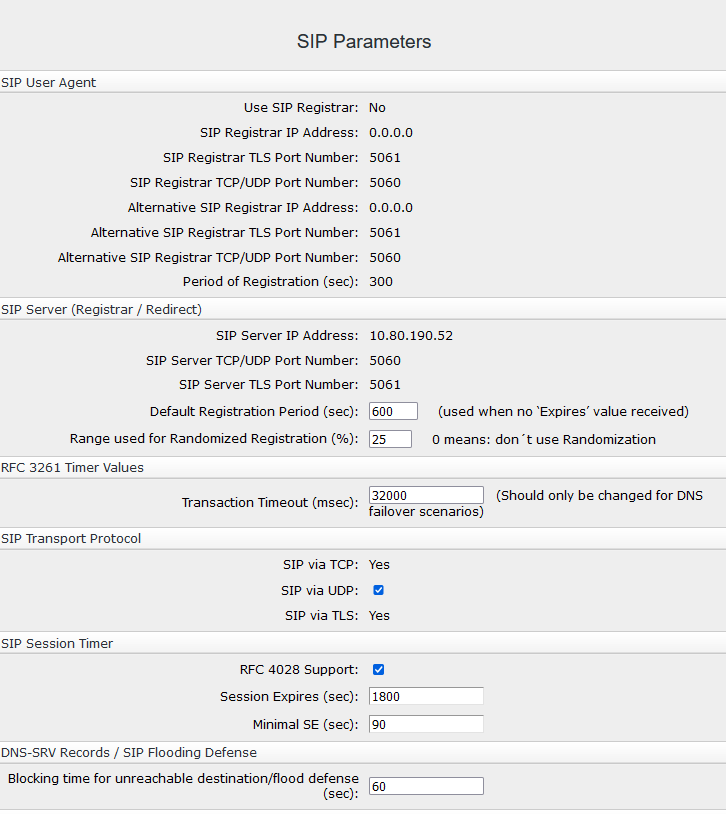
The same transport protocol (TCP, UDP) must be configured in all systems.
The transport protocol used can be set with WBM under Configuration
> Voice Gateway > SIP Parameters.
The HG 3500 board in node 10-60-100 is now configured
properly and is communicating with the LEGK. However, the gateway is
still missing in the partner node.