2.8.1. Feature Description 


This feature is designed to increase the availability of IP terminals
(HFA/SIP), IP trunking lines (HG3550) and IPDA function boards (HG3570)
in the event of board failure or LAN cable defects. All these features
are supported for the Standby Board Feature, either with single feature
mode or with multi feature support (MFS). Basically the Standby Board
will overtake all configured features from the Normal board in failure
case.
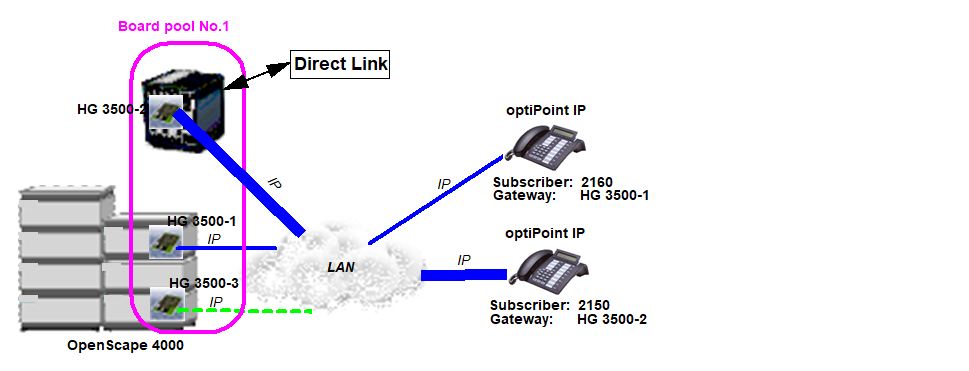
HFA infrastructure
INFO:
Usage of the "Standby Board HG3500" Feature between STMI2/4 boards
together with STMIX/STMIY boards is only restrictively compatible. In case
the StandBy Feature (one BPOOL) between STMI2/4 <-> STMIX/STMIY is used
and configuration data like SIP Profile Settings, SPE certificates,
etc. stored on the e. g. STMI2/4 board these cannot be exchanged to the
STMIX/STMIY (and vice versa). Usually the Standby feature uses the Assistant
HBR HG3500M backup & restore mechanism (backup sets) to distribute
the data to the Standby board in failure cases. Due to the restriction
that the backup sets between STMI2/4 to STMIX/STMIY and vice versa are not
compatible, this affects the Standby feature for that data. Background
information: StandBy boards checks, receives and imports the Assistant
HBR set when going in service! in case it is configured in CGGWB and
an existing backup set is available... In case you want to use mixed
gateways (STMI2/4 with STMIX/STMIY) and you use Assistant HBR for data not
stored in the AMO (e.g. trunk profiles, SPE cert, etc.), then you would
need to do a manual WBM configuration synchronization to ensure configuration
consistency. Optimal solution: Use one BPOOL consisting of only STMI2/4
boards and another BPOOL with only STMIX/STMIY boards.
This is achieved through
the introduction of a board. In the event of a board or LAN cable defect,
boards can inherit the IP stations or IP trunking lines, etc. assigned
to an active board. If appropriately configured, this action can be performed
automatically, that is, without manual intervention or use of AMO commands.
This is illustrated in the following example which depicts a common gateway
with HFA stations.
In the example in Figure 2 HFA infrastructure,
the board is the HG 3500-3. If, for example, an HG 3500-1 fails, the
IP Phone 2160 will be reconfigured to HG 3500-3 and goes into operation
with the new board.
Provided this feature was preconfigured (see below), automatic switchover
takes place in the following events:
- When the board is removed without prior deactivation
- Faults on the LAN connection cable. Please note that LAN faults that are located “behind“ routers, hubs or IP switches do not trigger a switchover, and nor do faults on IP terminal devices. The switchover mechanism is only triggered by a signaled Layer 1 fault, that is, a general cable defect.
- Faults that are detected by the security system and that lead to the DC status “DEF“ (on board level), for example, “Message not transmittable. Exception: a statistic overflow does not lead to a switchover.
The automatic switchover mechanism is not triggered if either the
board or hierarchically superior elements (LTU, LTG) are disabled.
The IP terminals go out of operation during switchover and are automatically
put back into operation following a successful switchover. The duration
of the switchover process is determined by the board data loading time
and by timers on the board and in the terminal device. It normally takes
between one and two minutes.
Please note that following the switchover operation, the board sends
a “gratuitous ARP” (Address Resolution Protocol) request to the LAN
on startup so that the MAC address (which has changed with the board)
associated with the IP address is updated in the LAN components immediately
rather than waiting until the aging timer expires. On the LAN side, take
care that the ARP request does not get blocked by any routers that may
be involved.
The automatic switchover is signaled at the service terminal. SYSDEP-NMC
also receives a message confirming switchover. Designed specially for
this purpose is the NMC alarm 36 (PER-BOARD SWITCHOVER). The message
at the service terminal is as follows:
F5880 M4 N0542 NO ACT   BPA   BOARD    RECONFIGURATION         06-11-09 10:13:30
      ALARM CLASS:CENTRAL:036
        P101 :LTG1 :LTU3 :055:  0-239:90 Q2316-X10  STMI2/1    BST:01  PLS:-06
      FORMAT:43
      REASON:00H  BOARD RECONFIGURATION OK
      SOURCE BOARD      : P117:LTG1 :LTU17:097:
      DESTINATION BOARD : P101:LTG1 :LTU3 :055:
If the service personnel has replaced the defective board
on which the IP stations were originally configured with an intact board,
then the IP stations can be configured back in the course of manual startup.
The board that took over operation after the defect was discovered resumes
its role as board and is ready for switchover in the event of future
defects.
Apart from automatically switching IP stations to a board when a
defect occurs, this feature also offers manual switchover options that
can be implemented with the AMO BSSU. This lets the IP stations maintain
their group relationships, which means there is no need for station reconfiguration
with the AMO SBCSU, AMO AUN, etc.
The feature must be preconfigured before it can be put into operation.
This involves the following steps (for AMO details see Section 8.4,
“Generation”):
- Configure the common gateway board: Both the normal boards (on which the IP stations are configured) and the boards are configured as usual with the AMO BFDAT and AMO BCSU. No distinction is made at this stage between the two functions.
- Configure common gateway board data: The common gateway boards are normally parameterized with the AMO CGWB. The parameters set here determine whether the board will be used as a normal board with IP stations or as a board. The normal boards must be assigned an IP address (as in previous configurations), whereas the boards are programmed with no IP address or other parameters.
- All common gateway boards that want to use the feature must be grouped together in a board pool with the AMO BPOOL. A board pool is administered by means of a pool number and must contain both the normal boards and the boards. Only when this is complete can a normal board switch over to a board in the event of a defect. Please note that following a defect, a pool-based board can only be automatically switched to a board in the same pool. In the case of AMO-activated manual switchover, on the other hand, the board and can be located in separate pools; both boards must, however, belong to a pool (any pool) for this function to work.
- As usual, the IP stations are configured on the normal boards and put into operation with the AMO SBCSU. Stations cannot be configured on a board.
Besides the functionalities described above, the feature also offers
the following functions:
- The following attributes can be set on a pool-specific basis:
- SINGLE / MULTI
This setting specifies whether automatic switchover should be performed once (SINGLE) or several times, such as when further defects occur.
- SINGLEIf SINGLE automatic switchover is configured, further defects do not trigger a switchover to a board, even if there are boards available in the pool. This setting allows stations to be switched back manually after the defective board has been replaced, without having to specify their current location.
- MULTIIf MULTI automatic switchover is configured, defects continue to trigger switchovers until there are no more boards available in the pool. When switching back manually, you must specify the boards from which and to which the stations should be switched. In other words, you must know or find out the source board and the target board.
- SINGLE
- INFO
The purpose of this is to provide clarity when operating multiple pools. It may be useful to assign names to pools.
- SINGLE / MULTI
- Trace pool history
A History field is provided for every board in the pool. The following information can be entered here and read out with the AMO BPOOL:
- Board (LTU, slot) from which the stations currently configured were switched
- Board (LTU, slot) to which the stations previously configured were switched
- Date and time at which the IP stations were switched to or from the board
- Counter indicating how often the stations currently configured were switched
This information is available separately for automatic switchover (following a defect) and for manual switchover. The AMO BPOOL can be used to reset the history data (but only for all data simultaneously).The history only contains information on the last switchover performed. Only the counters provide information on all switchover stages.
IMPORTANT:
For automatic IP station switchover to work, the
boards must be in operation (DC status “Ready“) at the time of the
defect. The feature is not implemented if a defect is discovered when
starting up the board or the system; in this case, an automatic restart
is performed. This is necessary for system stability reasons. Exception:
A detached LAN cable results in a successful start; the later detection
of the LAN cable failure activates the automatic switchover as long as
a board is available.