2.8.4. Generation 


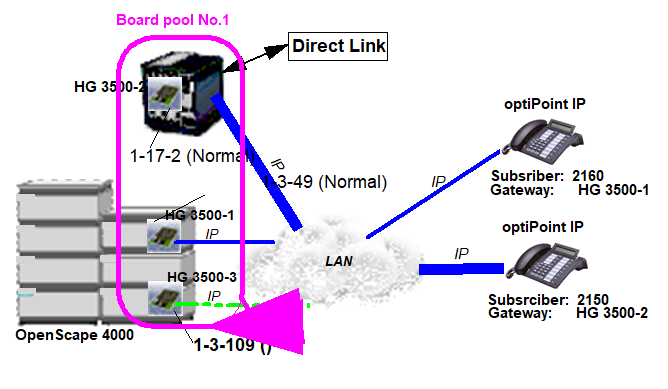
In
the interest of clarity and to keep things simple, we will not discuss
the general configuration of DPLN, LTU, etc. here. However, a list of
all common gateway specific commands is provided:
Configure the DIMSU memory for the common gateway boards:
ADD-DIMSU:TYPE=SYSTEM,CGW=4;
Configure the common gateway boards:
FCTBLK=1 : HG 3500-1
ADD-BFDAT:FCTBLK=1,FUNCTION=HG3530,BRDBCHL=BCHL60;
CHANGE-BFDAT:CONFIG=CONT,FCTBLK=1,FUNCTION=HG3530,LINECNT=60,BCHLCNT=30;
CHANGE-BFDAT:CONFIG=OK,FCTBLK=1,ANSW=YES;
FCTBLK=2 : HG 3500-2
ADD-BFDAT:FCTBLK=2,FUNCTION=HG3530,BRDBCHL=BCHL120;
CHANGE-BFDAT:CONFIG=CONT,FCTBLK=2,FUNCTION=HG3530,LINECNT=120,BCHLCNT=60;
CHANGE-BFDAT:CONFIG=OK,FCTBLK=2,ANSW=YES;
FCTBLK=3 : HG 3500-3 (Reserve-Baugruppe)
ADD-BFDAT:FCTBLK=3,FUNCTION=STANDBY,BRDBCHL=BCHL60&BCHL120;
Assigning a function block to a board:
ADD-BCSU:MTYPE=IPGW,LTG=1,LTU=3,SLOT=49,PARTNO=Q2316-X,FCTID=1,FCTBLK=1; /*HG
3500-1
ADD-BCSU:MTYPE=IPGW,LTG=1,LTU=17,SLOT=2,PARTNO=Q2316-X10,FCTID=1,FCTBLK=2; /*HG
3500-2
ADD-BCSU:MTYPE=IPGW,LTU=3,SLOT=109,PARTNO=Q2316-X,FCTID=1,FCTBLK=3; /* board HG
3500-3
Configuration of common and global feature board data
of the common gateway board. In this example 2 normal and one board
will be configured:
ADD-CGWB:LTU=3,SLOT=49,SMODE=NORMAL,IPADR=192.16.16.12,NETMASK=255.255.255.0; /
*HG 3500-1
ADD-CGWB:LTU=17,SLOT=2,SMODE=NORMAL,IPADR=192.16.16.10,NETMASK=255.255.255.0; /
*HG 3500-2
ADD-CGWB:LTU=3,SLOT=109,SMODE=STBYRDY; /* board HG 3500-3
Load the board data to the boards:
RESTART-BSSU:ADDRTYPE=PEN,LTU=17,SLOT=2,WTIME=10;
RESTART-BSSU:ADDRTYPE=PEN,LTU=3,SLOT=109,WTIME=10;
RESTART-BSSU:ADDRTYPE=PEN,LTU=3,SLOT=49,WTIME=10;
Configure a board pool with all boards including board(s):
ADD-BPOOL:MTYPE=CGW,LTU=17,SLOT=2,POOLNO=1,HOPAUT=SINGLE,INFO=“TEST1“;
ADD-BPOOL:MTYPE=CGW,LTU=3,SLOT=109,POOLNO=1; /*  Board */
ADD-BPOOL:MTYPE=CGW,LTU=3,SLOT=49,POOLNO=1;
Configure the IP stations:
ADD-SBCSU:STNO=2150,OPT=OPTI,CONN=IP2,PEN=1-17-2-29, DVCFIG=OP TIIP,COS1=5,COS2=6,LCOSV1=11,LCOSV2=12,LCOSD1=21,LCOSD2=22; ADD-SBCSU:STNO=2160,OPT=OPTI,CONN=IP2,PEN=1-3-49-0, DVCFIG=OP TIIP,COS1=5,COS2=6,LCOSV1=11, LCOSV2=12,LCOSD1=21,LCOSD2=22;
Reset FUNSU bit to shorten the Reload time of the STMI2
board
CHANGE-FUNSU:PIT=FLASH,PARTNO=”Q2316-X”,FCTID=3,ACTION=RESET;
- Automatic switchover: This is not controlled by AMO commands but rather is triggered when an active board goes out of service.
-
Example prior to automatic switchover:
DIS-BPOOL;
H500: AMO BPOOL STARTED
+------------------------------------------------------------------------------+
| POOLNO = 1                    MTYPE = CGW                    HOPAUT = SINGLE |
| INFO = TEST1                                                                 |
+------------------------------------------------------------------------------+
| LTU = 3   SLOT = 49            HOP-AUT-CNT = 0             HOP-MAN-CNT = 0   |
| DC-STATUS = READY             LAN_VERB = READY           SMODE = NORMAL      |
+------------------------------------------------------------------------------+
| LTU = 3   SLOT = 109           HOP-AUT-CNT = 0             HOP-MAN-CNT = 0   |
| DC-STATUS = READY             LAN_VERB = READY           SMODE = STBYRDY     |
+------------------------------------------------------------------------------+
| LTU = 17  SLOT = 2             HOP-AUT-CNT = 0             HOP-MAN-CNT = 0   |
| DC-STATUS = READY             LAN_VERB = READY           SMODE = NORMAL      |
+------------------------------------------------------------------------------+
If board 1-3-49 now becomes defective, all board data and all IP stations are switched to board 1-3-109. This provides the following AMO BPOOL output after the switchover:DIS-BPOOL; H500: AMO BPOOL STARTED +------------------------------------------------------------------------------+ | POOLNO = 1 MTYPE = CGW HOPAUT = SINGLE | | INFO = TEST1 | +------------------------------------------------------------------------------+ | LTU = 3 SLOT = 49 HOP-AUT-CNT = 0 HOP-MAN-CNT = 0 | | DC-STATUS = NPR LAN_VERB = SMODE = STBYDEF | | SWITCHED AUTTO BRD LTU = 3 SLOT = 109 DATE/TIME : 2003-09-25 18:07 | +------------------------------------------------------------------------------+ | LTU = 3 SLOT = 109 HOP-AUT-CNT = 1 HOP-MAN-CNT = 0 | | DC-STATUS = READY LAN_VERB = READY SMODE = NORMAL | | SWITCHED AUTFR BRD LTU = 3 SLOT = 49 DATE/TIME : 2003-09-25 18:07 | +------------------------------------------------------------------------------+ | LTU = 17 SLOT = 2 HOP-AUT-CNT = 0 HOP-MAN-CNT = 0 | | DC-STATUS = READY LAN_VERB = READY SMODE = NORMAL | +------------------------------------------------------------------------------+
Explanation of important abbreviations in the output:HOPAUT: Automatic switchover between the boards in this pool is permitted once (SINGLE) or several times (MULTI).SMODE: mode (see Section 8.3, “Service Information”)HOP-AUT-CNT: Number of automatic switchoversHOP-MAN-CNT: Number of manual switchoversDC-STATUS: The board’s DC status (see also AMO SDSU)LAN_VERB: LAN connection status; READY generally means “LAN cable connected”, DEF means “LAN cable disconnected or defective”. If the field is empty, the LAN connection has a DC status which does not get interpreted by the AMO BPOOL. In this case, the LAN status has no effect on switchover. If this is of interest, you can use the AMO SDSU.The following history data is only displayed after a switchover:SWITCHED AUTFR BRD: The IP stations were automatically switched away from this board (for example, on account of a defect) (see also DATE/TIME)SWITCHED AUTTO BRD: The IP stations were automatically switched back to this board (for example, on account of a defect in another board) (see also DATE/TIME)SWITCHED MANFR BRD: The IP stations were manually switched away from this board (with the AMO BSSU) (see also DATE/TIME)SWITCHED MANTO BRD: The IP stations were manually switched back to this board (with the AMO BSSU) (see also DATE/TIME)The history data can be reset with the following AMO command:CHANGE-BPOOL:MTYPE=CGW,TYPE=HISTRES,LTU=3,SLOT=109;All functions assigned to board 1-3-49 are now transferred to board 1-3-109, including the board’s IP address and all IP stations. The supplementary information shows the history of the last switching operation. This example shows that on 25.9.2003, a switchover occurred from 1-3-49 to 1-3-103 because board 1-3-49 was removed (DC status NPR).The counters HOP-AUT-CNT and HOP-MAN-CNT are set for boards with SMODE=NORMAL. All history data is deleted for boards. - Manual switchover with the AMO BSSU:
- The stations switched away from 1-3-49 on account of a board defect should be switched back into service following the repair of 1-3-49:
RESTART-BSSU:ADDRTYPE=PEN,LTU=3,SLOT=49,CGWSW=IPSTNBCK;orACTIVATE-BSSU:LTU=3,SLOT=49,CGWSW=IPSTNBCK;All IP stations assigned to board 1-3-49 should be switched to board 1-3-109:RESTART-BSSU:ADDRTYPE=PEN,LTU=3,SLOT=49,CGWSW=SWITCH, LTU2=3,SLOT2=109;Please note that any AMO lock set will be transferred to the target board (see also Section 8.3, “Service Information”)A board that is in STBYDEF mode because of a defect, for example, and because the IP stations were switched away should resume its board role. This generally occurs after it has been repaired or the board has been replaced. The following command can be used for this:RESTART-BSSU:ADDRTYPE=PEN,LTU=3,SLOT=49,CGWSW=STBYRDY; - Shorten the Reload time of the common gateway board
CHANGE-FUNSU:PIT=FLASH,PARTNO=”Q2316-X”,FCTID=1,ACTION=RESET;