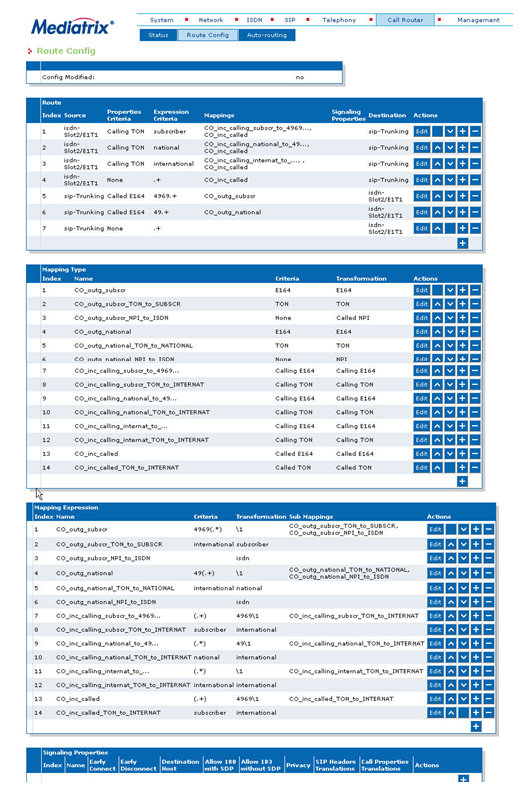
3.3.3.4. S2 Interface (Mediatrix 36xx) 


In this sample scenario a Mediatrix gateway is used for trunking to
the public network.
Figure 73. OpenScape 4000 SoftGate scenario with Mediatrix 36xx gateway - S2 Interface
Overview
- Network -> Host
- Network -> Interfaces
- SIP -> Gateways
- SIP -> Servers
- SIP > Registrations
- System -> Hardware
- ISDN -> Primary Rate Interface
- ISDN > Status
- Call Router -> Route Config
Network -> Host
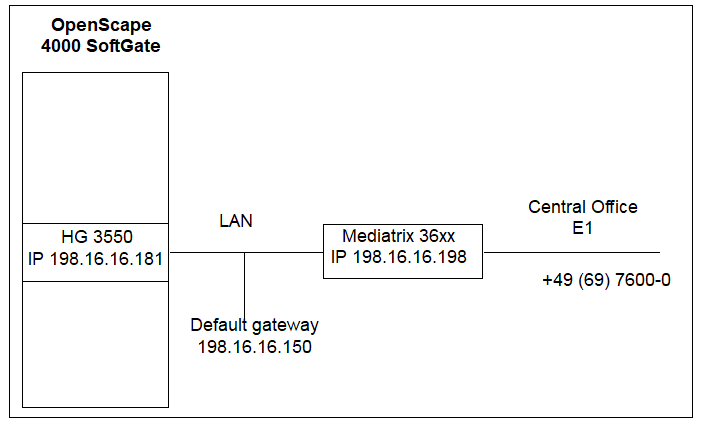
Set Static
- in section Host Name Configuration for Domain Name Configuration Source,
- in section DNS Configuration for Configuration Source,
- in section SNTP Configuration for Configuration Source,
- in section Default Gateway Configuration for Configuration Source.
Figure 74. Mediatrix gateway 36xx - Network > Host
Network -> Interfaces
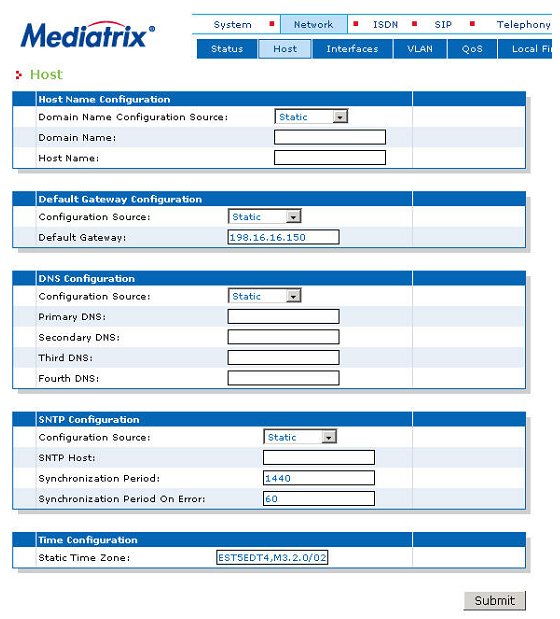
The network interfaces should be configured with unique LAN IP addresses.
Currently only eth5 is used as uplink. Eth1-4 are not used yet (will
be used as ports of a switch).
IMPORTANT:
Take care that all IP addresses are reachable
by the OpenScape 4000 SoftGate.
Mediatrix gateway 36xx - Network >
Interfaces
You can check the status by selecting Network -> Status
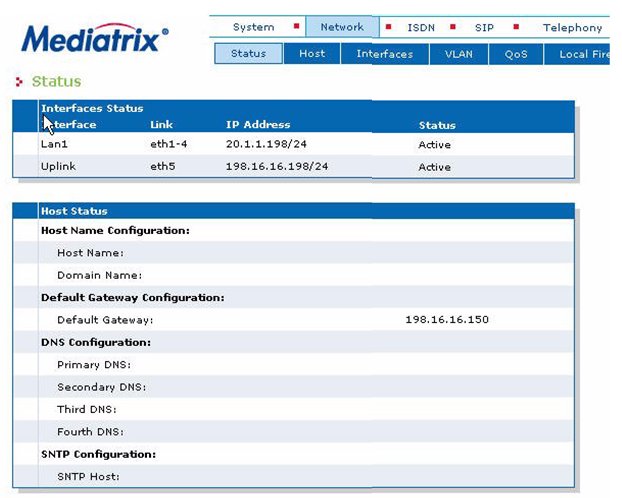
Mediatrix gateway 36xx - Network >
Status
SIP -> Gateways
Configure your SIP gateway now.
SIP gateway configuration:
For this example we use "Trunking" as the Gateway Name.
In section Gateway Configuration field Network Interface
select Uplink.
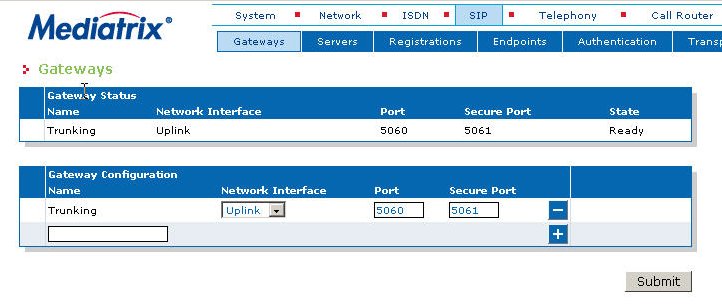
Mediatrix gateway 36xx - SIP > Gateways
SIP -> Servers
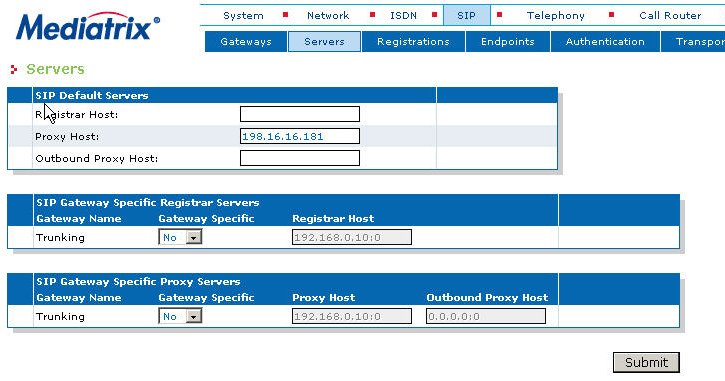
Configuring the vHG 3550 gateway address (198.16.16.181):
In section SIP Default Servers enter the IP address to field
Proxy Host.
Figure 75. Mediatrix gateway 36xx - SIP > Servers
SIP > Registrations
There are no endpoints in the trunking configuration, therefore registration
is not necessary.
IMPORTANT:
As the Mediatrix gateway only supports native
SIP (not SIP-Q), a registration mechanism is not provided for trunking.
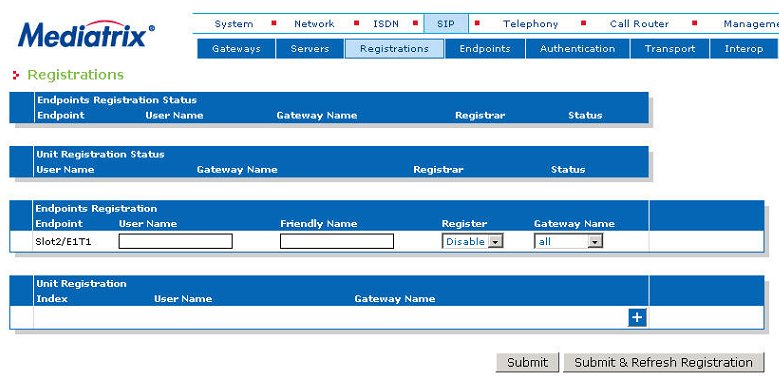
Mediatrix gateway 36xx - SIP > Registrations
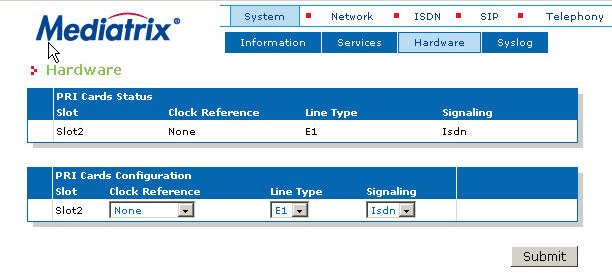
System -> Hardware
Hardware configuration of the PRI card.
In section PRI Cards Configuration:
- Select the Line Type (E1 or T1)
- Select Isdn for Signaling
Figure 76. Mediatrix gateway 36xx - System > Hardware
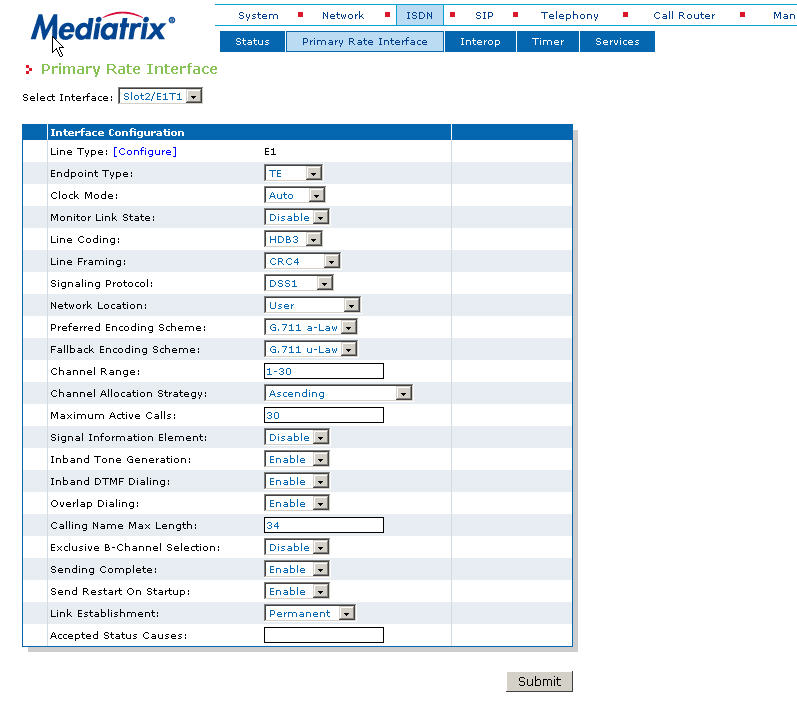
ISDN -> Primary Rate Interface
Configure the primary rate interface.
Figure 77. Mediatrix gateway 36xx - ISDN > Primary Rate Interface
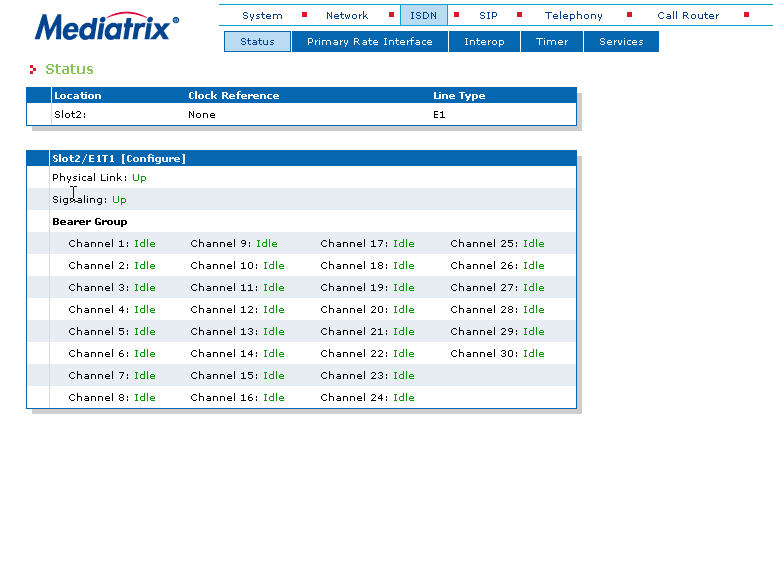
ISDN > Status
Checking status by selecting ISDN > Status.
Figure 78. Mediatrix gateway 36xx - ISDN > Status
Call Router -> Route Config
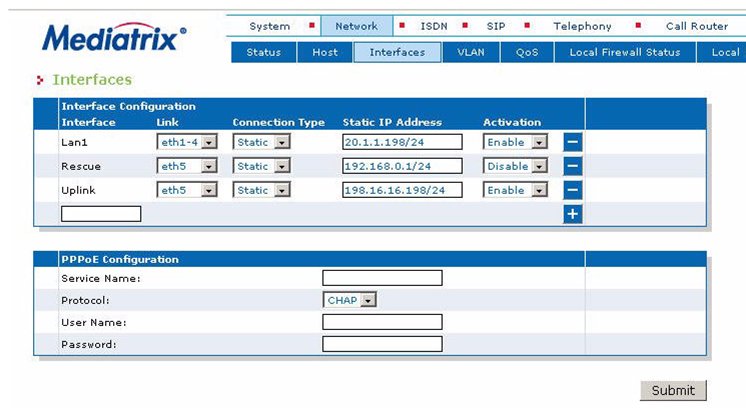
The Mediatrix gateway's "Call Router - Route Config" setting is not
used in the general scenario for CO trunks (especially not for differentiation
based on E.164 number). Station number handling is usually configured
in the OpenScape 4000 system (see OpenScape 4000 sample configuration for S2 interface).
OpenScape 4000 sample configuration for S2 interface
ADD-UCSU:UNIT=AP,LTG=1,LTU=18,LTPARTNO="Q2329-X ",SRCGRP=18,FRMTYPE=SO COAP,CONNTYPE=APDL,LSRTADDR=198.16.16.186,APRTADDR=198.16.16.150,LOCID=001,LOCA TION="CPCI23 SOFTGATE18",PLCHECK=YES,BCHLCNT=120,CONVLAW=NO,TCLASS=0,ALARM NO=0,SOCOTYPE=SOCO50; ADD-BFDAT:FCTBLK=34,FUNCTION=HG3550&SIP,BRDBCHL=BCHL120,ATTR=SOCO; CHA-BFDAT:CONFIG=CONT,FCTBLK=34,FUNCTION=HG3550,LINECNT=1,UNITS=3; CHA-BFDAT:CONFIG=CONT,FCTBLK=34,FUNCTION=SIP,LINECNT=1,BCHLCNT=4; CHA-BFDAT:CONFIG=OK,FCTBLK=34,ANSW=YES; ADD-BCSU:MTYPE=IPGW,LTG=1,LTU=18,SLOT=1,PARTNO="Q2330-X ",FCTID=1,LWVAR=0,FCT BLK=34,BCHLSIP=4,BCHL3550=30,ALARMNO=0; ADD-CGWB:LTU=18,SLOT=1,SMODE=NORMAL,IPADR=198.16.16.181,NETMASK=255.255.255.0; CHANGE-CGWB:MTYPE=CGW,LTU=18,SLOT=1,TYPE=GLOBIF,DEFRT=198.16.16.150,BI TRATE=100MBFD,TRPRSIP=30; CHANGE-CGWB:MTYPE=CGW,LTU=18,SLOT=1,TYPE=LEGKDATA,GWNO=199,GWDIRNO=199,REGEXT GK=NO; ADD-BUEND:TGRP=18,NAME="AMT SOCO18 S2 ",NO=60,TRACENO=0,ACDTHRH=*,PRIO NO=1,TDDRFLAG=ON,GDTRRULE=0,ACDPMGRP=0,CHARCON=NEUTRAL; ADD-COT:COTNO=60,PAR=RCL&IBSY&ANS&CEBC&CBBN&BSHT&LWNC&NLCR&TSCS&DFNN&NLRD&NTON; ADD-COP:COPNO=60,PAR=L3AR&SPTR,TRK=TA,TOLL=TA; ADD-TDCSU:OPT=NEW,PEN=1-18-001-0,COTNO=60,COP NO=60,DPLN=0,ITR=0,COS=1,LCOSV=1,LCOSD=1,CCT="AMT SOCO18 ",DESTNO=0,PROTVAR=EC MAV2,SEGMENT=8,DEDSVC=NONE,TRTBL=GDTR,SIDANI=N,ATNTYP=CO,CBMATTR=NONE,TCHARG=N,S UPPRESS=0,TRACOUNT=31,SATCOUNT=MANY,ALARMNO=2,FIDX=1,CARRIER=1,ZONE=EMPTY,COTX=2 1,FWDX=1,CHIMAP=N,UUSCCX=16,UUSCCY=8,FNIDX=1,NWMUXTIM=10,CLASSMRK=EC&G711&G729AO PT,TCCID="",TGRP=18,SRCHMODE=DSC,INS=Y,SECLEVEL=TRADITIO,DEV=HG3550CO,BCHAN=1&&3 0,BCNEG=N,BCGR=1,LWPAR=0,LWPP=0,LWLT=0,LWPS=0,LWR1=0,LWR2=0,DMCALLWD=N; ADD-GKREG:GWNO=199,GWATTR=INTGW&HG3550V2&SIP,DIPLNUM=0,DPLN=0,LAUTH=1,INFO=""; ADD-GKREG:GWNO=19,GWATTR=EXTGW&HG3550V2&SIP,GWIPADDR=198.16.16.198,GWDIR NO=119,DIPLNUM=0,DPLN=0,LAUTH=1,INFO="",SECLEVEL=TRADITIO; /* -- LCR example for a national number -- */ /* -- Number must go out as block dial -- */ /* -- In the system either "prepared dial" must be activated -- */ /* -- or LDPLN end with -Z and dial with # (SIP functionality) -- */ ADD-RICHT:MODE=LRTENEW,LRTE=1011,LSVC=ALL,NAME="AMT-ORT SOCO18 ",TGRP=18,DNNO=1- 2-68,ROUTOPT=YES,DTMFCNV=SUFDIAL,DTMFDISP=DIGITS,DTMFTEXT="MFV-NACHWAHL ",DTMFPULS=PP300,DESTNO=60,ROUTATT=YES,EMCYRTT=NO,INFO="",PDNNO=0,CHARCON=NEU TRAL; ADD-LODR:ODR=1011,CMD=OUTPULSE,DGTS=49; ADD-LODR:ODR=1011,CMD=ECHO,FIELD=4; ADD-LODR:ODR=1011,CMD=NPI,NPI=ISDN,TON=INTERNAT; ADD-LODR:ODR=1011,CMD=END; ADD-LDAT:LROUTE=1011,LSVC=ALL,LVAL=1,TGRP=18,ODR=1011,LAUTH=1,CARRI ER=1,ZONE=EMPTY,LATTR=WCHREG,VCCYC=4,GW1=19-0; ADD-LDPLN:LCRCONF=LCRPATT,DIPLNUM=0,LDP=0-W-0-Z,LROUTE=1011,LAUTH=1,PINDP=N;
It is assumed that the OpenScape 4000 transmits all dial
patterns (subscr, national, internat) in E164 ISDN / international format
(block dialing must be configured).
The example here refers to a location with ISDN number +49 (69) 7600-XXXXX.
IMPORTANT:
The longest number to be modified must be first
with these criteria!
Outgoing calls from the OpenScape 4000 SoftGate to the CO Carrier
Between Mediatrix Gateway and the HG 3550 interface all numbers are
send as E.164 International ISDN Numbers. This number format is signaled
with a "+" at the beginning of each pattern.
Depending on the CO carriers requirements, the number format send
to the ISDN interface may be modified to type of number "National" ("CO_outg_national")
or "Subscriber" ("CO_outg_subscr").
The modification is executed for calling and called numbers.
Criteria/Transformation:
Therefore the following criteria/transformation is applied:
- E164 -> E164 or TONE -> TONE.
Incoming calls from the CO carrier to the OpenScape 4000 SoftGate
The same applies to incoming calls to the sip HG 3550.
The called number in the subscriber format is converted to international
("CO_inc_called") format. If the carrier transmits the called number
in national format, the routing must be changed from "CO_inc_called (.+)
+4969\1" to "CO_inc_called (.+) +49\1".
The incoming number (calling number) is modified depending on format
via the routing entries "CO_inc_calling_subscr_to_4969
" or "CO_inc_calling_national_to_49
".
Different rules apply to the calling number as to the called number because
the called number is always the same (depending on the carrier either
subscriber or national) but the calling number can be different (subscriber,
national or international).
Criteria/Transformation:
Therefore the following criteria/transformation is applied:
- Calling E164 -> Calling E164 or Calling TONE -> Calling TONE and
- Called E164 -> Called E164 or Called TONE -> Called TONE.
Figure 79. Mediatrix gateway 36xx - Call Router > Route Config