3.6.1.4. Switchover process 


The following switchover process applies to all scenarios:
OpenScape 4000 SoftGate 18 is no longer accessible due to a hardware,
software or IT network failure (connection to CCA/CCB lost ). The switchover
is therefore performed:
- OpenScape 4000 SoftGate is deactivated. The vHG 3530 / vHG 3500 gateways
have the status STBYDEF (
AB-BPOOL:MTYP=AP;) - The associated gateways in OpenScape 4000 SoftGate 20 are restarted (warm standby) and enter the status NORMAL.
- The HFA / SIP stations are rewritten in the database (AMO SBCSU) from position 1-18-3 or 1-18-8 to positions 1-20-3 or 1-20-8 and the HFA / SIP terminals register automatically at the corresponding vHG 3530 / vHG 3500 gateway (secondary gateway).
- The IP addresses of the boards are not rewritten (as with the previous, traditional BPOOL concept). These are permanently configured with AMO CGWB.
- Manual switchover / Manual switchback
-
A manual switchover can be performed with the AMO command
EXEC-USSU, in other words in case of maintenance work or following an automatic switchover (in the event of error), for switching back to the original configuration.IMPORTANT:
If a switchover is performed manually from OpenScape 4000 SoftGate 18 to OpenScape 4000 SoftGate 20 via AMO (EX-USSU:ART=SGRED,LTU=18,SWTYPE=...) owing to maintenance work or the like, the vHG3530 vHG3500 gateways in OpenScape 4000 SoftGate 18 enter the status STBYRDY (AB-BPOOL:MTYP=AP,...;). Only the boards configured in the relevant BPOOL are switched over here. All other boards in OpenScape 4000 SoftGate 18 are not affected by the switchover.
Scenario 1: All vHG 3530 boards in the failed OpenScape 4000 SoftGate are configured as active gateways
Normal status:
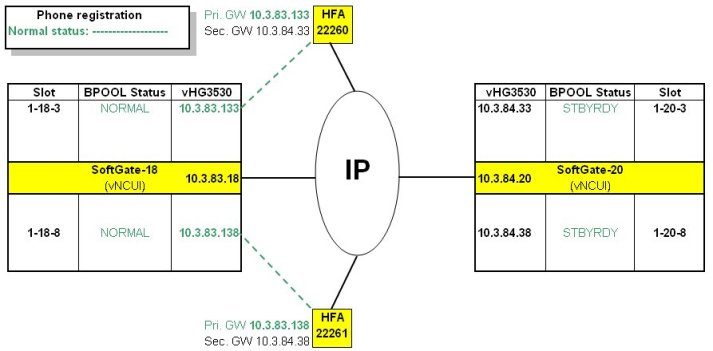
HFA gatekeeper redundancy "simple"
mode - Normal status
Upon failure of OpenScape 4000 SoftGate 18:
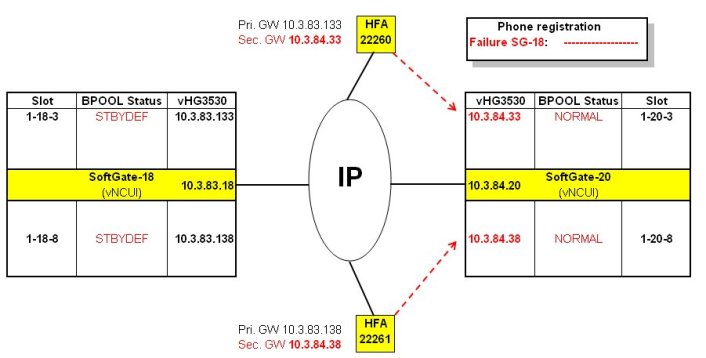
HFA gatekeeper redundancy "simple"
mode - Failure of OpenScape 4000 SoftGate 18
Scenario 2: There are active vHG 3530 gateways and standby vHG 3530 gateways in the failed OpenScape 4000 SoftGate.
Normal status:
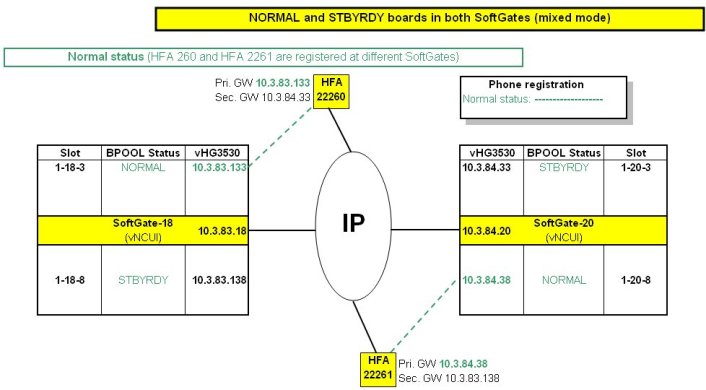
HFA gatekeeper redundancy "mixed" mode
- Normal status
Upon failure of OpenScape 4000 SoftGate 18:
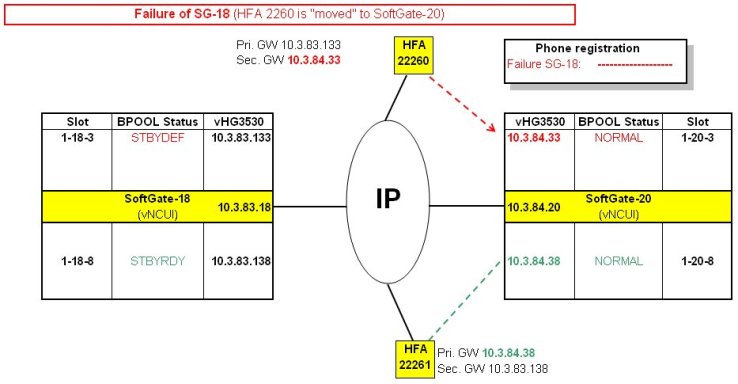
HFA gatekeeper redundancy "mixed" mode
- Failure of OpenScape 4000 SoftGate 18
Upon failure of OpenScape 4000 SoftGate 20:
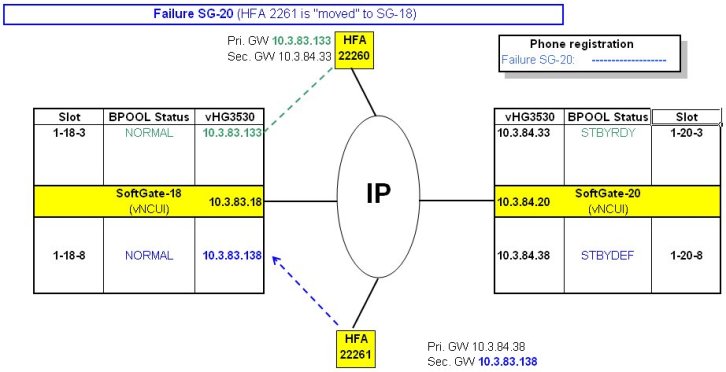
HFA gatekeeper redundancy "mixed" mode
- Failure of OpenScape 4000 SoftGate 2
Scenario 3: All vHG 3500 boards in the failed OpenScape 4000 SoftGate are configured as active gateways
Normal status:
Figure 101. SIP gatekeeper redundancy "simple" mode - Normal status
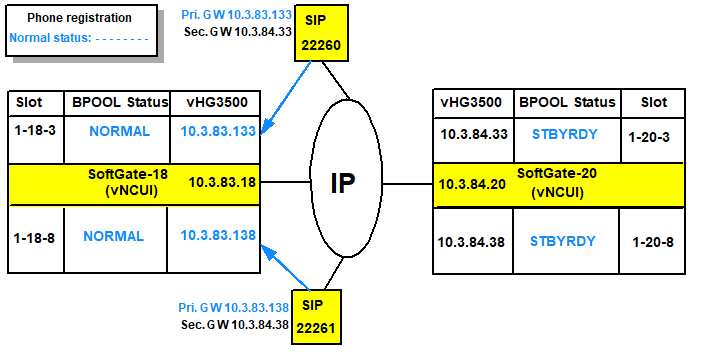
Upon failure of OpenScape 4000 SoftGate 18:
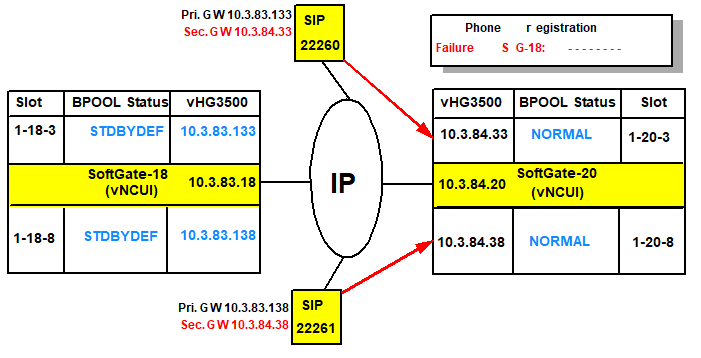
SIP
gatekeeper redundancy "simple" mode - Failure of OpenScape 4000 SoftGate
18
Scenario 4: There are active vHG 3500 gateways and standby vHG 3500 gateways in the failed OpenScape 4000 SoftGate.
Normal status:
Figure 102. SIP gatekeeper redundancy "mixed" mode - Normal status
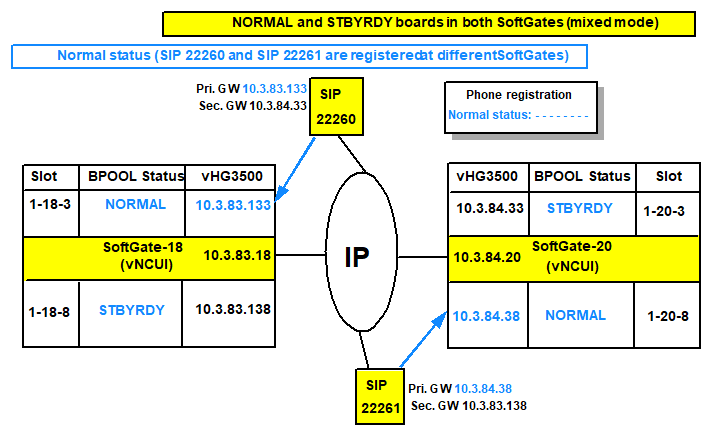
Upon failure of OpenScape 4000 SoftGate 18:
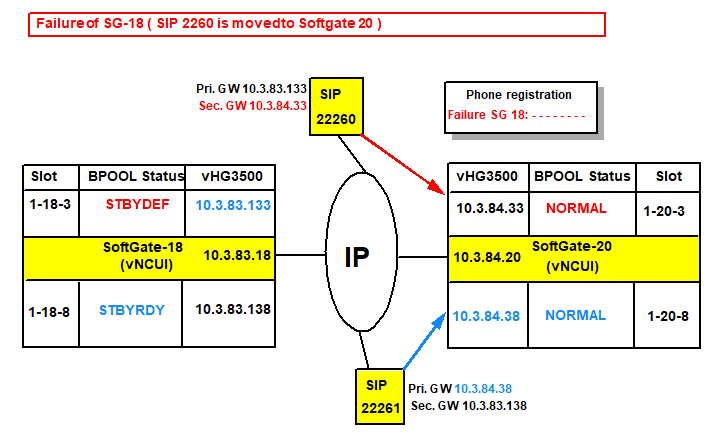
SIP
gatekeeper redundancy "mixed" mode - Failure of OpenScape 4000 SoftGate
18
Upon failure of OpenScape 4000 SoftGate 20:
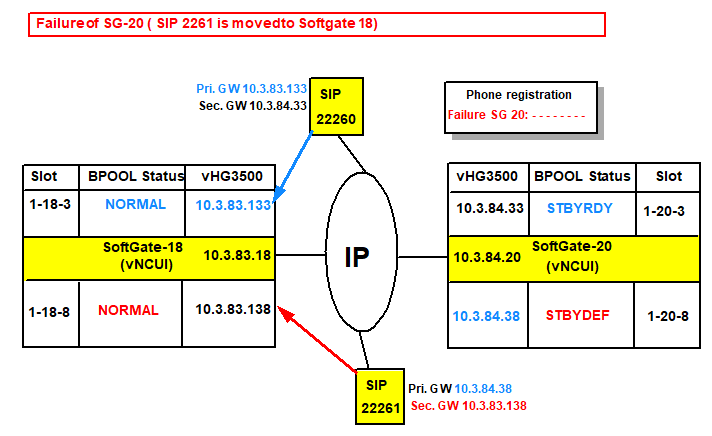
SIP
gatekeeper redundancy "mixed" mode - Failure of OpenScape 4000 SoftGate
20