3.9.3.4. Registration of UC Media Server Farm 


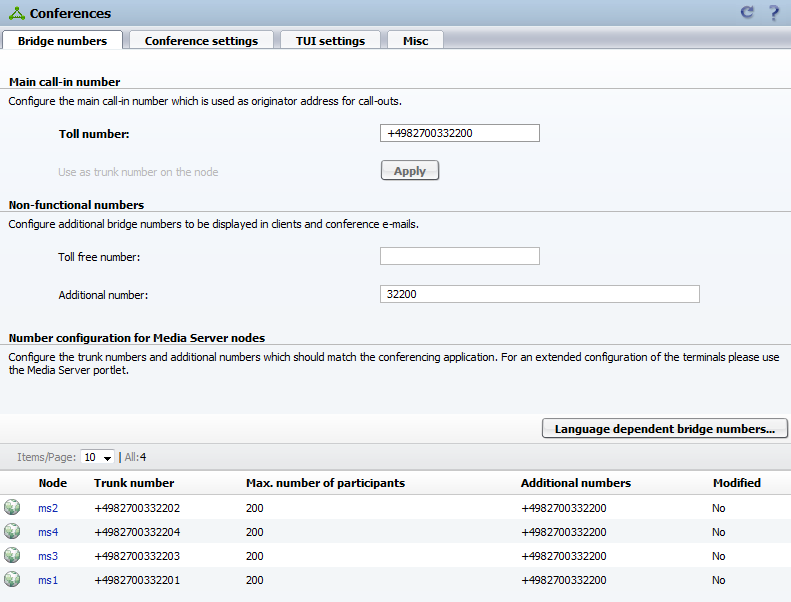
See below screenshot for a typical Media Server farm configuration
in a large or very large deployment. Each Media Server has an individual
conference dial-in number known as Trunk number (e.g. +4982700332201)
and a general conference dial-in number known as Additional numbers
(e.g. +4982700332200).
Figure 126. OpenScape UC Media Server farm
The following section describes shortly how to configure the OpenScape
4000 SIP Load Balancer (SLB) in combination with a Media Server farm.
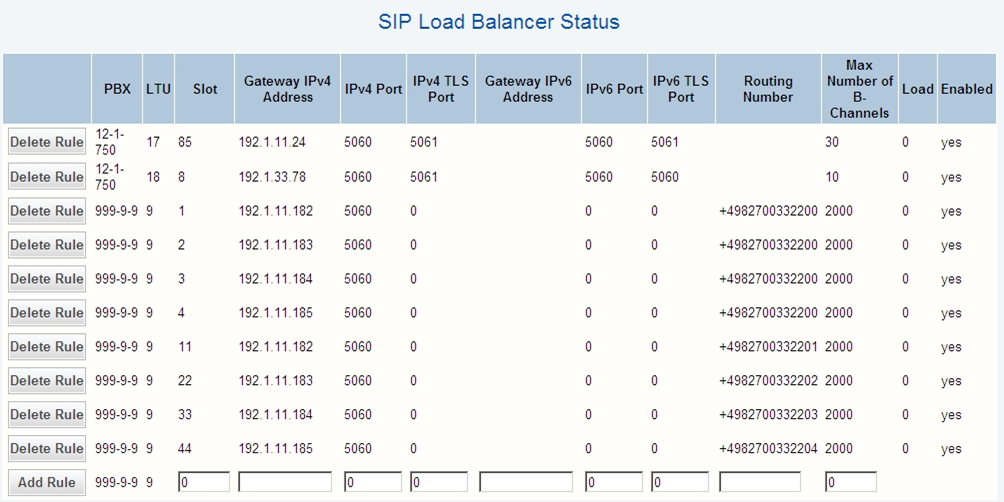
The Media Servers have to be added manually. Both dial-in numbers,
the individual and the general one, of each Media Server has to be configured
in SLB. This means two entries have to be configured for each Media Server.
The Media Server configuration is done in the WBM of the OpenScape
4000 SoftGate.
WBM > Configuration > SIP Load Balancer > Status
- Adding a rule in SLB
Enter all necessary/needed parameters in the text boxes at the bottom of the page and click Add Rule.
- Changing an existing rule in SLB
If an existing rule must be modified simply add all necessary/needed parameters again in the text boxes and click Add Rule. The existing rule will be replaced with new parameters.
Necessary/needed fields
- Slot
This field is normally used for the OpenScape 4000 configuration slots. In the Media Server case this parameter should be used as unique identifier. Useful would be to use e.g. "1" and "11" for the first Media Server to separate the conference dial-in numbers, "2" and "22" for the second Media Server and so on.
- Gateway IPv4 Address
IP address of the Media Server (e.g. 192.1.11.182)
- IPv4 Port
SIP port of the Media Server (e.g. 5060)
- Routing Number
Dial-in numbers for the Media Server (e.g. +4982700332200 for "1" and +4982700332201 for "11")
- Max Number of B-Channels
In best case the maximum possible parallel channels of each Media Server shall be used. Due to this a limitation of parallel channels from Media Server side can be prevented. In the example 2000 is used.
Figure 127. Media Server configuration for SIP Load Balancing
INFO:
For information on how to configure the OpenScape UC please refer to the OpenScape UC documentation.