3.2.1. Upgrade via Assistant Gateway Manager 


The OpenScape 4000 SoftGate image can be transferred either with the
LW Update Manager or with the PCHI tool on the RMX hard disk.
- OpenScape 4000 SoftGate image (RPM format with OMF 386 header):
-
softgate-5.0-0.i586.rpm.abs - Directory on the RMX hard disk:
-
:A1H1E:/APSP/LTG/LGA0/under:PZKSGW50
LW Update Manager
- Start the file transfer operation with the OpenScape 4000 Assistant Gateway
Manager:
OpenScape 4000 Assistant > Expert Mode > LW Update Manager
Figure 47. OpenScape 4000 Assistant: Loadware Update
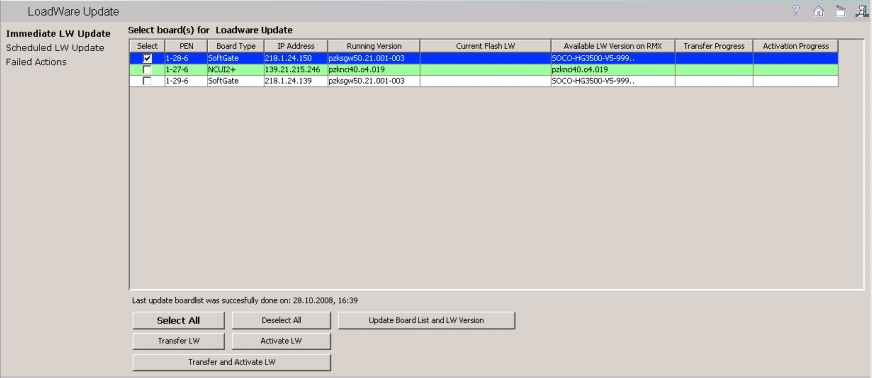
- Select the OpenScape 4000 SoftGate that you want to upgrade from the list of boards.
- The following options are now available:
- Transfer LW button: The loadware is transferred but not activated. You can press the Activate LW button either now or later to activate the loadware on the required boards.
- Transfer and Activate LW button: The loadware is transferred and activated.
IMPORTANT:
Please note that the board is briefly removed from service when the loadware is being activated.