18.4.1.2. Creating a New Root Certificate 


Navigate in the OpenScape 4000 Assistant start page to Expert Mode > Signaling
and Payload Encryption > SPE Root Certificate. The SPE Root Certificate
dialog opens.
There are two cases which have to be distinguished:
- No SPE root certificate exists
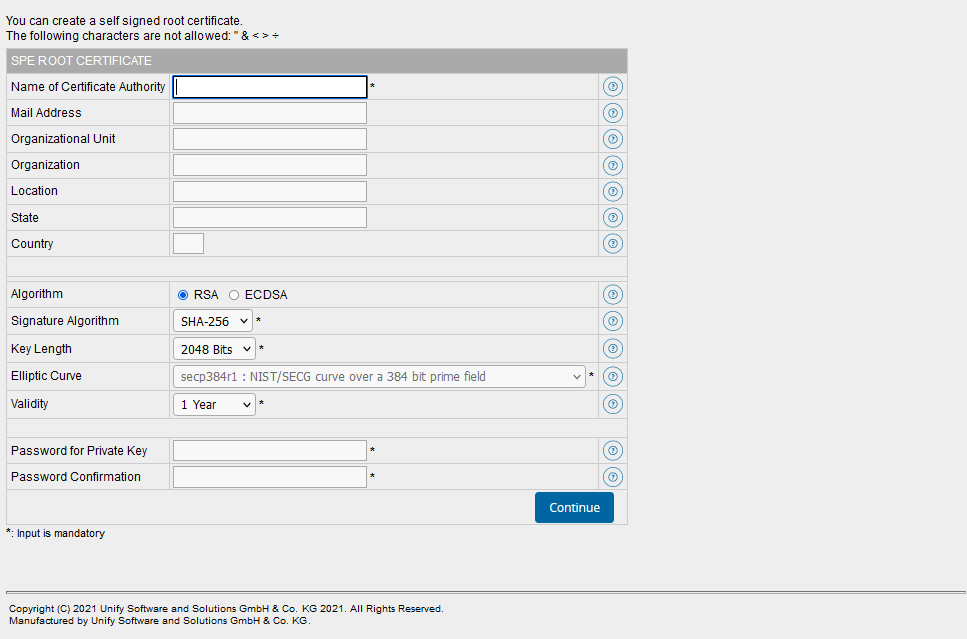
- If no SPE root certificate is created yet, the dialog for creating
a SPE root certificate is displayed with empty fields.
Figure 379. SPE root certificate generation (no SPE root certificate exists)
- A SPE root certificate already exists
-
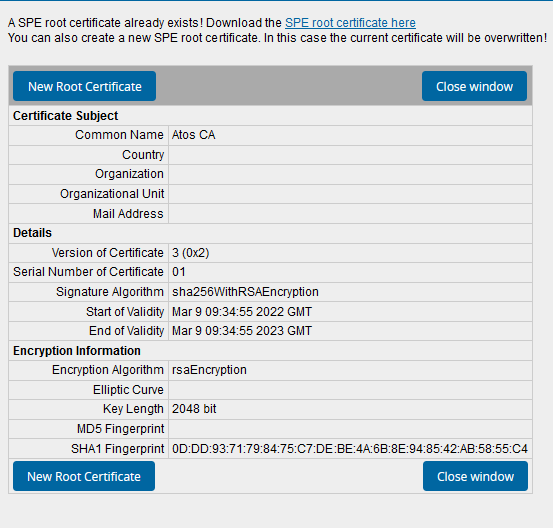
If a SPE root certificate is already created, click the New Root Certificate button for creating a new SPE root certificate. A new dialog opens. The data of the existing SPE root certificate are displayed in the entry fields and can modified accordingly for the new SPE root certificate.
IMPORTANT:
If you create a new SPE root certificate although a SPE root certificate already exists for this server, the existing SPE root certificate will be overwritten.Figure 380. SPE root certificate generation with existing SPE root certificate
Procedure
- Enter all required data. Mandatory fields are flagged with a red asterisk (*). The following characters are not allowed in the entry fields: " & < > ÷ as well as accented and special characters.
- To get additional context information related to the individual entry fields, click on the ? icon to the right of each entry field. The context-specific information related to the respective field is displayed as a tooltip in the browser.
- Click on Continue. The SPE root certificate will be generated. After the creation of the certificate it is displayed and can be downloaded via a link.
- When creating a SPE certificate based on the ECDSA Signature Algorithm,
please ensure that all endpoints support ECDSA.
For example, HG3500 and STMI2/4 boards do not support them.