7.3.7. Configuring IP Trunking in the LCR 


When resolving addresses for TDM connections, an LCR route is administered
as destination address information and is subsequently used to determine
the LODEN of a remote circuit for CO or TIE connections.
To satisfy the requirements of IP address resolution, new parameters
for destination gateways (GW1 to GW5) are administered in the LCR data
with the AMO LDAT. Information on destination gateways 1...5 consists
of:
- the gateway number
the sector path number
The gateway number can be used to determine the IP address of the
destination gateway and therefore to reach every required OpenScape 4000
system in the customer’s IP network.
Enter all sectors to be crossed between the source and destination
gateway under the sector path number. It does not contain the sector
numbers of the source and destination gateway.
There are no multiple paths for this path type. In other words, there
is only one defined path. To avoid having to configure an unnecessary
number of sector paths, you can also specify a sector path that was defined
for DMC here. If this is a multiple path, a search is performed here
for the correct sector path segment. For the sake of clarity, however,
separate sector paths should be defined for IP trunking and DMC.
The IP address resolution administration concept is embedded in the
existing LCR device search and can be performed with the same AMOs (namely
the AMOs RICHT, LDAT, and LDPLN).
Figure 153. Example for sector path description
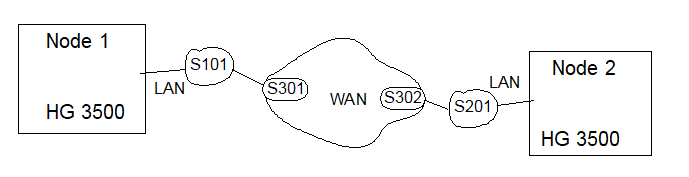
An outgoing seizure from gateway S13 to gateway S23 uses the following
sector path:
-
S13 > S23: S101,S301,S302,S201
Generation
AMO RICHT
Use the branch MODE=LRTENEW to configure the LCR route for IP trunking.
Alternatively, the trunk group number can be left out when configuring
IP address resolution for a remote gateway (OpenScape 4000 system without
gatekeeper) because B channels do not have to be seized at the gatekeeper’s
PBX in this case.
 |
Configuration can be performed with OpenScape 4000 Assistant/Manager in the LCR Route
window.
|
 |
ADD-RICHT:MODE=LRTENEW,LRTE=35,LSVC=ALL,NAME=“STMI2 3-91“,DNNO=1-69-300,REROUT=NO,ROUTATT=NO, EMCYRTT=NO,PDNNO=10-69-300, CHARCON=NEUTRAL,CONFTONE=NO,RERINGRP=NO; Route 35 is configured on PEN 3-91 for all services for HG 3500; no trunk group number
was entered.
|
AMO LDAT
Use this AMO to configure the necessary LCR route elements for IP
trunking for an LCR route.
Every route element can contain up to five destination gateways from
remote OpenScape 4000 systems. The parameters GW1 through GW5 define
the connection setup sequence, that is, first the path described in GW1
and so on until finally the path in GW5.
If five destination gateways is not sufficient, then a new route element
must be configured and in addition, the value LRTGCONT must be specified
in the parameter LATTR. This creates five additional destination gateways
for the same route element. All data associated with the route element
already created is automatically adopted independently of the current
AMO input.
As in the past, multiple route elements can also be configured with
different LCR parameters for an LCR route. In this case, the parameter
LATTR must not contain the value LRTGCONT.
The trunk group number can be left out. If a trunk group number is
specified, all trunk-group-specific data is also adopted.
|
|
Configuration can be performed with OpenScape 4000 Assistant/Manager in the LCR Route
Element window.
|
|
|
ADD-LDAT:LROUTE=35,LSVC=ALL,LVAL=1,ODR=2,LAUTH=1,CARRIER=1,ZONE=TIE01,LATTR=WCHREG,VCCYC=4,GW1=1-1;
A route element is created for route 35 with path data for destination gateway
1. ADD-LDAT:LROUTE=35,LVAL=1,ODR=2,LAUTH=1,LATTR=LCRCONT,GW1=6-16;
If the path data for all five destination gateways is entered in a route element for
route 35, this follow-up command can be used to create another route element with
the path
data, for example, for the sixth destination gateway.
|
AMO LDPLN
Use this AMO to configure the LCR digit pattern for each destination
gateway in the OpenScape 4000 systems in a customer network.
Up to 2,048 dial plans can be configured. But first, the required
dial plan numbers must be administered with the AMO LDPLN. Dial plan
number 0 is an exception. This configures fixes and cannot be administered
in the branch LCRCOS=LCRADM. Random digit patterns can be configured
here immediately.
If you want to save the LCR digit pattern under a dial plan number
other than 0, then this must be configured before the first entry. The
branch LCRCONF=LCRVADM is used for this. In the following AMOs, the user
only uses the dial plan number (0-2047).
A dial plan number greater than the permanently set plan 0 is usually
only needed if a gatekeeper is configured at the local system.
|
|
Configuration can be performed with OpenScape
4000 Assistant/Manager in the LCR Digit Pattern window.
|
|
|
ADD-LDPLN:LCRCONF=LCRADM, DIPLNUM=2,LWMPOOL=1; Dial plan number 2 is configured on the first unused dial
plan in LCR digit pattern pool 1.
|
Use the following step to configure the required digit pattern.
|
|
Configuration can be performed with OpenScape 4000 Assistant/Manager in the LCR Digit
Pattern window.
|
|
|
ADD-LD PLN:LCRCONF=LCRPATT,DIPLNUM=2,LDP=“00891242390“,LAUTH=1,PINP=N; The digit pattern 00891242390 is created under dial plan number 2.
|
A digit pattern that leads to a gateway is an exception.
If a gateway directory number cannot be resolved with the dial plan
(DPLN), it must be administered in the LCR dial plan DIPLNUM=0. The following
command is required for this (see also Section 3.6,
“Configuring the HG 3500 Directory Number”, on page 567).
|
|
Configuration can be performed with OpenScape 4000 Assistant/Manager in the LCR Digit
Pattern window.
|
|
|
ADD-LDPLN:LCRCONF=LCRPATT,DIPLNUM=0,LDP=“008973114711“,GW NO=7,LAUTH=3; The gateway directory number 008973114711 is assigned to destination gateway 7.
|
Display:
AMO RICHT
|
|
Displaying can be performed with OpenScape 4000
Assistant/Manager in the LCR Route window.
|
|
|
DISPLAY-RICHT:MODE=LRTE,LRTE=35; The AMO outputs the LCR routing data for LRTE 35.
|
AMO LDAT
|
|
Displaying can be performed with OpenScape 4000
Assistant/Manager in the LCR Route Element window.
|
|
|
DISPLAY-LDAT:KIND=LCR,LROUTE=35; The AMO outputs the routing data configured for all configured
route elements for LCR route 35.
|
AMO LDPLN
Display the internal administration configuration for dial plan number 2.
|
|
Displaying can be performed with OpenScape 4000
Assistant/Manager in the LCR Digit Pattern window.
|
|
|
DISPLAY-LDPLN:LCRCONF=LCRADM,DIPLNUM=2; The AMO outputs the administrative data LWMPOOL, DIALPLN
and INFO for dial plan number 2.
|
Displaying the digit pattern configured for gateway 7.
|
|
Displaying can be performed with OpenScape 4000
Assistant/Manager in the LCR Digit Pattern window.
|
|
|
DISPLAY-LDPLN:LCRCONF=LDP,GWNO=7; The AMO outputs the digit pattern data configured for
gateway 7.
|
Delete:
AMO RICHT
|
|
Deletion can be performed with OpenScape 4000
Assistant/Manager in the LCR Route window.
|
|
|
DELETE-RICHT:MODE=LRTE,LRTE=35; The AMO deletes LCR route 35.
|
AMO LDAT
|
|
Deletion can be performed with OpenScape 4000
Assistant/Manager in the LCR Route Element window.
|
|
|
DELETE-LDAT:KIND=LROUTE,LROUTE=35; The AMO deletes all route elements and data for LCR route
35.
OR
DELETE-LDAT:KIND=LRTEL,LROUTE=35,LRTEL=1,GWIDX=2; The AMO deletes only the second gateway entry for LCR
route 35 in route element 1.
|
The last gateway in an LCR route element cannot be deleted with GWIDX. In this case, the entire route element (LRTEL) must be deleted.
AMO LDPLN
Delete the internal administration configuration for dial plan number 2.
A dial plan number can only be deleted after all digit patterns have
been deleted.
|
|
Deletion can be performed with OpenScape 4000
Assistant/Manager in the LCR Digit Pattern window.
|
|
|
DELETE-LDPLN:LCRCONF=LCRADM,DIPLNUM=2; The AMO deletes dial plan number 2. Data can no longer
be accessed on these dial plans. Dial plan number 2 should be reconfigured
when next required.
|
Delete the digit pattern configured for a dial plan number.
|
|
Deletion can be performed with OpenScape 4000
Assistant/Manager in the Extension window.
|
|
|
DELETE-LDPLN:LCRCONF=LCRPATT,DIPLNUM=6,LDP=“0307469412“; The AMO deletes the digit pattern 0307469412 configured
for gateway 6.
|