11.3.1.2. Creating a Schedule for the Backup 


In the second configuration step, you must now define when OpenScape
4000 Assistant Backup & Restore should carry out a backup on the
configured AP backup server. Typically, a backup is performed daily at
a time when there is not much activity.
When you select a start time for the backup, keep in mind that this
also indirectly defines the start time for the restore on the CC-APs.
The restore on the CC-AP/Survivable OpenScape 4000 SoftGate starts as
soon as the CC-AP/Survivable OpenScape 4000 SoftGate detects availability
of new completed backup. Dependencies are shown in the section “Section
3.1, “Basic conditions regarding timing”“.
Prerequisite:
- Logged on to the OpenScape 4000 Assistant via a Web browser under the
ID “
rsta“. - Software Management -> Backup & Restore has been started.
- In the OpenScape 4000 Assistant Backup & Restore user interface, select the function Schedule.
Figure 213. OpenScape 4000 Assistant Backup & Restore: Creating a schedule for the backup
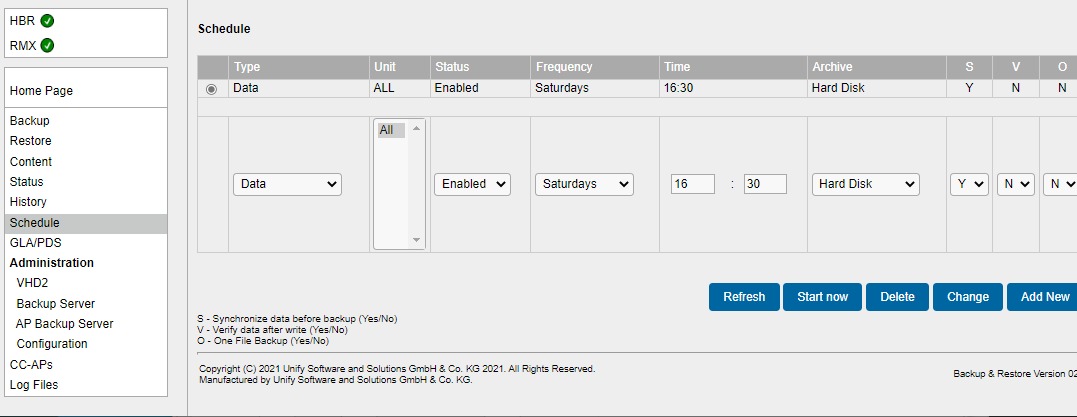
The following fields must be now be completed:
Table 73. Input fields in the OpenScape 4000 Assistant Backup & Restore schedule
|
Field name
|
Value
|
Explanation
|
|
Type
|
AP Emergency
|
Only this value is permitted
|
|
Unit
|
All
|
Only this value is permitted
|
|
Status
|
Activated
|
This is where a configured schedule can be activated
or deactivated.
|
|
Frequency
|
Daily
(weekdays, Mondays, Tuesdays,
Wednesdays, ...)
|
Typically, a backup should be carried out daily.
|
|
Time
|
Hour: Minute
|
Time of day at which the backup should start
|
|
Archive
|
AP backup server
|
Only this value is permitted - AP backup server
must already have been configured.
|
|
S
|
Yes
|
Synchronize before backup, i.e. perform UPDATE.
Must
be set to Yes so that the latest version of the database is saved.
|
|
V
|
Yes/No
|
Backup data verification
|
|
O
|
Yes/No
|
One File Backup
|
|
I
|
Yes/No
|
Include installation partition
|
To perform more than one backup a day, enter additional daily backups
in the schedule, for example, one backup at 12 noon and an additional
one at 6pm.
Complete the AP backup server configuration with
- Add New- The new entry is saved in the timetable. A backup is performed according to the configuration.
This completes configuration on the OpenScape 4000 host system.
The time required for a backup procedure depends heavily on the amount
of data to be transferred and the transmission bandwidth available between
the host system and the AP backup server. The procedure takes at least
one hour.