11.7.4. Configuration Steps in the CC-AP 


Step 1: Install AP Emergency on DSCXL2 or OpenScape 4000 SoftGate/OpenScape Access 500
- USB installation of DSCXL2s (Deployment AP Emergency) or OpenScape 4000 SoftGate / OpenScape Access/Branch 500 (Deployment Survivable SoftGate).
- Connect the monitor/keyboard or connect to the system using a standard IP address (192.168.0.2). Change the password for root (hicom). Set the IP address for SLES (default 192.168.0.2) in YaST, set the time server in the same way as in the host, switch the keyboard from English to German if appropriate (owing to special characters in the password).
- Set up the connection to the OpenScape 4000 Platform Administration Portal via YaST. Launch the LAN wizard. The LAN wizard contains the initial config file for IPDA:
Figure 219. LAN wizard - Selecting the deployment for AP Emergency installation
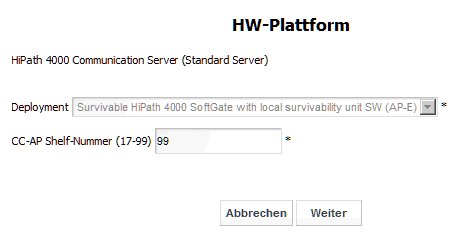
Configure the IP address of the portal and the OpenScape 4000 Assistant in the
LAN wizard. Please note here that this is about APE addresses and not host
addresses.
If necessary configure the default router.
The IP address of the APE is entered under IPDA-LAN.
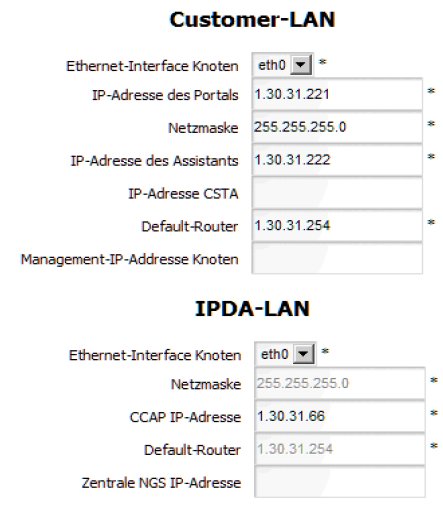
LAN wizard - Entering the customer LAN and IPDA LAN addresses
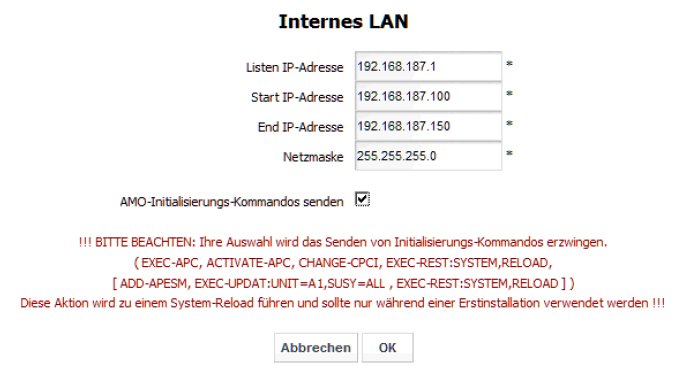
Make sure that the checkbox Send AMO initialization commands is activated
in the Internal LAN section. The RMS configuration AMOs are configured
automatically as a result.
Figure 220. LAN wizard - Send AMO initialization commands
Now configure the IPDA shelf (in this case as OpenScape 4000 SoftGate in Access
500/Branch).
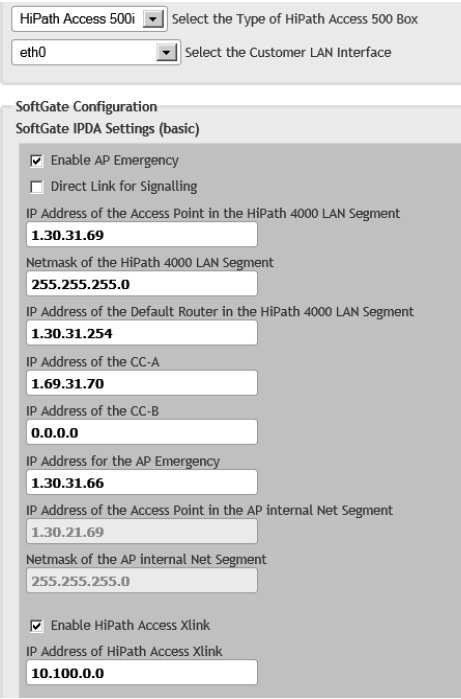
Configuring the IPDA shelf
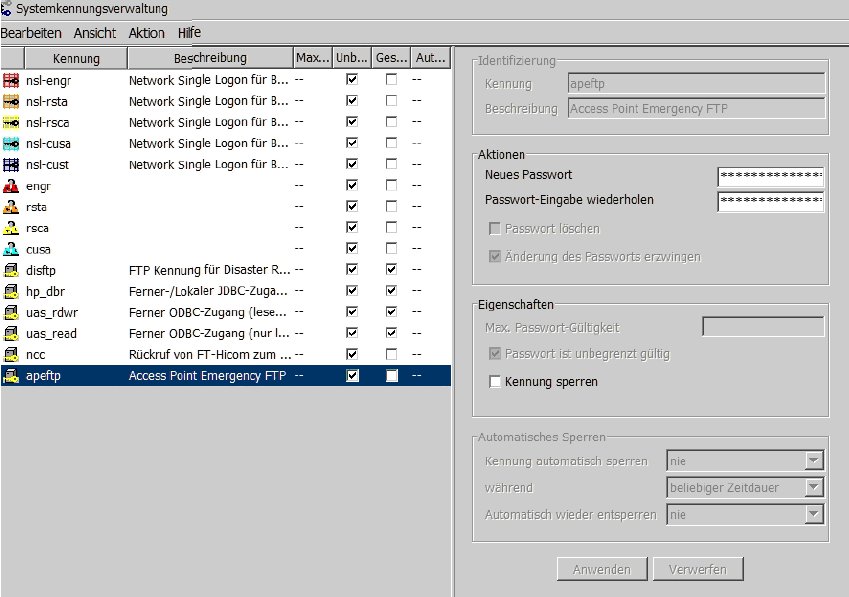
Step 2: Configure the user ID of the FTP user (apeftp)
The user for the FTP transport (apeftp) must also be activated in
the CC-AP and configured with the same password as in the host.
Figure 221. Configuring the apeftp system ID in the CC-AP
Step 3: Configure the FTP backup for APE in the CC-AP
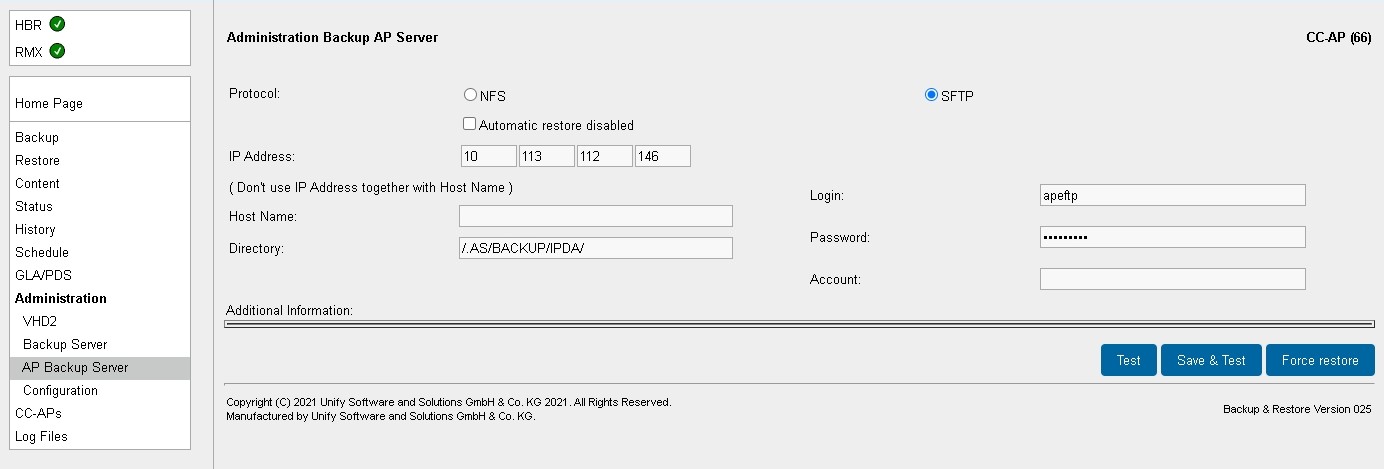
Configure the FTP server for the APE backup in the OpenScape 4000
Assistant for the CC-AP. The entries are the same as in the host.
Synchronization of the CC-AP is started immediately with Save & Test.
Figure 222. Configuring the AP backup server in the CC-AP
Step 4: Query the status
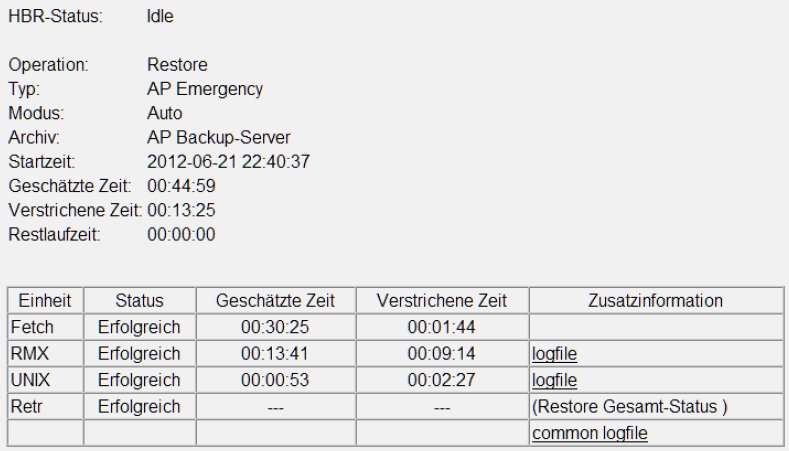
The progress can be seen on the HBR status page. With the initial
installation, the CC-AP starts with a backup so that it has a comparison
with the host backup. Immediately afterwards, the CC-AP starts with a
restore, which is concluded with a reload. The CC-AP then starts up automatically.
The CC-AP only performs restores in normal operation. To this end, the
CC-AP contacts the AP backup server every 10 minutes and checks whether
a new, complete backup set is available so as to then download and activate
the modified sections of the backup set.
The time required for the restore procedure depends to a large extent
on the amount of data to be transferred and the transmission bandwidth
available between the AP backup server and the CC-AP. The process takes
about half an hour, but may be shorter if only changes were made to the
RMX.
Figure 223. Checking the backup status
Step 5: Output the APE status
DISPLAY-APESU;
H500: AMO APESU GESTARTET
+------------------------------------------------------------------------------+
| AKTUELLE SYSTEMZEIT  : 22-06-2012 10:38:14                                   |
+------------------------------------------------------------------------------+

+------------------------------------------------------------------------------+
| CC-AP: 99                           IP ADRESSE: 1  .30 .31 .66               |
+------------------------------------------------------------------------------+

+------------------------------------------------------------------------------+
| AP EMERGENCY GRUPPE: 1    CC-AP: 99          NAME: HPA MUC                   |
| SCHWELLE: 0         RSMODE: AUTO                                             |
| STABIL: 5   MIN     RSBEGIN: 20 H     RSENDE: 6  H     RSOFFSET: 15 MIN      |
+------------------------------------------------------------------------------+
| AP: 98  AP EMERGENCY GRUPPE: 1   CC-AP: 99  GEWICHT: 0     UMSCHALT: GRUPPE  |
| KONTROLL-EINHEIT: HOST-CC     SIGNAL-PFAD: LAN                               |
| LETZTE AUFGEZEICHNETE VERBINDUNGS-STATUS-AENDERUNG:                          |
|                                                                              |
|     HOST-CC:  VERBUNDEN: JA        VERBUNDEN SEIT: 22-06-2012  10:07         |
|     CC-AP:    VERBUNDEN: JA        VERBUNDEN SEIT: 22-06-2012  10:07         |
+------------------------------------------------------------------------------+
| AP: 99  AP EMERGENCY GRUPPE: 1   CC-AP: 99  GEWICHT: 0     UMSCHALT: GRUPPE  |
| KONTROLL-EINHEIT: HOST-CC     SIGNAL-PFAD: LAN                               |
| LETZTE AUFGEZEICHNETE VERBINDUNGS-STATUS-AENDERUNG:                          |
|                                                                              |
|     HOST-CC:  VERBUNDEN: JA        VERBUNDEN SEIT: 22-06-2012  10:08         |
|     CC-AP:    VERBUNDEN: JA        VERBUNDEN SEIT: 22-06-2012  10:08         |
+------------------------------------------------------------------------------+