13.3.1.1. Configuring the OpenScape 4000 


Figure 228. Signaling survivability via Modem
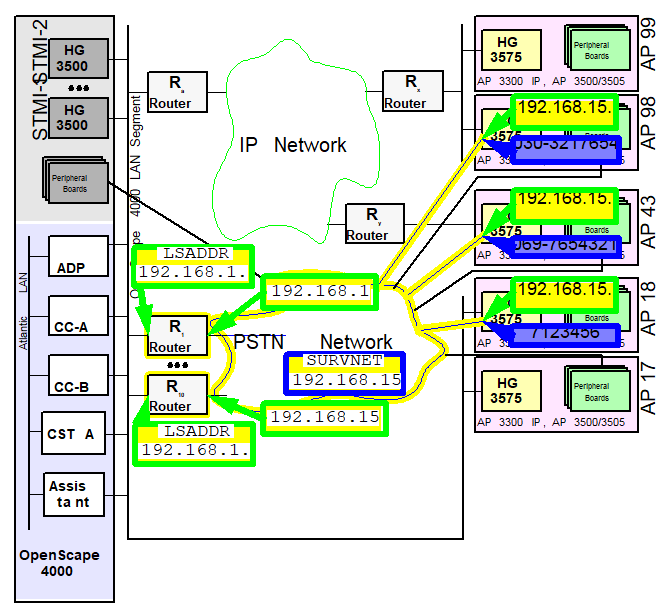
The access connections of the survivability routers and modems into
the PSTN telephone network form a virtual IP network, the survivability
network. Every access to this virtual network requires an IP address
in this network. In order to keep the administrative effort for this
network to a minimum, a number of stipulations have been agreed on:
- The survivability network has the netmask 255.255.255.0.
- A maximum of 10 survivability routers are supported between the OpenScape 4000 LAN segment and the survivability network; these are numbered consecutively from 1 to 10. The fourth digit in the IP address of routers in the survivability network is the consecutive number of the router, i.e. 1-10.
- The address of an access point in the survivability network is likewise specified. The fourth section of the IP address is set to be identical to the LTU number of the access point.
Thus, only one parameter essentially remains to be configured in the survivability
network: the network address.
This is configured with the AMO SIPCO and must already be specified
during ADD-SIPCO if the customer has purchased signaling survivability
licenses (see IP Distributed Architecture > Section 2.1,
“OpenScape 4000 LAN Segment”).
If the licenses for signaling survivability are not purchased until
later or if the zero address 0.0.0.0 was specified during initial installation,
this address must be set now.
 |
Configuration Management > System Data
> IPDA > IPDA System Data
Click Search, enter
or change the survivability network address on the System Data
tab, then Save.
|
 |
|
IMPORTANT:
The last digit of the SURVNET address must always
be ZERO. Otherwise, it would not be a network address, together with
the specified netmask 255.255.255.0.
The licenses for signaling survivability can be queried as follows:
|
|
Configuration Management > HiPath Inventory
Management
> HIM System Data > Feature > Marketing
Units
Click Search > Sales Features tab >
Signaling Survivability entry
|
|
|
DISP-CODEW; “SIGNALING SURVIVABILITY“
entry |
Although this network is only used when needed and the communication
partners are fixed, the address for this network must be agreed on with
the customer network administrator.
Thought now has to be given to the assignment of access points to
survivability routers. Every survivability router can be described through
the following data, which must also be configured in the router itself:
- Consecutive number of the router [1..10]
- IP address of the router in the OpenScape 4000 LAN segment
- IP address of the router in the survivability network
- Access points to be operated via this router, including:
- LTU number and, derived from that number, its IP address for survivability
- Telephone number of the modem connection
- Signaling survivability type = MODEM
Ultimately, the router is to be configured in such a way that, upon receipt
of a packet with a target address identical to that of the survivability
address of an access point, it establishes a dial-up connection to the
modem of that access point and subsequently transmits the packet. If
the connection is not used for an extended period (e.g. 30 seconds),
the access point can be reached again via LAN and the link to the modem
can be disconnected.
An STMI2/4 module with WAML function in the OpenScape 4000 CC can
also be used as a survivability router.
IMPORTANT:
If a survivability router is to access the ISDN
network via the OpenScape 4000, there must be sufficient connection capacity
in the trunk access of the OpenScape 4000. If, for example, 83 access
points on a system are equipped with signaling survivability, 83 B-channels
to the CO must be made available immediately in the central area around
the OpenScape 4000 system in the event of an IP network failure. If this
capacity is not reserved, it may not be possible to reach all access
points. Access points that are not reached via signaling survivability
perform a restart and can only operate again if they are accessed by
CC via LAN or modem.
The configuration in the OpenScape 4000 switch is realized as follows:
- Announce the survivability routers in the system
|
|
Configuration Management > System Data
> IPDA > IPDA Signaling Survivability Router
Click Search,
enter or change the router number and address on the Router Data tab,
then Save.
|
|
|
|
Routers 1 and 10 from the example in Figure 6 “Signaling survivability via Modem”
are thus configured.
- Assign the access points to the survivability routers
|
|
Configuration Management > System Data > IPDA > IPDA Access Point
Click Search, set the desired router number on the General tab under
signaling survivability and Save.
|
|
|
|
Thus, all access points with signaling survivability in the example
in Figure 6 “Signaling survivability via Modem”
are assigned to a router. Finally, when assigning the access points to
a router, signaling survivability for the respective access point is
configured. This command checks whether a license for signaling survivability
is available. If so, the use is booked; if not, the configuration is
rejected.
If the assignment of an AP to a survivability router is changed, e.g.
if AP 43 should in future be operated by Router 10 instead of Router
1, the following action is required:
|
|
Configuration Management > System Data > IPDA > IPDA Access Point
Click Search, set the desired router number on the General tab under
signaling survivability and Save.
Configuration Management > System Data > IPDA > IPDA System Data
Click Search and select the access point.
Click Execute on the Action pull-down menu and select the mode of action
Update AP, confirm with OK.
|
|
|
A CHANGE of the configuration for signaling survivability with APRT is not possible.
In
order to change the configuration, the corresponding assignment is simply deleted
and
subsequently re-configured.
In order for this change to become effective, AP 43 has to be restarted.
|
IMPORTANT:
Connections are cleared down without further
warning. Prior to the
EXEC-USSU:UPDATAP, the configuration
must be updated on the system hard disk.