21.8.1. HFA (IP) Terminal at STMI 


IMPORTANT:
For OpenStage 60/80, OpenScape Desk Phone CP600
and OpenScape Desk Phone IP 55. Settings, like volume or ring type, are
not controlled by the system, so values set via AMO ACTDA/AMO KCSU for
such devices are not used.
Figure 441. HFA (IP) terminal with plug-in power supply
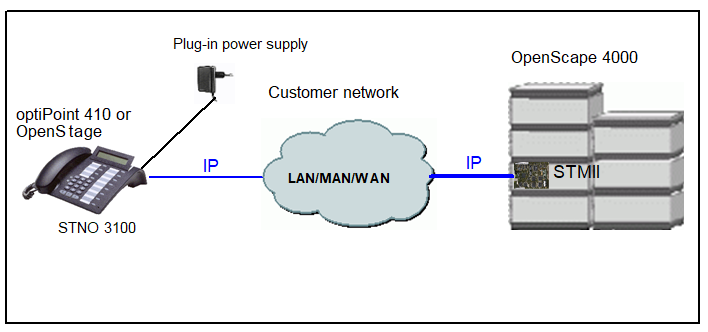
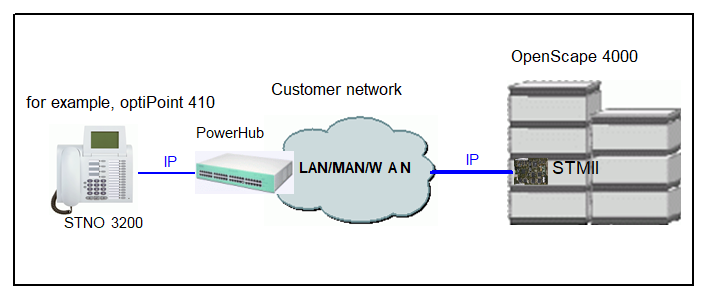
Figure 442. HFA (IP) terminal with PowerHub power supply
To configure a HFA (IP) terminal at the STMI, enter:
ADD-SBCSU:STNO=<number>,TYPE=OPTI,CONN=IP2,PEN=<ltg-ltu-slot-cct>,
DVCFIG=OPTIIP,COS1=<number>,COS2=<number>,LCOSV1=<number>, LCOSV2=<number>,LCOSD1=<number>,LCOSD2=<number>,ITR=<number>,
DPLN=0,STD=<number>,[IPPASSW=<Password>],HEADSET=WITHIND;
IMPORTANT:
For OpenStage and Desk Phone IP: HEADSET=WITHIND
must be configured to get the correct display message in case the headset
key is pressed and no headset is connected.