14.7.7. Signaling and Payload Encryption (SPE) 


IMPORTANT:
The virtual HG 3500 gateways can be configured
to offer either MIKEY or SDES operation but not both at the same
time. The HG 3500 gateways can be configured for MIKEY only.
INFO:
The following steps are the minimum required settings to enable
secure calls using MIKEY or SDES encryption over a HG 3500 gateway configured
directly between OpenScape 4000 and OpenScape Voice systems.
INFO:
SDES is supported only by virtual HG 3500 gateways on OpenScape
4000 SoftGate.
IMPORTANT:
All OpenScape Voice and OpenScape 4000 systems
must be timed accurately using an NTP time server. Over 60 seconds
difference and registration and security will not be possible.
- Copy the system default security certificates from the OpenScape Voice
to your work station. These certificates are located in the
/usr/local/ssl/certsfor theclient.pemand in the/usr/local/ssl/privatedirectory for theroot.pem. - There are dedicated TLS ports on the OpenScape Voice. They can be displayed by logging
on as SRX
user and executing the following command from the SRX directory:
$ startup/srxqry <cr/enter>
-
This provides a long output for each node but look for the entry that shows:SIP TLS Auth Vip: 10.237.84.104 Up ....for IPV4 addressSIP TLS Auth Vip: fd00:10:237:84::104 Up ....for IPV6 address
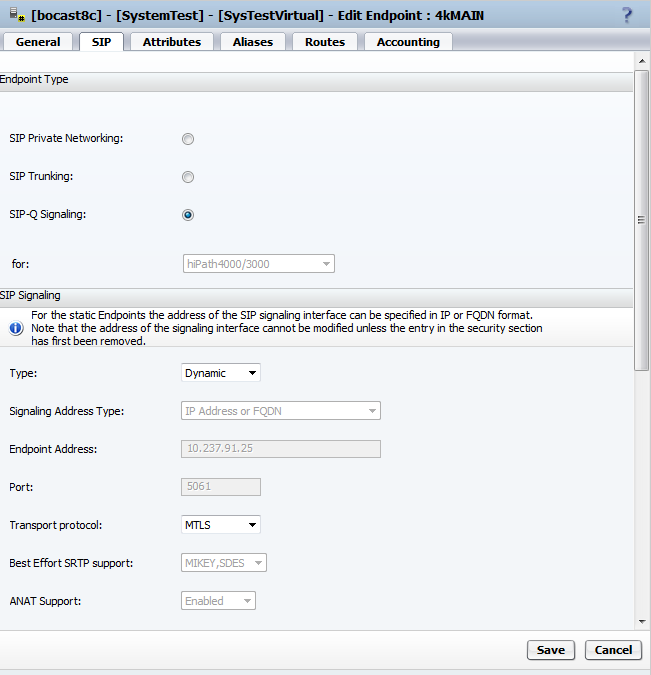
- OpenScape Voice configuration: Add or modify an Endpoint. Required here is SIP-Q
Signaling with the Port set to 5061 and the Transport
protocol is set to MTLS.
Figure 285. OpenScape Voice: Signaling and Payload Encryption: Endpoint configuration
On OpenScape 400
- AMO ZANDE for TYPE=SECURITY must have SPESUPP=YES, SECIPSB=SECURE and SECIPTR=SECURE.
- AMO TDCSU must have SECLEVEL=SECURE.
- AMO CGWB for both HFA and trunk configuration must have SECSUBS=YES and SECTRNK=YES. The REGIP1 and REGIP2 parameters should use the OpenScape Voice TLS port IDs (if the OpenScape Voice is a duplex) as determined from step 2.
- The certificates are now copied to the HG 35xx board by logging on to the WBM.
-
Select Configuration > Security > Signaling and Payload Encryption (SPE) > Import SPE certificate..
Figure 286. OpenScape 4000: Signaling and Payload Encryption: Load SPE CA certificate
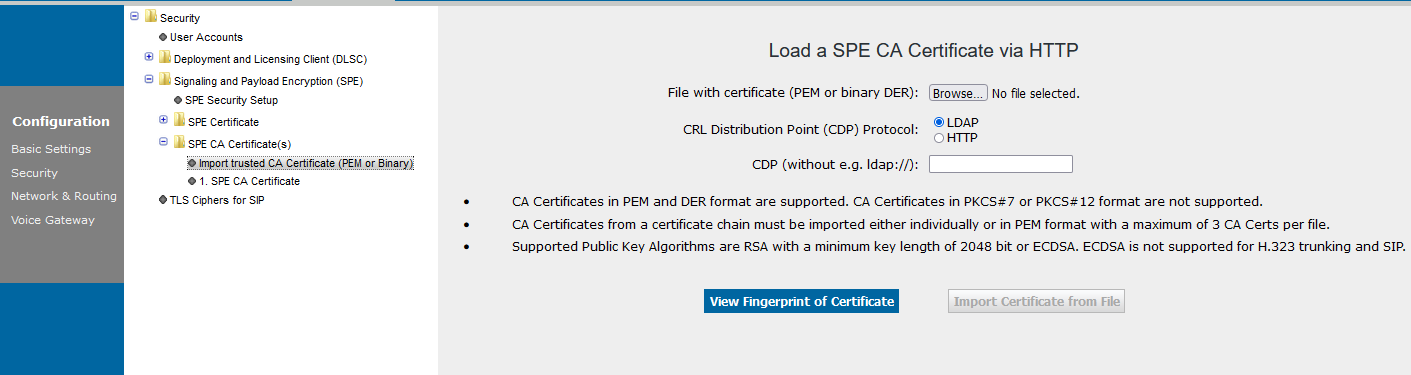 It is advised to install the certificates in the following order:First load the SPE CA Certificate using the root.pem. Right 'click' on SPE CA Certificate to Import trusted CA Certificate. This will now open a new session of the browser titled Load a SPE CA Certificate via HTTP. Use the Browse button to locate and select the
root.pemfile on your workstation. Now select View Fingerprint of Certificate. After verification of the fingerprint select OK. Now Import Certificate from File can be selected.Do the same process for the SPE Certificate and theclient.pemfile.Now the gateway registers on the OpenScape Voice using TLS as transport protocol. For payload SRTP with MIKEY encryption is offered.Figure 287. OpenScape 4000: Signaling and Payload Encryption: Load SPE certificate
 SDES security is available only with SIP Trunk Profile configuration. No changes on the OpenScape Voice settings are required. Changes are only required only in the OpenScape 4000:In AMO CGWB SIPREG must be set to NO:
CHANGE-CGWB:MTYPE=CGW,LTU=22,SLOT=2,TYPE=SIPTRSSA,SIPREG=NO;
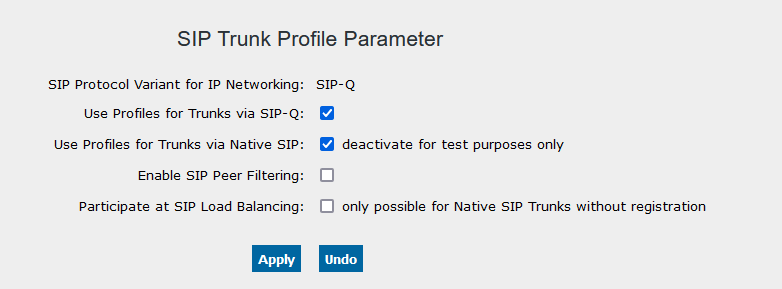
This allows the SIP Trunk Profiles to manage registration from the gateway WBM. These profiles are found and activated by logging on to the WBM, selecting Configuration > Voice Gateway > SIP Trunk Profile Parameter. Right click and select Edit.Use Profiles for Trunks via SIPQ must be enabled/checked and confirm with Apply.Figure 288. OpenScape 4000: Enable use of profiles for SIP-Q trunks
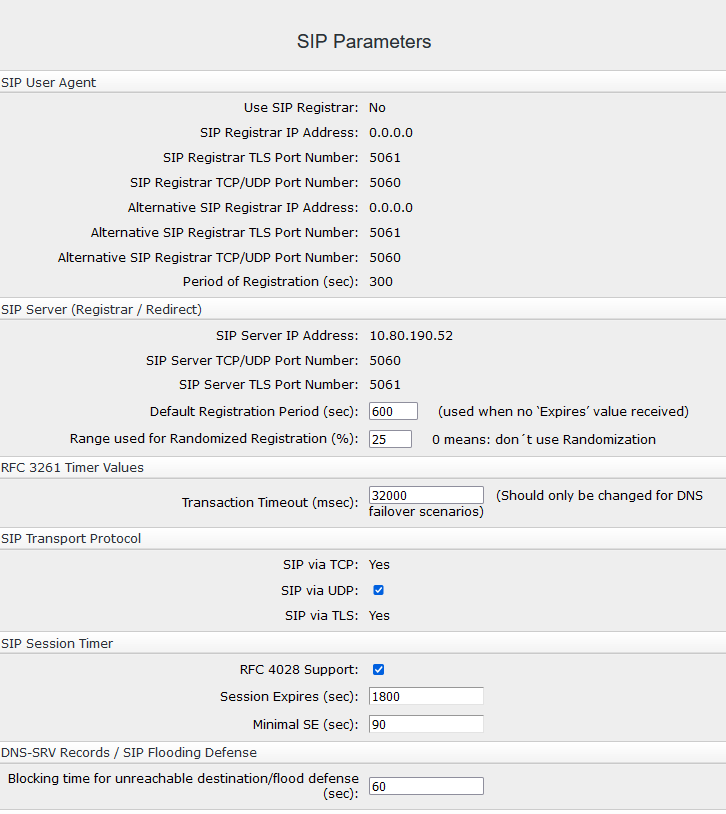
 Now a folder with available for SIP Trunk Profiles is shown. Open this folder, scroll down and select SIPQTrkWithRegistration.Enter the necessary data for the Registrar. The IP Address / Host name should be a DNS-SRV entry and the Registration Interval cannot be set lower than 300 seconds. The Proxy must also be configured with the same information as the Registrar. Outbound Proxy is used to connect to OpenScape Branch or to another Branch/Proxy device. Scroll down to the bottom of this screen and select SDES security with Fallback to Insecure.
Figure 289. OpenScape 4000: Settings for SIP Trunk Profile
 Here you can see how it should look after configuration:
Figure 290. OpenScape 4000: SIP Trunk Profile - Part 1
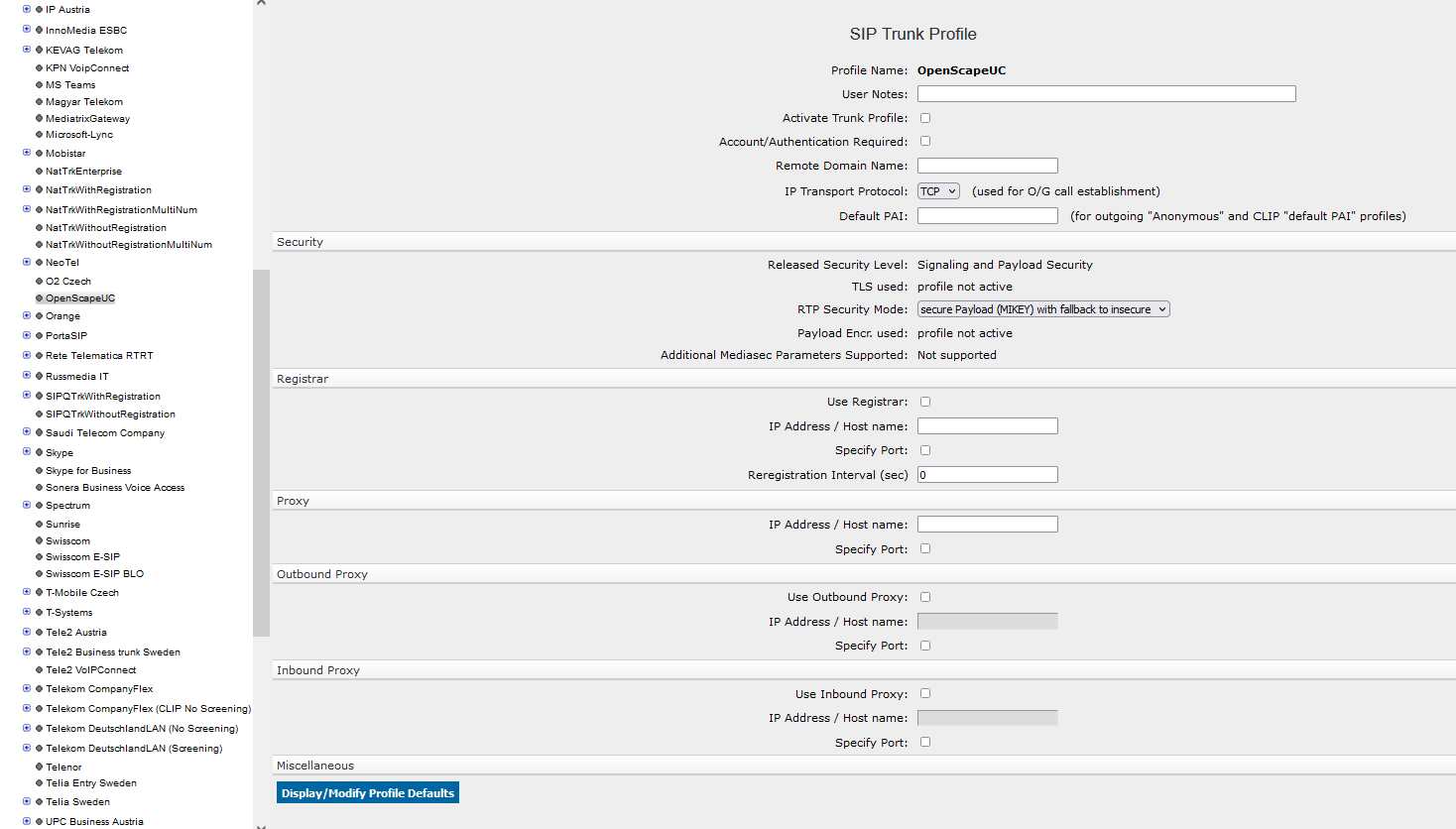 Select the RTP Security Mode:
Figure 291. OpenScape 4000: SIP Trunk Profile - Part 2
 Now a sub-menu appears to configure the Account Name. You can edit the account name by right click. The Account Name must be identical with the GWDIRNO configured in AMO CGWB, TYPE=LEGKDATA.
CHANGE-CGWB:MTYPE=CGW,LTU=22,SLOT=2,TYPE=LEGKDATA,GWDIRNO=166,REGEXTGK=NO;
Now activate the profile with right click on SIPQTrkWithRegistration.Save the configuration.The folder is RED if the gateway is not registered successfully on the OpenScape Voice and OpenScape Branch. It turns GREEN when registration was successful.
 - End-to-end secure calling
The OpenScape 4000 and its SIP gateway are now configured to support Signaling and payload security (SPE) on the SIP-Q trunk to the OpenScape Voice. To have end-to-end secure calls which is displayed on the phones, the devices must be configured secure, too. Configure the SIP phones in the same way as the gateway by importing proper OpenScape Voice security certificates. After the certificates are installed a secure connection icon is displayed on the phones.
IMPORTANT:
On the OpenScape Voice both optiPoint and OpenStage devices can be MIKEY, but only OpenStage devices support SDES.Check the SIP transport protocol (should be TLS) for the OpenStage devices and make sure that the Connectivity check timer has a value greater than 0 (in this example 100).OpenStage IP Admin > System > SIP InterfaceFigure 292. OpenStage: SIP interface settings
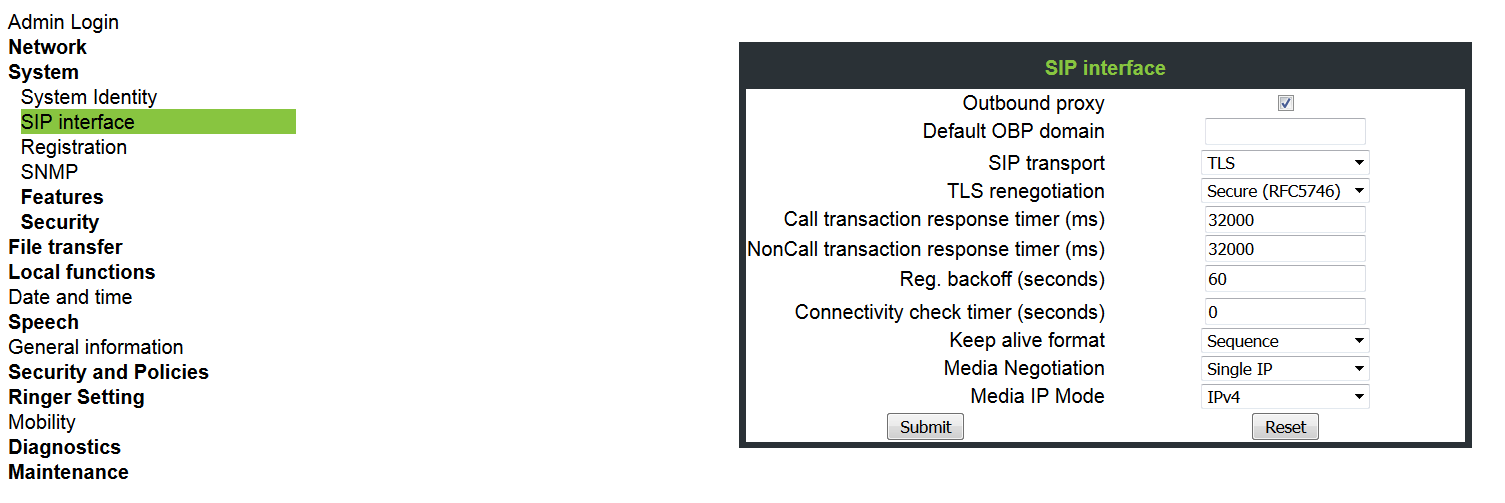 Then move to the Security section. Select System and enable Use secure calls and select an SRTP type. In case of OpenStage you can choose between MIKEY and SDES.OpenStage IP Admin > Security > System
Figure 293. OpenStage: Security settings
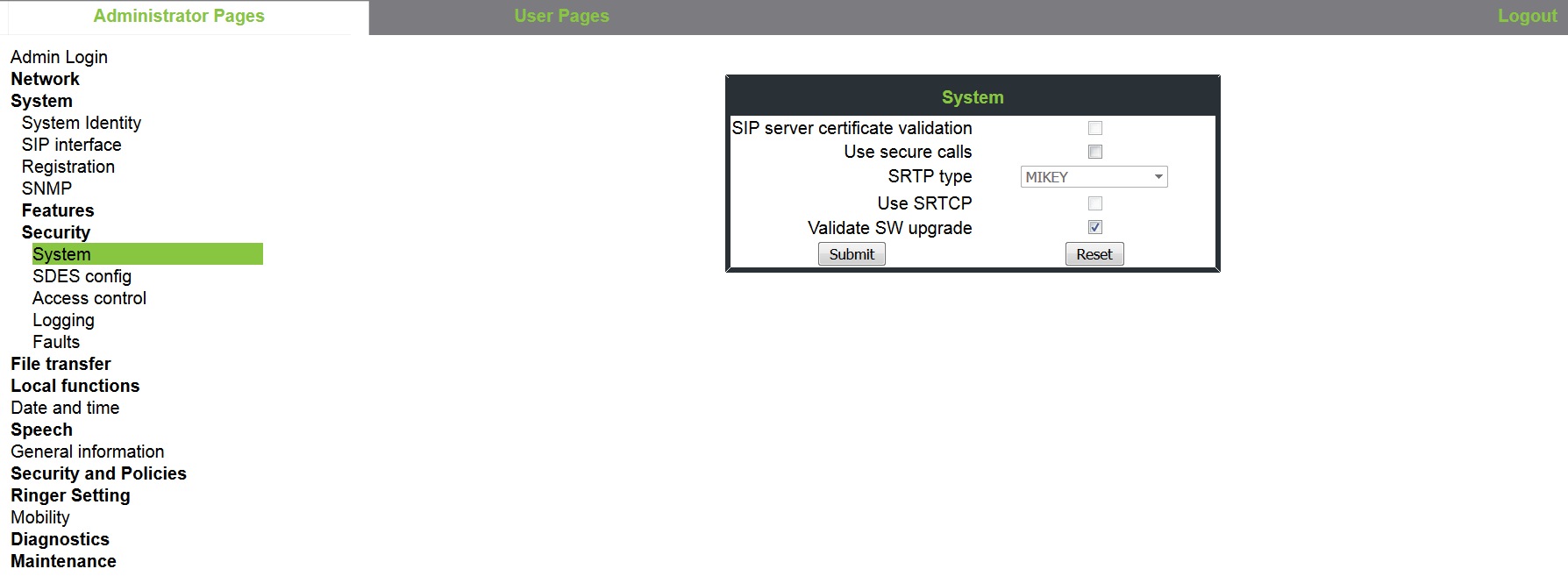 Then there is a SDES configuration selection that allows you to change SDP negotiation (by default it is SRTP and RTP) and the priority of the SDES SHA1-80 or SHA1-32 methods. These can also be left at the defaults which has the SHA1-80 as the highest priority.For subscribers on the OpenScape Voice the configuration must have Transport Protocol set to TLS and the Port set to 5061.Common Management Portal > OpenScape Voice > Business Group > Main Office > Members > Subscribers
Figure 294. OpenScape Voice: Subscriber configuration > Tab “Connection”
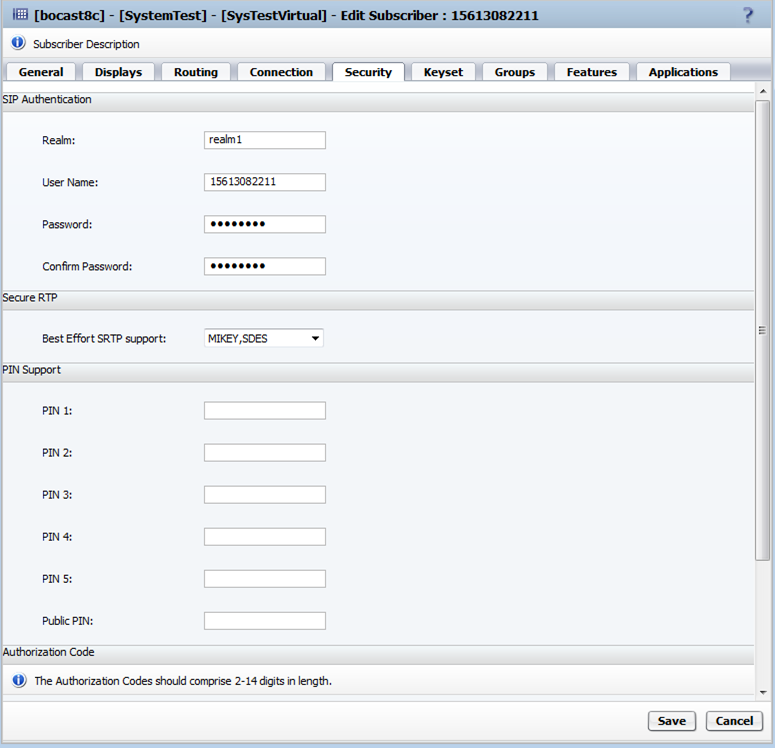
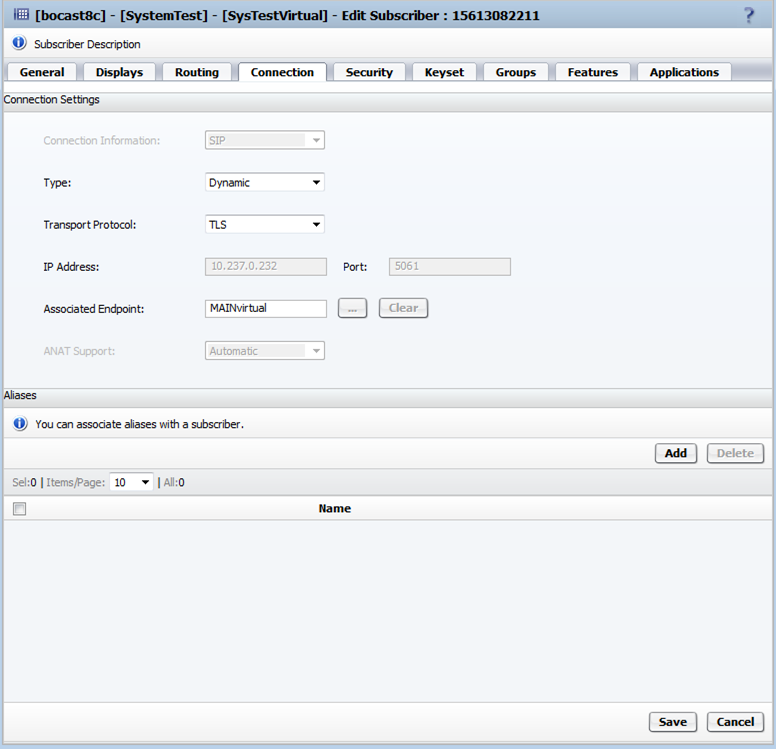 Under the Security tab, the Secure RTP can be left at its default of MIKEY, SDES.
Figure 295. OpenScape Voice: Subscriber configuration > Tab “Security”
INFO:
The SIP authentication fields are for Digest Authorization and are not required for SPE operation.