14.7.8. OpenScape Voice Route to OpenScape 4000 


To access the endpoint a destination and route must be configured.
Common Management Platform > OpenScape Voice > Business Group
> Destinations and Routes > Destinations > Add
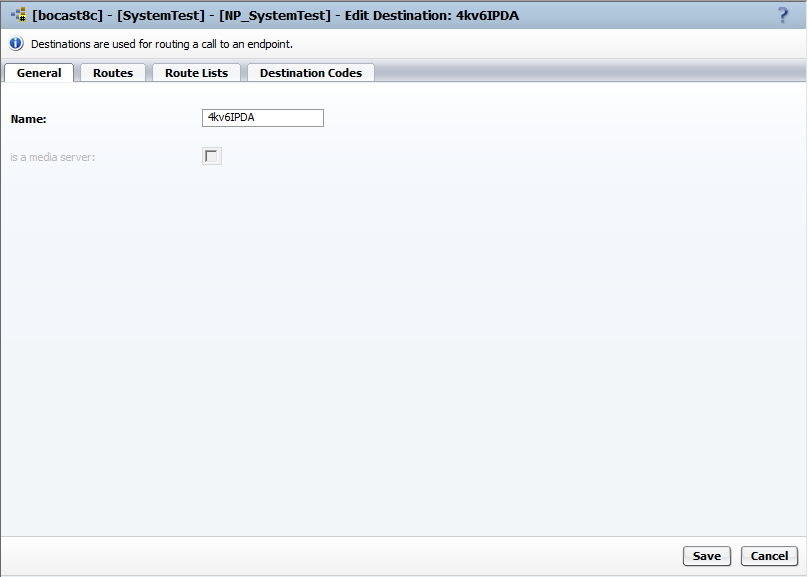
Navigate to the Destinations folder and select Add.
A new folder opens on the General tab.
Create a name for the Destination table (e.g.: 4kv6IPDA) and don’t
activate the checkbox is a media server. Confirm with Save.
Figure 296. OpenScape Voice: Destination and route configuration
Return to the Destinations folder for 4KV6IPDA and navigate
to the tab Routes and select Add.
Figure 297. OpenScape Voice: Destination and route configuration
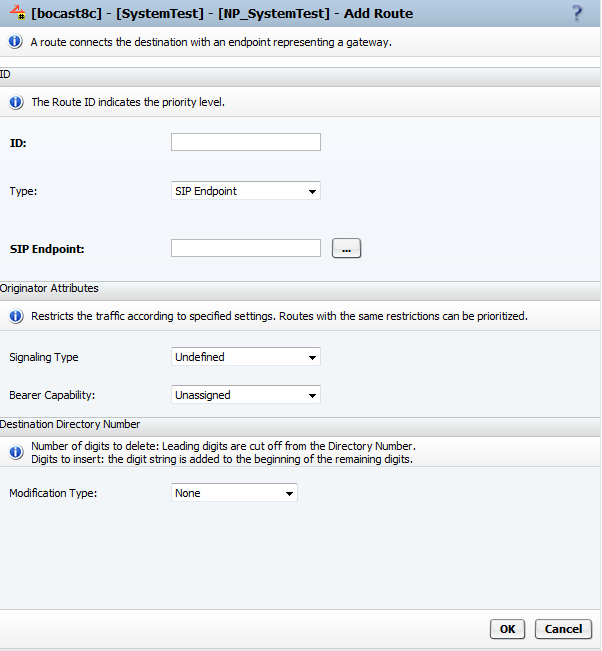
ID: Any number can be used. But typically if it is the first
route then use "1". The number of the route ID also indicates the priority
level if more than 1 route is configured.
Type: Default is SIP Endpoint. Don’t change.
SIP Endpoint: Use menu to select your endpoint, e.g. 4KV6IPDA
Signaling Type: leave the default
Bearer Capability: leave the default
Modification Type: leave the default
Now select OK at the bottom of the tab.