13.3.2. Connecting Announcement Units 


Possible announcement units are the Musifone multimax from Bayer and
the Genius ST from Speech Design. All these devices can be run in CONTINUOUS
or START/STOP mode. The predecessor of Musiphone multimax was Musiphone
5000 S. The following section describes how to connect these devices
to the TMOM2 board.
- Musifone 5000 S:
This device has a text memory for announcements between 32 and 320 secs.If you are using the Bayer Musifone 5000 S, you should use the following settings:- CONTINUOUS operating mode: Functional setting = 4, Operating mode setting = 8.- START/STOP operating mode: Functional setting = 4, Operating mode setting = 9.The following diagram shows the announcement unit connected to circuit 0 of the TMOM board in START/STOP mode.
Figure 126. TMOM Connection Musiphone 5000 S
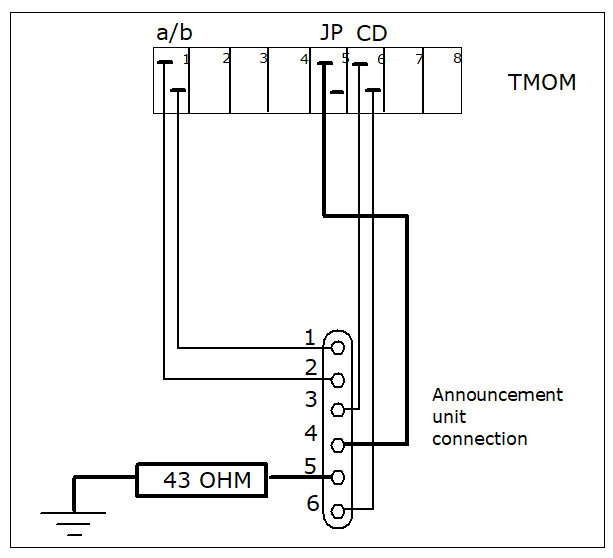 If the announcement unit is to be run in CONTINUOUS mode, the TMOM input JP does not need to be wired (bold lines). In order for the announcement unit to repeat automatically, pins 4 and 5 of the announcement unit interface must be bridged.
 - Musiphone multimax
This device is a further development of the Musifone 5000 S. It has 8 independent text memories.The following diagram shows the announcement unit connected to circuit 0 of the TMOM board in START/STOP mode.
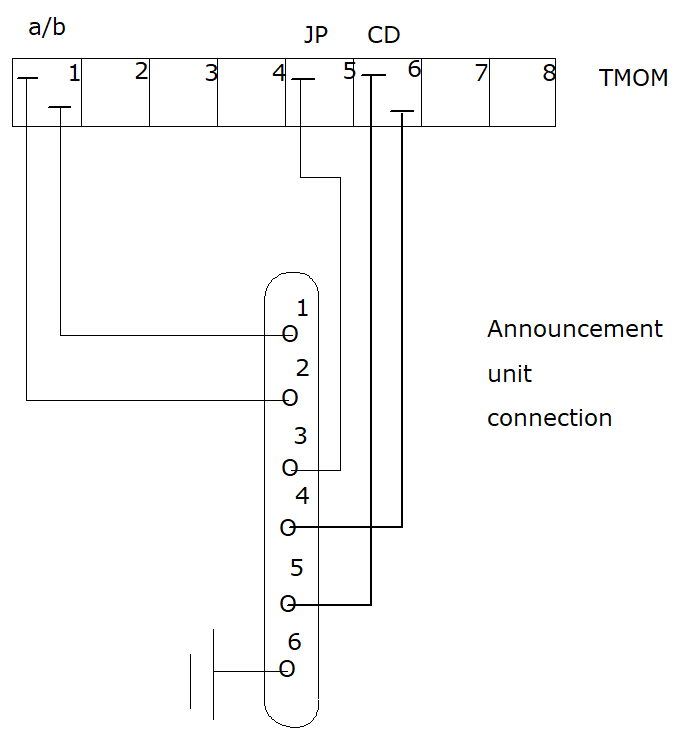 TMOM connection to Musiphone multimax
 - Genius ST:
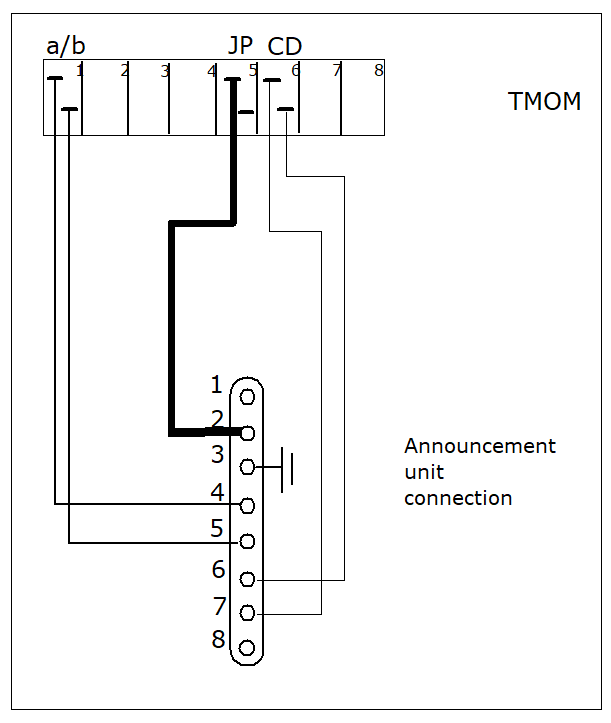
This device has 2-4 independent text memories. Text 1 can be up to 3 minutes in length; all other texts can be max. 32 seconds long.No changes to the DIP switch settings are necessary.- CONTINUOUS operating mode:Activate the used text memories manually with the appropriate buttons. The announcements are then played back continuously in looped mode.- START/STOP operating mode:Do not activate the text memories manually.The following diagram shows the announcement unit connected to circuit 0 of the TMOM board in START/STOP mode.
Figure 127. TMOM Connection Genius ST
 If the announcement unit is to be run in CONTINUOUS mode, the TMOM input JP does not need to be wired (bold lines).