8.9.3. Example 


Figure 93. Hunting group, network wide: Example
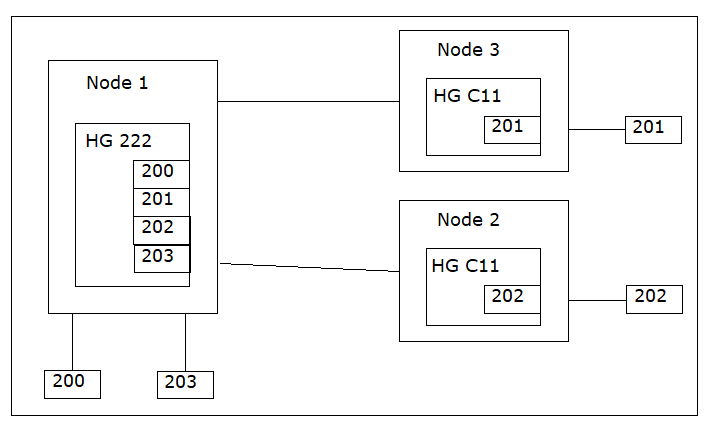
Generating node 1:
The actual hunting group with internal and external stations is configured
in this node.The feature will only work if LVAFTEXT is set to N!
CHA-FEASU:TYPE=A,CM=HTNW;

ADD-DIMSU:TYPE=USER,HGMEMB=<number of configured
hunting group stations>;

ADD-SA:TYPE=VCE,CD=222,STNO=200&201&202&203,
STYPE=LIN,CQMAX=0,LVAFTEXT=N;

CHANGE-TAPRO:STNO=200,KY12=HT;

CHANGE-TAPRO:STNO=202,KY12=HT;

CHANGE-ZAND:TYPE=ALLDATA2,DISCLHNT=YES;
Generating nodes 2 and 3:
An additional fictitious hunting group is configured in nodes 2 and
3 (in this case, it has the number "C11", which cannot be dialed). The
fictitious can be either DAR HUNT or a floating (FLOAT) station as the
head station to allow the HG button to function (meaning the station
can leave the hunting group using the HG button). Furthermore with
this configuration, the external stations (201, 202) are merely members
and not masters of the hunting group i.e. as a result, there are no restrictions
on these stations when they are called directly (for example, callback).
Set the DISCLHNT parameter to YES so that the external stations can
leave the hunting group.
Generating node 2:
CHA-FEASU:TYPE=A,CM=HTNW;

ADD-DIMSU:TYPE=USER,HGMEMB=<number of configured
hunting group stations>;

ADD-WABE:CD=C11,DAR=HUNT,CHECK=N;

ADD-SA:TYPE=VCE,CD=C11,STNO=201,STYPE=CYC,CQMAX=0,
LSTMBOFF=Y;

CHANGE-TAPRO:STNO=201,KY12=HT;

CHANGE-ZAND:TYPE=ALLDATA2,DISCLHNT=YES;
Generating node 3:
CHA-FEASU:TYPE=A,CM=HTNW;

ADD-DIMSU:TYPE=USER,HGMEMB=<number of configured
hunting group stations>;

ADD-WABE:CD=C11,DAR=HUNT,CHECK=N;

ADD-SA:TYPE=VCE,CD=C11,STNO=202,STYPE=CYC,CQMAX=0,
LSTMBOFF=Y;

CHANGE-TAPRO:STNO=202,KY12=HT;

CHANGE-ZAND:TYPE=ALLDATA2,DISCLHNT=YES;