10.10.3. Prerequisites 


- LCR Dialing Plan Configuration
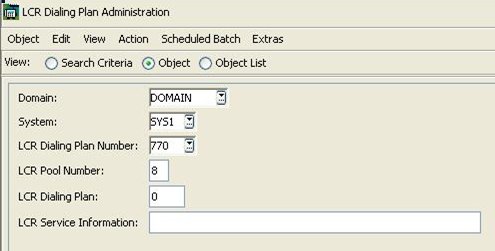
Only for DDI table type of CLIMA records.In order to add a DDI type of clima record , user must add a dial plan having the following values.
- LCR Dialing Plan Numbers:
DPLNUM=770 is reserved for DDI tableDPLNUM=771-789 for CLI tables 1-19
- LCR Pool Number : 8
LWMPOOL=8
- LCR Dialing Plan :0
DIALPLAN=0 for DDIDIALPLAN=1-19 for CLI. 1 -19Create the DDI/CLI tables with AMO CLIMA (770 for the DDI table,771-789 for the CLI tables).
- LCR Dialing Plan Numbers:
- To add a clima record having dial plan number "x", user should previously add a dial
plan having
dial plan number "770 + x" and LCR Pool Number 8 in OpenScape 4000 Assistant "LCR
Dialing
Plan Administration" dialog.
For example if an user want to create a clima record having dial number 1, 771 dial plan having poll number 8 should be added first.For all table types(DDI & CLI) is the following
Figure 96. LCR Dialing plan configuration
- Assign the COT parameters:
- CLNA (for CLI name translation)
- CLNO (for CLI number modification)
- CLAC (for CLI action/ call barring)
- DDIC (for DDI control)
- CLNI (CLI number unknown - no intercept to attendant console)