10.10.4. Service Information 


How calls are processed:
- An incoming call is received with a called number (e.g. WABE access code STN/TLN)
- If COT parameter DDIC is set, the called number is checked against the DDI table (only when the digit analysis result is station or a hunt group). This table will determine which CLI table to use for checking the CLI number.
- If COT parameter DDIC is not set, or if the DDI table is empty, or if the called number is not found in the DDI table, only the first CLI table will be used. Specifically, this means if you are checking for CLI only and not called party/DDI, then configuration entered in CLI tables 2-19 will not be checked, only CLI table #1 will be searched.
- Then the CLI number (from step 1) will be checked against the CLI table.
- If the calling number is found in the CLI table the following will
happen:
- If COT parameter CLNA is set, the calling party name will be overwritten by the name from the CLI table.
- If COT parameter CLNO is set, the calling party number will be overwritten by the number from the CLI table.
- If COT parameter CLAC is set, the CLI action from the CLI
table will be executed:
- For REJECT the calling party will be disconnected.
- For RESTRICT the call will be routed to the hotline destination specified in the CLI table.
- For ACCEPT the call will be accepted (to the called destination).
- If at least one of the COT parameter CLNA or CLNO or CLAC
is set :
- the call will be accepted (sent to called party) if COT DDIC is not set.
- the call will be intercepted to Attendant if COT DDIC is set and COT CLNI is not set.
- the call will be accepted if COT DDIC and COT CLNI are set and calling number has PresInd Restricted.
- If none of the COT parameters CLNA or CLNO or CLAC is set, then the call will be accepted (sent to called party).
Scenarios
- Incoming call is rejected
If an incoming call is rejected by this feature the call is cleared with cause "incompatible destination" in order to disable a callback attempt from the calling party.
- Incoming call to a station that is restricted
For an incoming call to a station that is restricted, the hotline destination is called. If this hotline destination is busy the call is cleared with cause "incompatible destination" in order to disable a callback attempt from the calling party.
- Call back
There is an incoming call to a station where the calling party name/number is modified according to this feature and the calling party activates a callback. Then during callback execution the original name/number of the calling party will appear and not the modified name/number.
Restriction
This feature will only work for incoming digital trunks (including
IP trunks). The new COT parameters can only be set for digital trunks.
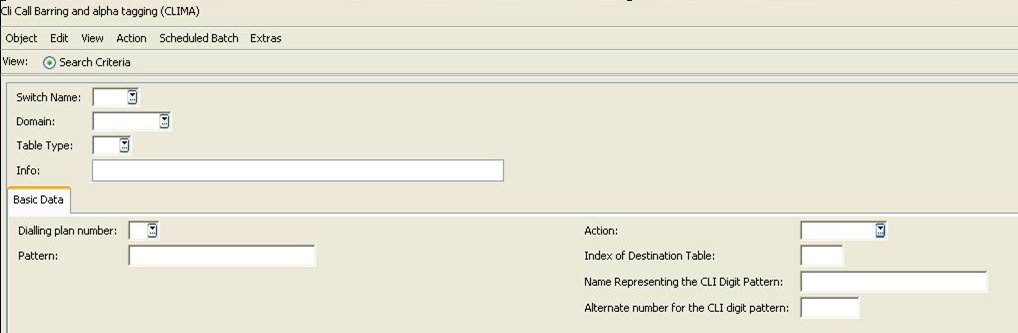
"CLI Call Baring and Alpha Tagging (CLIMA)" in OpenScape 4000 Assistant/Manager
The "CLI Call Baring and Alpha Tagging (CLIMA)" is available
in CM Assistant and CM Manager. There is a close relationship between
"CLIMA" (Start Page > Configuration Management
> Tables > Dial Plan) and "LCR Dialing Plan
Administration" (Start Page > Configuration Management
> Least Cost Routing) dilalogs. To use all functionality in
CLIMA dialog, user should first configure LCR Dialing Plans by using
"LCR Dialing Plan Administration" .
Rules for CLIMA
To add/modify a clima record you should obey the rules mentioned below.
If you do not obey the rules, an error message appears.
- For all clima table types, the user must specify the switch name, table type dial plan and pattern.
- If the user tries to add a CLI type of clima record, Action must be specified.
- If the user specified restrict value in action field, "Index of destination table" must be also specified. This value must be between 1 and 2512.
- During adding/modifying DDI type of clima record, it is not allowed to enter values for "Action", "Index of Destination Table", "Name Representing the CLI Digit Pattern" and "Alternate Number for the CLI Digit Pattern".
- Pattern should be unique among the all clima records and change operation on pattern field is not allowed like table type.
- Pattern could be a combination of 0..9xXzZ.
- Dial plan number must be in the range between 1-19.
- Dial plan number choice list shows the list of predefined LCR dial
plan number – 770 in the range between 770 and 790.
Figure 97. CLI call barring and alpha tagging (CLIMA)