10.2.2.1. Configuring a “Networked” Access Point 


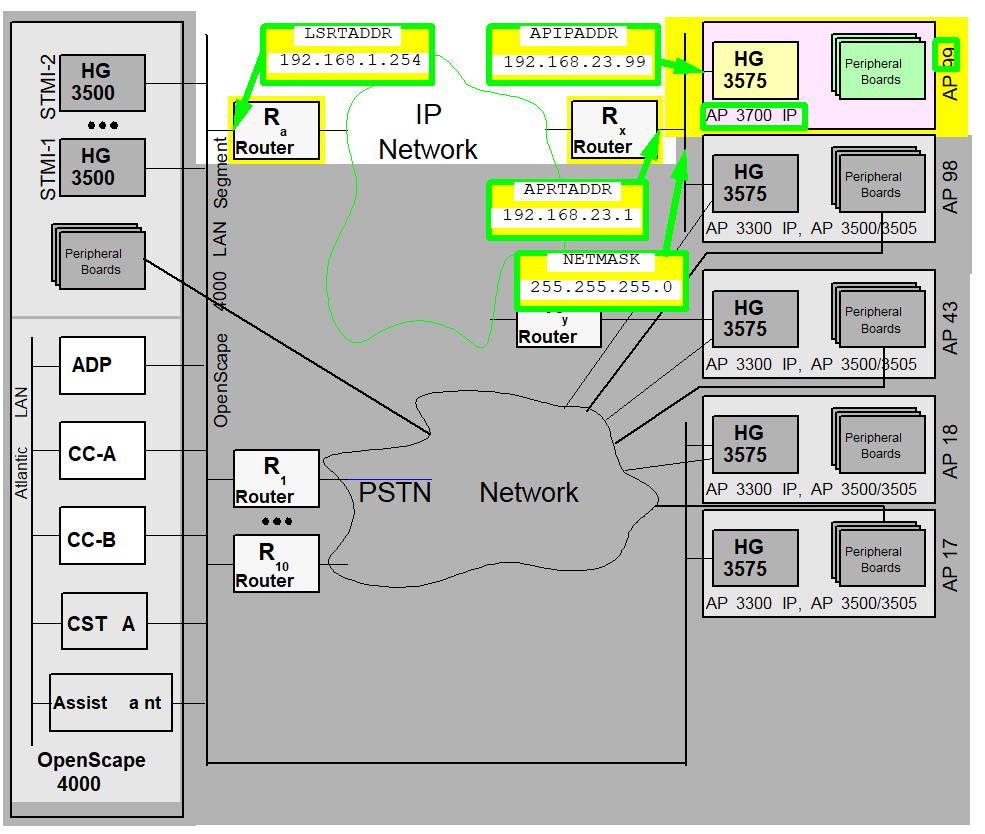
Figure 179. Configuring a “networked“ access point
ADD-UCSU: |
UNIT=AP, |
LTU=99, |
LTPARTNO=Q2305-X35 |
SRCGRP=2, |
|
FRMTYPE=AP 9837009, |
CONNTYPE=APNW, |
|
LSRTADDR=192.168.1.254, |
APRTADDR=192.168.23.1, |
|
LOCID=2, |
LOCATION=“BLN ROHRDAMM 85. GEB. 30-222”, |
|
PHONE=03038612345, |
FAX=03038654321, |
|
PLCHECK=YES, |
BCHLCNT=40, |
|
CONVLAW=NO, |
SIGMODE=HSRTCP;
|
|
ADD-APRT: |
TYPE=APNET, |
LTU=99, |
APIPADDR=192.168.23.99, |
NETMASK=255.255.255.0; |
Figure 14 “Configuring a “networked“ access point”
shows the fundamental information required for configuring a “networked“
access point
- The fact that the access point is linked via router with the OpenScape 4000 LAN segment: Link type APNW, i.e. “networked“.
- The LTU number of the access point, i.e. 99.
- The LTU part number specifies the HG 3575 used.
- The access point’s shelf type is derived from the type designation.
- The IP address of the access point: 192.168.23.99.
- The IP address for the TAP/Service PC link at the access point: 192.168.23.199.
- The IP address of the router (port), via which AP99 accesses the OpenScape 4000 LAN segment: 192.168.23.1.
- The netmask in the segment of the AP99: 255.255.255.0.
- The IP address of the router (port) at the OpenScape 4000 LAN segment, via which the AP99 can be accessed by the central components in the OpenScape 4000 LAN segment, i.e. in this case: 192.168.1.254.
- By limiting the number of B-channels, the bandwidth available to AP99 is indirectly reduced in the configuration example. This mechanism works independently of the bandwidth limitation performed by the Resource Manager in the “Large Enterprise Gatekeeper” Feature. For further information, please refer to Chapter 3, “Load Calculation”.
- Should Payload Quality Handling be activated? For details see Section 2.9, “Payload Survivability”.
- The Source Group Index is explained in detail in Section 2.8, “Source Dependent Routing”.
Additional data is explained in more detail with the corresponding AMO
parameters.
Generation
An access point is configured with three AMOs (UCSU, APRT, STMIB)
and activated with USSU.
UCSU
With the AMO UCSU, the access point is configured as a new shelf in
the system and its reachability via routers is ensured.
 |
Configuration Management > System Data > IPDA > IPDA Access Point
Click New and enter the LTU of the access point.
Enter the relevant data on the General and IP Interface (NW) (Connect
Type=APNW) tab and Save.
|
 |
|
IMPORTANT:
The parameters FRMTYPE and CONNTYPE
cannot be changed after the ADD!
IMPORTANT:
Prior to
ADD-UCSU, use ping
to check that the IP addresses given to you by the administrator are
reachable. LSRTADDR and APRTADDR must respond.Table 35. APNW: AMO UCSU parameters in ADD branch under TYPE=AP
|
AMO
|
Parameter
|
Sprache/ Language
|
Beschreibung/Description
|
||
|
UCSU
|
LTSACHNR
|
d
|
Sachnummer der LTU-Baugruppe,
hier die Sachnummer der verwendeten NCUI2+/NCUI4.
|
||
|
LTPARTNO
|
e
|
Part Number of the LTU Board,
here part number of the NCUI2+/NCUI4 used.
|
|||
|
SRCGRP
|
d
|
Source Group Index
Zuordnung
des Access Points in eine Source Group für “Source Dependent Routing”.
(Wegesuche in Abhängigkeit vom Rufenden) Dieser Parameter ist wichtig
für Source Dependent Routing und Payload Survivability und wird dort
näher beschrieben.
|
|||
|
SRCGRP
|
e
|
Source Group Index
Assignment
of the Access Point to a Source Group for “Source Dependent Routing”.
This parameter is relevant for Source Dependent Routing and Payload
Survivability and will be described in more detail there.
|
|||
|
FRAMETYP
|
d
|
Typ des LTU-Rahmens (Shelf Typ)
|
|||
|
AP-Typ
|
FRAMETYP
|
||||
|
AP 3300 IP
|
L80XF
|
||||
|
AP 3500 IP
|
INCH19
|
||||
|
AP 3700 IP
|
AP37009
|
||||
|
FRMTYPE
|
e
|
Type of the LTU Frame (Shelf Type)
|
|||
|
AP-Type
|
FRAMETYPE
|
||||
|
AP 3300 IP
|
L80XF
|
||||
|
AP 3500 IP
|
INCH19
|
||||
|
AP 3700 IP
|
AP37009
|
||||
|
VERBART
|
d
|
Art der Verbindung zwischen Access
Point und Zentrale Für IPDA kommen nur die Werte APDL und APNW in Frage.
APNW
- Access Point via Network: Access Point und Zentrale werden in unterschiedlichen
IP-Netzen betrieben, welche über Router miteinander verbunden sind.
|
|||
|
CONNTYPE
|
e
|
Type of the Connection between
Access Point and the Central Switch
Only the values APDL and APNW
are possible for IPDA.
APNW - Access Point via Network: Access
Point and central switch are located in different IP-Networks interconnected
by routers.
|
|||
|
LSRTADR
|
d
|
Adresse des Routers im OpenScape
4000 LAN Segment
VERBART=APNW:
IP Adresse des Routers (Ports)
im OpenScape 4000 LAN Segment, über den der Access Point / das Netz,
in dem sich der Access Point befindet, erreichbar ist.
|
|||
|
LSRTADDR
|
e
|
Address of the Router in the OpenScape
4000 LAN Segment
CONNTYPE=APNW:
IP address of the router
(port) in the OpenScape 4000 LAN Segment, via which the Access Point
/ the network, where the Access Point is located, is reachable.
|
|||
|
APRTADR
|
d
|
Adresse des Routers im Netzwerk
des Access Points
IP Adresse des Routers (Ports) im Netz, in dem
sich der Access Point befindet, über den der Access Point Adressen außerhalb
dieses Netzes erreicht.
VERBART=APNW:
Über diesen Router
muss der Access Point CC-A, CC-B, ADP und die HG 3500 Baugruppen im OpenScape
4000 LAN Segment erreichen sowie alle anderen Access Points *).
*)Ausnahmen
für Sonderrouten sind möglich und werden im Routing Table Zweig des
AMO APRT eingerichtet.
|
|||
|
APRTADDR
|
e
|
Address of the Router in the Access
Point’s Network
IP address of the router (port) in the network
where the Access Point is located, via which the Access Point reaches
addresses outside of this network.
CONNTYPE=APNW:
Via this
router the Access Point must be able to reach CC-A, CC-B, ADP and the
HG 3500 boards in the OpenScape 4000 LAN Segment as well as all other
Access Points*).
*) Exceptions for special routes are possible.
They are administered in the routing table branch of AMO APRT.
|
|||
|
STANDOID
|
d
|
Standort Identifikation
Schlüsselzahl
zur Identifikation des Standorts eines Access Points, der unterschiedlich
zum Standort der Zentralanlage sein kann. Der Parameter wird benötigt,
um den vertrieblichen Bestand (PARK-Daten) der Anlagenteile standortabhängig
zu pflegen. Der Wert wird vom Konfigurator-Tool vergeben und muss so
übernommen werden. Gegebenenfalls ist der Wert vom Systemplaner zu erfragen.
Ist kein Tool-generierter Wert verfügbar, z.B. bei Teststellungen, soll
der Wert 999 verwendet werden, um dies auszudrücken. Bei Erweiterungen
an einem Standort (zusätzlicher Access Point) kann der Wert des bereits
existierenden Access Points übernommen werden. Systemkomponenten in
einem anderen Raum, Stockwerk, oder Gebäude werden unter einer anderen
Standort-Identifikation geführt!
|
|||
|
LOCID
|
e
|
Location Identification
Key
number for identification of the location of an Access Point, which can
differ from the location of the central switch. This parameter is necessary
to maintain the sales database for the parts of the system, based on
locations. The value is determined by the Configurator tool and must
be taken over unchanged. If necessary, ask the system planner for the
value. If no tool-generated value is available, e.g. for test and demo
configurations, the value 999 shall be used to express this. For expansions
at a certain location (additional Access Point), the value of the already
exisiting Access Point can be taken. System components in another room,
floor or building are listed under a different location ID.
|
|||
|
STANDORT
|
d
|
Angabe darüber, wo der Access
Point zu finden ist.
z.B. Firma, Ort, Straße, Gebäude, Stockwerk,
Raumnummer, ...
Maximal 48 Zeichen können eingegeben werden.
|
|||
|
LOCATION
|
e
|
Info, where to find the Access
Point
E.g. Company, city, street, building, floor, room number,
...
A maximum of 48 characters is allowed.
|
|||
|
TEL
|
d
|
Telefonnummer am Standort des
Access Points
Nächstgelegenes Telefon, über das ein Techniker
vor Ort am Access Point erreicht werden kann.
|
|||
|
PHONE
|
e
|
Phone number at the Access Point
The
nearest phone, where a service engineer can be reached at the Access
Point.
|
|||
|
FAX
|
d
|
Faxnummer am Standort des Access
Points
Nächstgelegenes Faxgerät, über das ein Techniker vor
Ort am Access Point erreicht werden kann.
|
|||
|
FAX
|
e
|
Fax number at the Access Point
The
nearest fax, where a service engineer can be reached at the Access Point.
|
|||
|
PLCHECK
|
d
|
Payload Quality Check
Gibt
an, ob für diesen Access Point auf schlechte Payload Qualität reagiert
werden soll (durch Sperren der Verkehrsbeziehung bzw. Weg über Payload
Survivability) oder nicht. -> Section 2.9,
“Payload Survivability”
|
|||
|
PLCHECK
|
e
|
Payload Quality Check
Defines
whether this Access Point shall react on bad Payload Quality (by blocking
of the relation or routing via Payload Survivability Path) or not.
|
|||
|
ANZBKAN
|
d
|
Anzahl B-Kanäle
Gibt an,
wieviele B-Kanäle an der Schnittstelle zwischen Access Point und LAN
gleichzeitig genutzt werden dürfen. Auf diese Weise lässt sich die
maximale Bandbreite, die der Access Point im LAN benötigt, grob begrenzen.
|
|||
|
BCHLCNT
|
e
|
B Channel Count
Defines
how many B channels may be used concurrently at the interface between
Access Point and LAN. By this the maximum bandwidth needed by an Access
Point can be limited coarsely.
|
|||
|
KONVLAW
|
d
|
Konvertierung von A-Law zu µ-Law
bzw. µ-Law nach A-Law auf der HG 3575 Baugruppe.
|
|||
|
CONVLAW
|
e
|
Conversion from A-law to µ-law
or µ-law to A-law on the HG 3575 board.
|
|||
APRT
With the AMO APRT, the access point is assigned its own IP address.
|
|
Configuration Management > System Data
> IPDA > IPDA Access Point
Click Search and select
the access point.
Enter IP addresses on the IP Interface (NW)
tab and Save.
|
|
|
|
IMPORTANT:
Prior to
ADD-APRT, use ping
to check that the IP addresses given to you by the administrator are
reachable. APIPADDR must not respond, as this would indicate that
the corresponding address had already been assigned. APIPADDR
must be set differently for every access point. The AMO does not verify
if this rule is observed.Table 36. APNW: AMO APRT parameters in ADD branch under TYPE=APNET
|
AMO
|
Parameter
|
Sprache/ Language
|
Beschreibung/Description
|
|
APRT
|
APIPADR
|
d
|
Eigene IP-Adresse des Access Points
VERBART*)=APNW:
IP-Adresse
des Access Points an dessen Ethernet-Port.
APIPADR muss für jede
Baugruppe unterschiedlich sein. Der AMO prüft nicht die Einhaltung dieser
Regel.
*) AMO UCSU, ART=AP: siehe Parameter VERBART in
Table 6 “APNW: AMO UCSU parameters in ADD branch under TYPE=AP”
|
|
APIPADDR
|
e
|
Own IP Address of the Access Point
CONNTYPE*)=APNW:
IP
address of the Access Point’s ethernet port.
APIPADDR must be
different for every board. The AMO does not check compliance with this
rule.
*) AMO UCSU, ART=AP: see see parameter CONNTYPE
in Table 6 “APNW: AMO UCSU parameters in ADD branch under TYPE=AP”
|
|
|
NETMASK
|
d
|
Netzmaske des Netzes, dem APIPADR angehört
|
|
|
NETMASK
|
e
|
Netmask of the network which APIPADDR is part
of
|
With the AMO APRT, additional functions of an access point can be
configured.
- Signaling survivability
- Payload survivability - alternative routes -> Section 2.9, “Payload Survivability”
- Additional routes in the IP network which cannot/should not be accessible via the default router in the network of the access point or in the OpenScape 4000 LAN segment -> Section 2.5, “Special Routes”
STMIB
Nothing special has to be configured with STMIB. The CHANGE branches
allow a multitude of parameters to be set. Details are described in Section 2.2.3,
“Changing Access Point Parameters with the AMO STMIB”.
USSU
In order to actually put the access point into operation after the
configuration process, it has to be activated.
|
|
Configuration Management > System Data
> IPDA > IPDA System Data
Click Search and select
the access point.
Click Execute on the Action pull-down
menu
and set the mode of action Configure AP, confirm with
OK.
|
|
|
|
From this moment on, the OpenScape 4000 CC attempts to reach the access
point and, as soon it achieves this, to start it.
IMPORTANT:
Prior to
EXEC-USSU:CONFAP, the
configuration must be updated on the system hard disk, Otherwise, the
data on the system would conflict with the data on the HG 3575 when the
system is reloaded and could only be synchronized again with EXEC-USSU:UPDATAP,LTU
number,UL.In order to be able to reach the access point from the CC upon initial
installation, various data has to be entered locally at the access point
(see Section 2.2.5,
“Local Configuration of an Access Point”).