10.2.5.2. Special Routes between Access Point and OpenScape
4000 LAN Segment 


Figure 187. Special routes between access point and OpenScape 4000 LAN segment
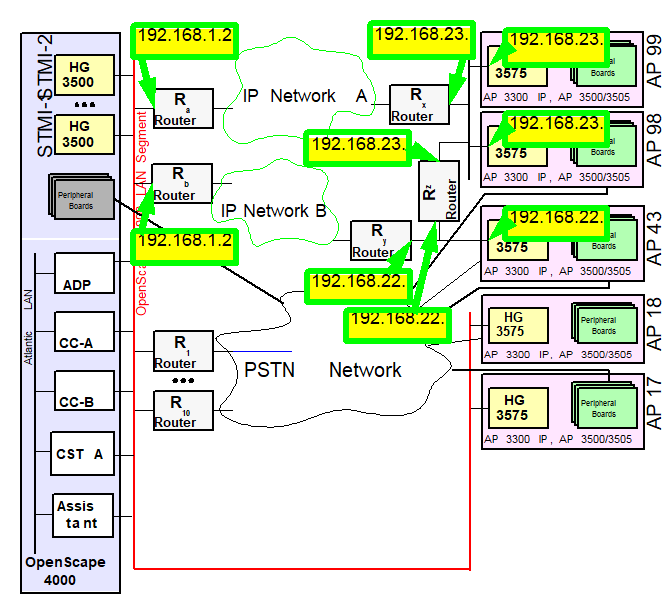
This complicated scenario is based on the simple case of the special
route between 2 access points. In addition, the IP network of the customer
in this case is broken down into 2 sub-networks which are not, or only,
linked to one another via the OpenScape 4000 LAN segment.
This scenario assumes that the routers a, x and y are the default
routers (for OpenScape 4000 components) in the respective networks.
Without additional routes, neither the HG 3500, nor the “direct
link“ access points AP17 and AP18 can reach access point AP 43.
The configuration for the entire scenario is realized according to
the following steps:
- Configure Router Ra as the default router for all HG 3500 modules
 |
Configuration Management > System Data
> IPDA > IPDA System Data
Click Search and enter
the default router address, then Save.
|
 |
ADD-SIPCO:  ... DEFRT=192.168.1.254
...; |
- Configure Router Ra as the default router for AP17 and AP18
|
|
Configuration Management > System Data
> IPDA > IPDA Access Point
Click Search and select
the access point.
Enter the router address on the IP Interface
(DL) tab, then Save.
|
|
|
ADD-UCSU:UNIT=AP,LTU=17, ... APRTADDR=192.168.1.254
                                 ...;
and
ADD-UCSU:UNIT=AP,LTU=18, ... APRTADDR=192.168.1.254
...; |
- Configure Router Rx as the default router for AP98 and AP99 and specify Router Ra as the route for the signaling messages of the CC-A and CC-B, respectively
|
|
Configuration Management > System Data
> IPDA > IPDA Access Point
Click Search and select
the access point.
Enter the router addresses on the IP Interface
(NW) tab, then Save.
|
|
|
CHANGE-UCSU:UNIT=AP,LTU=98, ... LSRTADDR=192.168.1.254,APRTADDR=192.168.23.1
                                 ...;
and
ADD-UCSU:UNIT=AP,LTU=99, ... LSRTADDR=192.168.1.254,APRTADDR=192.168.23.1
...; |
- Configure Router Ry as the default router for AP43 and specify Router Rb as the route for the signaling messages of the CC-A and CC-B, respectively
|
|
Configuration Management > System Data
> IPDA > IPDA Access Point
Click Search and select
the access point.
Enter the router addresses on the IP Interface
(NW) tab, then Save.
|
|
|
ADD-UCSU:UNIT=AP,LTU=43, ...
LSRTADDR=192.168.1.253,APRTADDR=192.168.22.1 ...; |
The payload between AP43 and AP98/AP99 would now be routed via Router
Ry -> Router Rb -> Router Ra -> Router
Rx. The shortcut via Router Rz is configured as in
the previous example with:
- Set the routes from AP43 to AP98/AP99 via Router Rz
|
|
Configuration Management > System Data
> IPDA > HG3575 Additional
Routing
Click
Search, select the access point, enter or change IP addresses,
then click Save.
|
|
|
CHANGE-APRT:TYPE=ROUTTBL,MTYPE=NCUI,LTU=43,
DSTADDR1=192.168.23.99,DSTMSK1=255.255.255.0, ROUTER1=192.168.22.2; |
For the payload route from AP98/AP99 to AP43, special routes likewise
have to be configured:
- Set the routes from AP98/AP99 to AP43 via Router Rz
|
|
Configuration Management > System Data
> IPDA > HG3575 Additional
Routing
Click
Search, select the access point, enter or change IP addresses,
then click Save.
|
|
|
CHANGE-APRT:TYPE=ROUTTBL,MTYPE=NCUI,LTU=98,
DSTADDR1=192.168.22.43,DSTMSK1=255.255.255.0,
                                 ROUTER1=192.168.23.2;
CHANGE-APRT:TYPE=ROUTTBL,MTYPE=NCUI,LTU=99, DSTADDR1=192.168.22.43,DSTMSK1=255.255.255.0,
ROUTER1=192.168.23.2; |
The payload from the HG 3500 to AP98/AP99 is routed via the default
router, Ra. The route is already specified with ADD-SIPCO.
The payload from AP98/AP99 to the HG 3500 is routed via the default
router, Rx. The route is already specified with ADD-UCSU.
However, for the payload transport from the HG 3500 to AP43, the route
is still missing. In this case, a special route has to be configured
for all HG 3500s (STMI2/4/STMIX/STMIY) via Router Rb:
- Set the route from the HG 3500 to AP43 via Router Rb
|
|
Configuration Management > System Data
> IPDA > HG3570 Additional
Routing
Click
Search, enter or change network mask, destination and router addresses,
then click Save.
|
|
|
CHANGE-APRT:TYPE=ROUTTBL,MTYPE=STMI,
DSTADDR1=192.168.22.43,DSTMSK1=255.255.255.0, ROUTER1=192.168.1.253; |
The payload from AP43 to the HG 3500 is routed via the default router,
Ry. The route is already specified with ADD-UCSU.
The payload between the HG 3500 and the “direct link“ access points
AP17/AP18 and back remains within the OpenScape 4000 LAN segment and
requires no additional routes.
The payload between the “direct link” access points AP17/AP18
and AP98/AP99 and back is routed via the route specified with ADD-UCSU.
(Ra, Rx)
However, for the payload transport from the “direct link“ access
points AP17/AP18 and AP43, the route is still missing. In this case,
a special route has to be configured via Router Rb:
- Set the routes from AP17/AP18 to AP43 via Router Rb
|
|
Configuration Management > System Data
> IPDA > HG3575 Additional
Routing
Click
Search, select the access point, enter or change network mask,
destination and router addresses, then click Save.
|
|
|
CHANGE-APRT:TYPE=ROUTTBL,MTYPE=NCUI,LTU=17,DSTADDR1=192.168.22.43,DSTMSK1=255.255.255.0,
ROUTER1=192.168.1.253; CHANGE-APRT:TYPE=ROUTTBL,MTYPE=NCUI,LTU=18,
DSTADDR1=192.168.22.43,DSTMSK1=255.255.255.0, ROUTER1=192.168.1.253;
|
The payload from AP43 to AP17/AP18 is routed via the default router,
Ry, and no additional routes need to be configured.
In order for these changes to become effective in the access points,
these have to be restarted.
|
|
Configuration Management > System Data
> IPDA > IPDA System Data
Click Search and select
the access point.
Click Execute on the Action pull-down
menu and select the mode of action Update AP, confirm with OK.
|
|
|
EXEC-USSU:MODE=UPDATAP,LTU=xx; |
IMPORTANT:
Connections are cleared down without further
warning. Prior to the
EXEC-USSU:UPDATAP, the configuration
must be updated on the system hard disk. In order for these changes to become effective in the HG 3500, all
HG 3500 modules have to be restarted.
|
|
Configuration Management > System Data
> Maintenance > Board Maintenance
Click Search
and select STMI.
Click Execute on the Action
pull-down menu, select Restart and confirm with OK.
|
|
|
RESTART-BSSU:ADDRTYPE=PARTNO,PARTNO=Q2316-X,FCTID=1; |
IMPORTANT:
Connections are cleared down without further
warning.
In order to maintain an overview in these somewhat more complex scenarios,
the creation of a communications matrix is recommended:
Table 44. Communication matrix for special routes between access point and OpenScape 4000 LAN segment”
|
to
from
|
CC-A
|
CC-B
|
HG 3500
|
AP 17
|
AP 18
|
AP 43
|
AP 98
|
AP 99
|
|
CC-A
|
-
|
-
|
-
|
direct
|
direct
|
Rb
|
Ra
|
Ra
|
|
CC-B
|
-
|
-
|
-
|
direct
|
direct
|
Rb
|
Ra
|
Ra
|
|
HG 3500
|
-
|
-
|
-
|
direct
|
direct
|
Rb
|
Ra
|
Ra
|
|
AP 17
|
direct
|
direct
|
direct
|
-
|
direct
|
Rb
|
Ra
|
Ra
|
|
AP 18
|
direct
|
direct
|
direct
|
direct
|
-
|
Rb
|
Ra
|
Ra
|
|
AP 43
|
Ry
|
Ry
|
Ry
|
Ry
|
Ry
|
-
|
Rz
|
Rz
|
|
AP 98
|
Rx
|
Rx
|
Rx
|
Rx
|
Rx
|
Rz
|
-
|
direct
|
|
AP 99
|
Rx
|
Rx
|
Rx
|
Rx
|
Rx
|
Rz
|
direct
|
-
|
Table 45. AMO APRT parameters in CHANGE branch under TYPE=ROUTTBL
|
AMO
|
Parameter
|
Sprache/ Language
|
Beschreibung/Description
|
|
APRT
|
MTYP
|
d
|
Modul Typ
Hier wird zwischen STMI2/4/STMIX/STMIY
(HG 3500) und NCUI2/4 (HG 3575) unterschieden.
MTYP=STMI:
Diese
Routing Table gilt für alle STMI2/4/STMIX/STMIY im System gleichermaßen.
DSTADRx darf nicht zum OpenScape 4000 LAN Segment gehören.
ROUTERx
muss zum OpenScape 4000 LAN Segment gehören.
(siehe NETADR
im AMO SIPCO, Table
1 “AMO SIPCO parameters in ADD branch or for CHANGE under TYPE=LSNET”)
MTYP=NCUI:
Diese
Routing Tabelle gilt nur für die durch LTU angegebene NCUI2/4.
Bei
Routen zwischen 2 NCUI2/4 müssen bei beiden NCUI2/4 die entsprechenden
Einträge gemacht werden!
|
|
MTYPE
|
e
|
Modul Type
This is to distinguish
between STMI2/4/STMIX/STMIY (HG 3500) and NCUI2/4 (HG 3575).
MTYPE=STMI:
This
routing table is common to all the STMIs in the system.
DSTADRx
must not belong to the OpenScape 4000 LAN Segment.
ROUTERx must
belong to the OpenScape 4000 LAN Segment.
(see NETADDR
in AMO SIPCO, Table
1 “AMO SIPCO parameters in ADD branch or for CHANGE under TYPE=LSNET”)
MTYPE=NCUI:
This
routing table is valid only for the NCUI2/4 assigned by LTU.
For
routes between 2 NCUI2/4 entries must be made for both NCUI2/4 respectively!
|
|
|
DSTADR1
|
d
|
Zieladresse der 1. Route.
Legt die Adresse
fest, die über die im 1. Eintrag spezifizierte Route erreicht werden
soll. Das kann eine Host- oder auch eine Netzadresse sein. Die DSTMSK1
erlaubt die Interpretation.
|
|
|
DSTADDR1
|
e
|
Destination Address for the 1st Route.
Assigns
the address to be reached using the route defined in the 1. entry. It
may be a host or a network address. DSTMSK1 allows the interpretation.
|
|
|
DSTMSK1
|
d
|
Netzmaske des Netzes, dem DSTADR1 angehört
|
|
|
DSTMSK1
|
e
|
Netmask of the network which DSTADDR1 is part
of
|
|
|
ROUTER1
|
d
|
IP-Adresse des Routers, über den Pakete an
DSTADR1 gesendet werden sollen.
Diese IP-Adresse muss zum OpenScape
4000 LAN Segment gehören (siehe NETADR
im AMO SIPCO, Table
1 “AMO SIPCO parameters in ADD branch or for CHANGE under TYPE=LSNET”)
|
|
|
ROUTER1
|
e
|
IP Address of the Router via which Packets to
DSTADDR1 are to be sent.
This IP address must belong to the OpenScape
4000 LAN Segment (see NETADDR
in AMO SIPCO, Table
1 “AMO SIPCO parameters in ADD branch or for CHANGE under TYPE=LSNET”)
|
|
|
DSTADR2
|
d
|
Zieladresse der 2. Route.
|
|
|
DSTADDR2
|
e
|
Destination Address for the 2nd Route.
|
|
|
DSTMSK2
|
d
|
Netzmaske des Netzes, dem DSTADR2 angehört
|
|
|
DSTMSK2
|
e
|
Netmask of the network which DSTADDR2 is part
of
|
|
|
ROUTER2
|
d
|
IP-Adresse des Routers, über den Pakete an
DSTADR2 gesendet werden sollen.
|
|
|
ROUTER2
|
e
|
IP Address of the Router via which Packets to
DSTADDR2 are to be sent.
|
|
|
DSTADR3
|
d
|
Zieladresse der 3. Route.
|
|
|
DSTADDR3
|
e
|
Destination Address for the 3rd Route.
|
|
|
DSTMSK3
|
d
|
Netzmaske des Netzes, dem DSTADR3 angehört
|
|
|
DSTMSK3
|
e
|
Netmask of the network which DSTADDR3 is part
of
|
|
|
ROUTER3
|
d
|
IP-Adresse des Routers, über den Pakete an
DSTADR3 gesendet werden sollen.
|
|
|
ROUTER3
|
e
|
IP Address of the Router via which Packets to
DSTADDR3 are to be sent.
|
|
|
DSTADR4
|
d
|
Zieladresse der 4. Route.
|
|
|
DSTADDR4
|
e
|
Destination Address for the 4th Route.
|
|
|
DSTMSK4
|
d
|
Netzmaske des Netzes, dem DSTADR4 angehört
|
|
|
DSTMSK4
|
e
|
Netmask of the network which DSTADDR4 is part
of
|
|
|
ROUTER4
|
d
|
IP-Adresse des Routers, über den Pakete an
DSTADR4 gesendet werden sollen.
|
|
|
ROUTER4
|
e
|
IP Address of the Router via which Packets to
DSTADDR4 are to be sent.
|
|
|
DSTADR5
|
d
|
Zieladresse der 5. Route.
|
|
|
DSTADDR5
|
e
|
Destination Address for the 5th Route.
|
|
|
DSTMSK5
|
d
|
Netzmaske des Netzes, dem DSTADR5 angehört
|
|
|
DSTMSK5
|
e
|
Netmask of the network which DSTADDR5 is part
of
|
|
|
ROUTER5
|
d
|
IP-Adresse des Routers, über den Pakete an
DSTADR5 gesendet werden sollen.
|
|
|
ROUTER5
|
e
|
IP Address of the Router via which Packets to
DSTADDR5 are to be sent.
|
|
|
DSTADR6
|
d
|
Zieladresse der 6. Route.
|
|
|
DSTADDR6
|
e
|
Destination Address for the 6thRoute.
|
|
|
DSTMSK6
|
d
|
Netzmaske des Netzes, dem DSTADR6 angehört
|
|
|
DSTMSK6
|
e
|
Netmask of the network which DSTADDR6 is part
of
|
|
|
ROUTER6
|
d
|
IP-Adresse des Routers, über den Pakete an
DSTADR6 gesendet werden sollen.
|
|
|
ROUTER6
|
e
|
IP Address of the Router via which Packets to
DSTADDR6 are to be sent.
|
|
|
DSTADR7
|
d
|
Zieladresse der 7. Route.
|
|
|
DSTADDR7
|
e
|
Destination Address for the 7th Route.
|
|
|
DSTMSK7
|
d
|
Netzmaske des Netzes, dem DSTADR7 angehört
|
|
|
DSTMSK7
|
e
|
Netmask of the network which DSTADDR7 is part
of
|
|
|
ROUTER7
|
d
|
IP-Adresse des Routers, über den Pakete an
DSTADR7 gesendet werden sollen.
|
|
|
ROUTER7
|
e
|
IP Address of the Router via which Packets to
DSTADDR7 are to be sent.
|
|
|
DSTADR8
|
d
|
Zieladresse der 8. Route.
|
|
|
DSTADDR8
|
e
|
Destination Address for the 8th Route.
|
|
|
DSTMSK8
|
d
|
Netzmaske des Netzes, dem DSTADR8 angehört
|
|
|
DSTMSK8
|
e
|
Netmask of the network which DSTADDR8 is part
of
|
|
|
ROUTER8
|
d
|
IP-Adresse des Routers, über den Pakete an
DSTADR8 gesendet werden sollen.
|
|
|
ROUTER8
|
e
|
IP Address of the Router via which Packets to
DSTADDR8 are to be sent.
|