10.2.14.1. Change of Address in a Network Segment to which Access
Points are Connected 


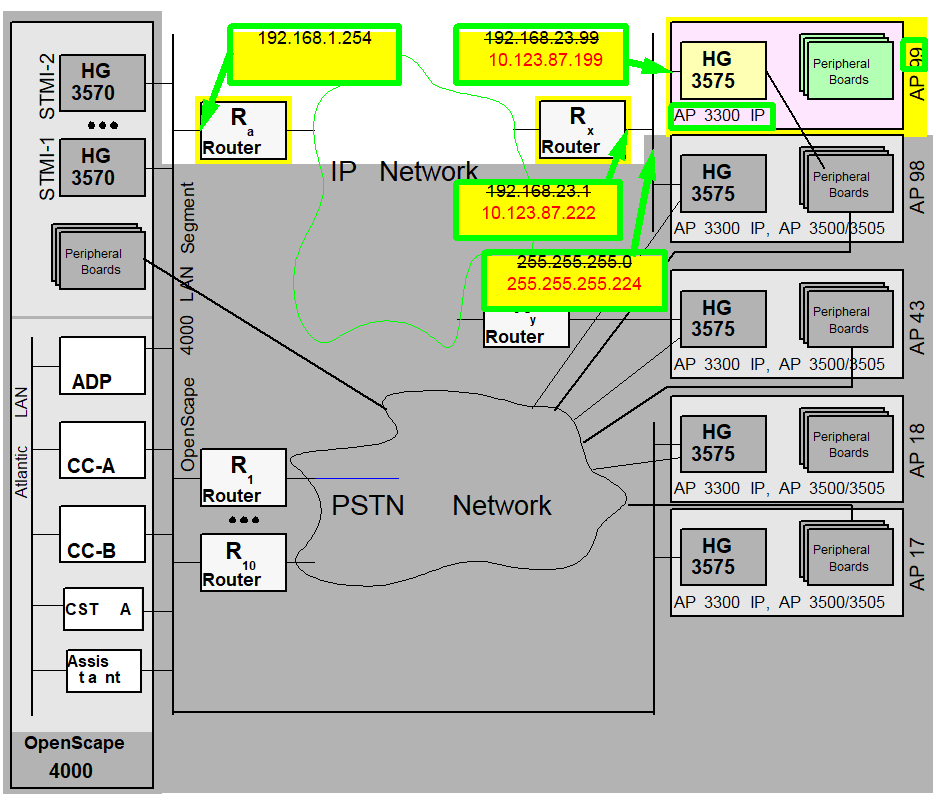
Let us use the configuration of Access Point AP99 as an example:
- It is to be reached from the OpenScape 4000 LAN segment via Router Ra (192.168.1.254).
- It is to reach other networks via Router Rx (192.168.23.1).
- Its own IP address is 192.168.23.99.
- The IP address for the TAP is 192.168.23.199.
- The netmask of the network in which the access point is located is 255.255.255.0
As this involves a change of the entire network segment, AP 98 is also
affected with APIPADDR=192.168.23.98.
We receive the following information from the customer’s network
administrator:
Table 48. Change of address in “networked“ access points
|
Name
|
NEW address
|
OLD address
|
|
Netmask
|
255.255.255.224
|
255.255.255.0
|
|
Router Rx
|
10.123.87.222
|
192.168.23.1
|
|
AP 98 APIPADDR
|
10.123.87.198
|
192.168.23.98
|
|
AP 99 APIPADDR
|
10.123.87.199
|
192.168.23.99
|
Figure 204. Change of address in “networked“ access points
The time of the address change in the access points is critical.
If parallel operation of both network addressing cannot be configured
in the customer network during the transition period, the address change
must be oriented to the time of transition of Router Rx and
the change in routing in the customer network.
The address change must be performed prior to the reconfiguration
of Router Rx and started on the access point via EXEC-USSU:UPDATAP. Existing
links are disconnected. After reconfiguring the router, we would no longer
be able to reach the access point and would only be able to implement
the address change locally at the access point.
IMPORTANT:
Prior to the
EXEC-USSU:UPDATAP,
the configuration must be updated on the system hard disk. Otherwise,
the data on the system would conflict with the data on the HG 3575 when
the system is reloaded and could only be synchronized again with EXEC-USSU:UPDATAP,LTU
number,UL.As soon as the access point has restarted with the new address, the
OpenScape 4000 central switch can no longer reach it via the signaling
survivability route (if configured), or can only reach it via this route.
This applies until the routing in the customer network has likewise been
changed.
IMPORTANT:
If special routes are used in the configuration
of the IPDA system (in access points or for HG 3500 modules), these must
all be checked and, if necessary, modified. (
CHANGE-APRT:TYPE=ROUTTBL
...)Generation
 |
Configuration Management > System Data
> IPDA > IPDA Access Point
Click Search and select
the access point.
Change the addresses on the IP Interface
tab and Save.
Configuration Management > System Data
> IPDA > IPDA System Data
Click Search and select
the access point.
Click Execute on the Action pull-down
menu and select the mode of action Update AP, confirm with OK.
|
 |
CHANGE-APRT:TYPE=APNET,LTU=98,APIPADDR=10.123.87.198,
NETMASK=255.255.255.224;EXEC-USSU:MODE=UPDATAP,LTU=98;CHANGE-APRT:TYPE=APNET,LTU=99,APIPADDR=10.123.87.199,
NETMASK=255.255.255.224;EXEC-USSU:MODE=UPDATAP,LTU=99; |