14.3.3.4.1. Change 


The following SIP trunk parameters can be configured.
- Account/authentication required (see Section 3.3.4.2, “Authentication”)
- Remote Domain Name
- SIP Transport Protocol
- Registrar, IP address/host name and/or port
- Proxy
- Inbound proxy
- Outbound proxy
- Security (see Section 3.3.4.3, “Security”)
If DNS names instead of IP addresses are configured for Registrar, Proxy,
Inbound Proxy or Outbound Proxy in the SIP trunk profile, DNS SRV is
used for resolution.
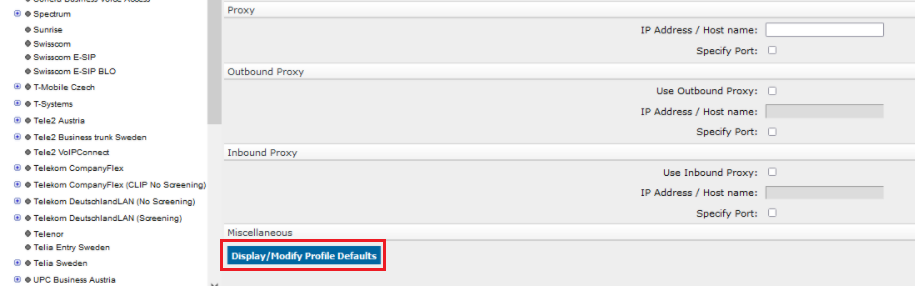
Expert mode parameters for SIP Trunk Profiles can be displayed and modified (only
for a
non-activated profile) via the "Display/Modify Profile Defaults" button.
Figure 245. Display/Modify Profile Defaults for SIP Trunk Profiles
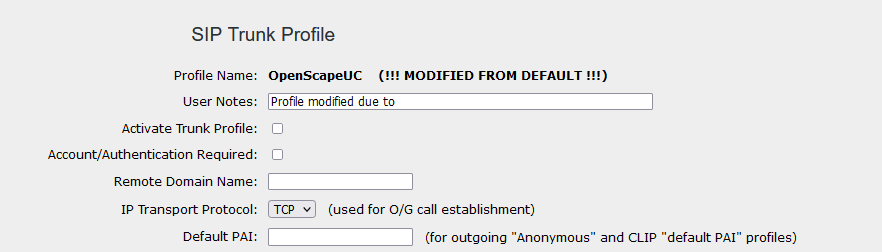
A modified profile is displayed as shown in the figure below:
Figure 246. Display of a modified profile
"Reset Profile Defaults" button will reset only the “expert mode parameters” to default:
Figure 247. Reset Profile Defaults

After changing the parameters, the "Apply" button needs to be pressed.
It is recommended to use the default profile parameters and change them only after
GVS
consultation. Support for modified profiles is limited, since the profiles are no
longer
compliant to the certified standard. The right is reserved to refuse software enhancements
for
modified profiles.
Issues identified with current software builds, requiring a profile modification to
work
correctly with a certified SIP partner, should be reported to investigate and address
any
certificate discrepancies.