3.11.3.2. Phone Configuration 


The phone configuration provides information needed in order to access
the OpenScape 4000 SoftGate as well as information about the mode of
operation.
The configuration can either be performed via the local phone menu,
the Web interface (WBM) or via the OpenScape Deployment Service (DLS).
Configuration via the phone menu
Admin > Applications >XML applications > Add application
This is basically the data for connectivity to the server hosting
the feature (usually OpenScape 4000 SoftGate) and the mode of operation.
- Display name:
-
Name of the application displayed on the application tab of the phone's display. Enter ldap.
- Application name:
-
Used internally to identify the XML application running on the phone. Enter ldap.
- Server address:
-
The IP address of the OpenScape 4000 SoftGate (e.g. 172.29.136.224).
- Server port:
-
The number of the http port used by the server to provide the XML documents for the application. Varies according to the protocol configured, but OpenScape 4000 SoftGate only allows 443.
- Protocol:
-
The protocol used for communication with the server. Choose https, because OpenScape 4000 SoftGate only allows https.
- Program name:
-
Enter ldap.
- Use proxy:
-
Must be set to No.
INFO:
None of the other configuration items is currently evaluated for the feature.IMPORTANT:
If the feature is to be deactivated, the LDAP settings should be deleted.
Phone canonical settings
For retrieval of contact data from the LDAP directory server, the
remote telephone number is converted according to the canonical dial
settings (Admin > Local functions > Locality > Canonical
settings) when a call arrives. The format of the resulting number
should match the format the numbers are stored under on the LDAP directory
server. It is recommended to convert the numbers to fully qualified format,
i.e. adding country and area code to the subscriber number. This ensures
that the number used for lookup is unique.
Example:
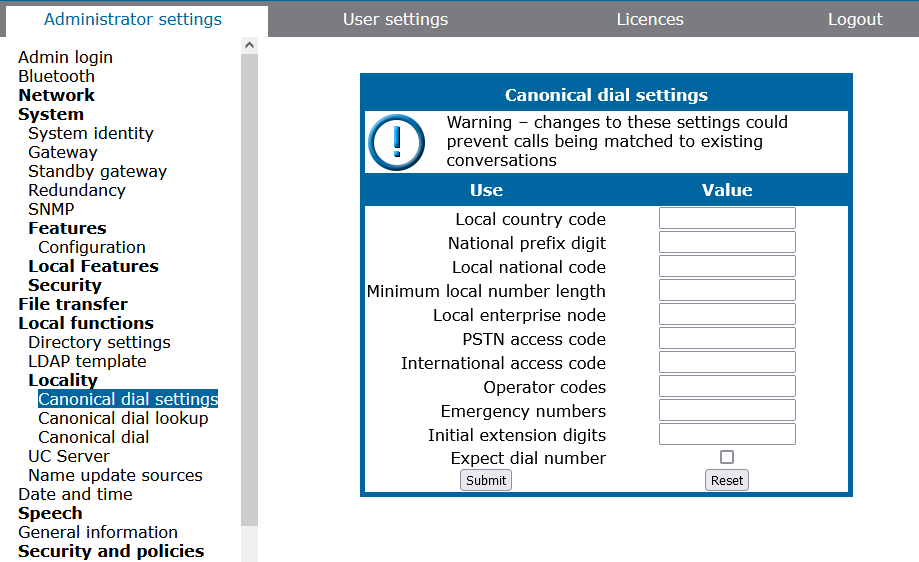
Canonical dial settings for picture
retrieval
Phone configuration via OpenScape Deployment Service
IP Devices > IP Phone Configuration > Application
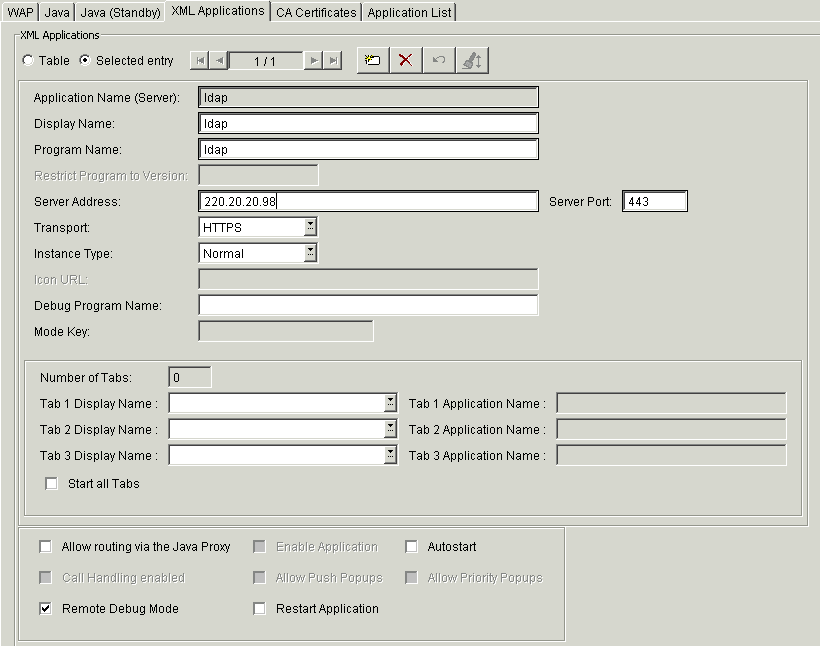
Picture retrieval configuration via
DLS
Tab XML Applications:
- Name of the Application:
-
Enter ldap.
- Display Name:
-
Enter ldap.
- Program-Name:
-
Enter ldap.
- Server Address:
-
Enter the IP address of the OpenScape 4000 SoftGate.
- Server Port:
-
Enter the server port of the OpenScape 4000 SoftGate.
- Transport:
-
Select http or https. OpenScape 4000 SoftGate only supports https.
INFO:
The subsequent entry GUI entry created in the phone menu under Applications is only a "dummy" entry to allow the feature to work. Navigating to it from the phone menu will result "Unable to parse information from the server".