8.2.1.2. HFA user registration 


Users are configured at a specific PEN (AMO SBCSU). While, however,
a digital (or analog) terminal can go directly into operation after connecting
to its module, in the case of an IP telephone settings must be first
made at the terminal.
Firstly an HFA user needs a separate IP address, a subnetwork mask
and - optionally - the specification of a default (customer network)
router. In the case of a Soft Client, it has, of course, the advantage
that it uses the network card of the PC and, consequently, no settings
are required.
However, in the case of an HFA fixed device, the IP settings must
be made. This is either done “automatically“ via DHCP (default setting
of the HFA fixed terminals) or manually.
A HFA user with IP settings now attempts to register with the appropriate
gatekeeper. Its gatekeeper is the HG 3500 at whose position it is configured.
In order to find its “home“ HG 3500, its IP address must be set up
at the terminal.
This alone, however, is not sufficient. The HG 3500 still has to check
whether the user who is sending it a “Registration Request“ is actually
authorized to register with it. The terminal must also send it the user
number for checking the user identity. The HG 3500 then asks the OpenScape
4000 whether this user number is set up at its position. If it is, the
HFA user is registered. If not, the HFA user is denied. Thus, the user
number must be set up beforehand on the terminal.
To prevent a user simply registering himself with the subscriber number
of another colleague, it is even possible to set up a so-called IP password
(IPPASSW) in the AMO SBCSU. This can only be changed via the administrator,
but not by the user at the terminal. If an IP password is set up in the
AMO SBCSU, it must also be configured at the terminal. Otherwise, the
subscriber is not registered.
Conclusion:
The IP address of the HG 3500, user number from the AMO SBCSU and,
optionally, the IP password from the AMO SBCSU must be configured at
the terminal. Otherwise, the HFA terminal will not be registered and,
thus, will remain out of operation. The configuration of these data can
take place at the terminal itself, via the WBM or via the DLS.
In case of a SoftClient, the respective configuration is made after
the program is invoked.
Note:
In some customer networks it may also be necessary to preset the L2
prioritization and the VLAN ID at the HFA terminal. Here, however, it
is also possible to automate this via DHCP.
Following successful registration, the HG 3500 transfers data concerning
the HFA user to the AMO SBCSU such as, e.g. device type, IP address,
etc. (AB-SBCSU / branch TYPE=OPTIDAT). These data can also be viewed
in the UW7 via the Configuration Menu in the user overview!
In the following figure the registration for user 4711 has already
been carried out. The other telephone has all IP settings, but is not
yet registered.
Figure 156. A user registers at another HFA phone
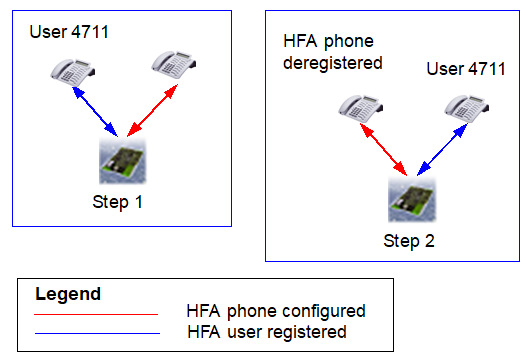
If an HFA user is already registered, he can change to another HFA
terminal by registering there and declaring the IP address of his “home“
HG 3500, his user number and his optional IP password. The original terminal
is automatically deregistered by the new registration. This is only not
possible if there is an existing telephone connection to the original
terminal. It is possible for HFA users to make the transfer to another
terminal via a digit analysis result in the WABE. This means that the
user at the terminal no longer needs to call up the hidden configuration
menu for a transfer. How to set up “Mobile HFA” please refer to IP
Solutions, “Mobile HFA Logon“.